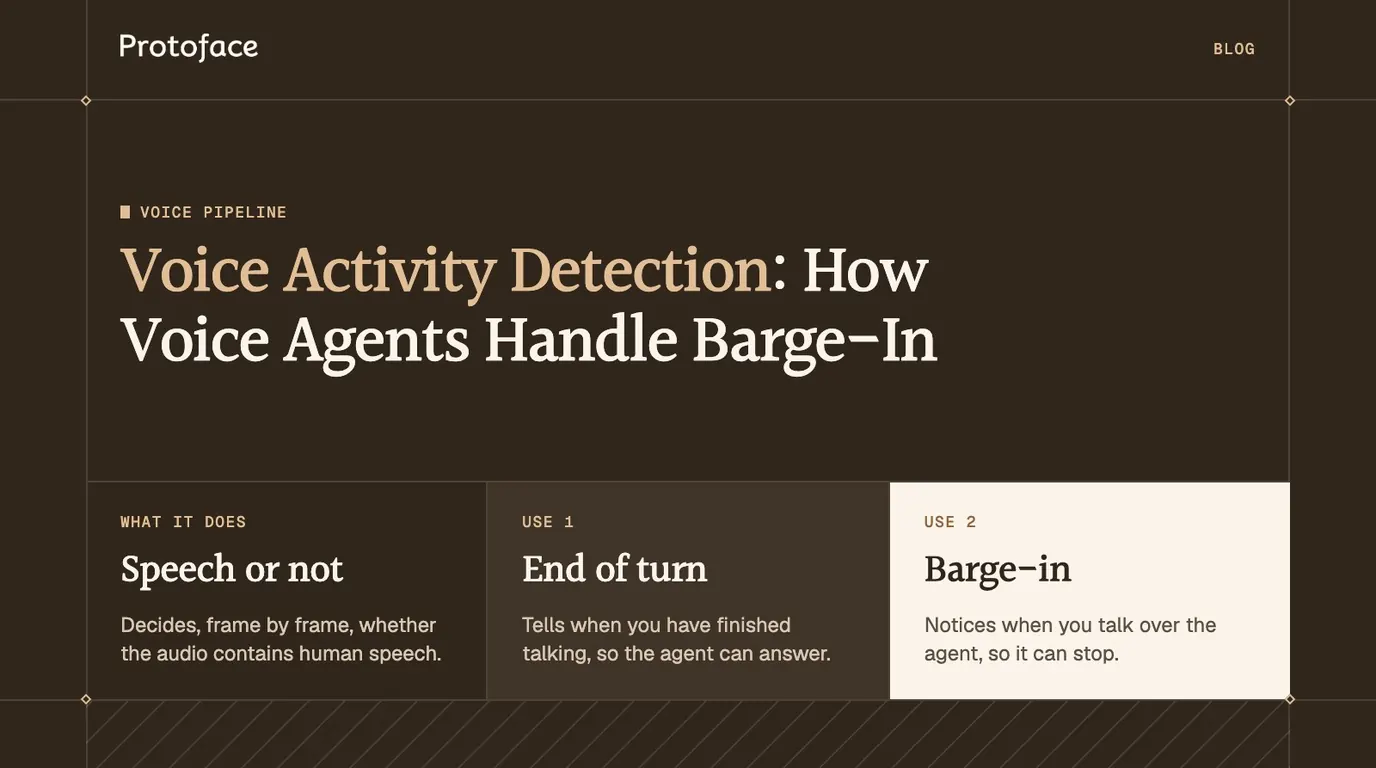
Voice activity detection (VAD) decides, frame by frame, whether an audio stream contains human speech. A voice agent uses it twice: to tell when you have finished talking so it can answer, and to notice when you start talking over it so it can stop. That second case is barge-in.
What is voice activity detection?
Voice activity detection is a classifier that labels each short slice of audio as speech or not speech. It does not know what was said or who said it, only that someone is talking and when they started and stopped.
Every voice agent depends on that signal. It decides which audio is worth sending to speech-to-text, when the user's turn is over, and whether the sound arriving while the agent speaks is an interruption. The job is the same whether you chain separate models or use one speech-to-speech model, the choice covered in OpenAI Realtime API vs STT, LLM and TTS pipelines.
How voice activity detection works
A VAD cuts the audio into frames of a few tens of milliseconds, gives each frame a speech score, and turns the scores into start and end events with a threshold and a timer. Only the scoring step differs between models.
Frame. The stream is split into fixed-size frames. The WebRTC VAD accepts frames of 10, 20 or 30 ms. Silero VAD takes 512 samples at 16 kHz, which is 32 ms.
Score. Each frame gets a number. An energy detector uses loudness. A neural model outputs a probability that the frame holds speech.
Threshold. A frame scoring above the threshold counts as speech. Good detectors use two thresholds, a higher one to enter speech and a lower one to leave it, so a score hovering near the line does not flicker.
Smooth. Speech ends only after a set stretch of silence, and many detectors also wait for several speech frames before they start it. That silence timer, often called hangover, keeps a pause between two words from ending the turn.
Emit. The output is two events, speech started and speech stopped, usually padded with a little earlier audio so the first syllable is not clipped.
Picture the waveform of "book a table, for two". The detector marks speech from "book", stays in speech through the short pause because the silence timer has not run out, and marks the end only once enough quiet follows "two".
Voice activity detection models: energy-based, WebRTC and Silero VAD
Use an energy threshold only as a gate in a quiet room, the WebRTC VAD when you need something tiny, and Silero VAD as the default for a conversational agent. Hosted speech APIs run their own VAD, so you configure it instead of shipping it.
Option | How it decides | Runs on | Typical use |
|---|---|---|---|
Energy threshold | Frame loudness against a noise floor | A few lines of code, anywhere | Push-to-talk gates, quiet rooms |
WebRTC VAD | Signal-processing classifier with four aggressiveness modes | C library, CPU, 16-bit mono PCM | Embedded devices, telephony, cheap prefilter |
Silero VAD | Neural network that outputs a speech probability | PyTorch or ONNX, CPU | Voice agents, noisy or far-field audio |
Server VAD in a speech API | The provider's model, set through session options | The provider's servers | Speech-to-speech sessions |
WebRTC VAD. The detector from Google's WebRTC project is available in Python as py-webrtcvad. It takes 16-bit mono PCM at 8, 16, 32 or 48 kHz and a mode from 0 to 3, where 3 filters out non-speech most aggressively. It returns yes or no per frame, with no probability to tune.
Silero VAD. Silero VAD is an MIT-licensed model of about two megabytes that supports 8 and 16 kHz audio. Its maintainers state that one chunk of 30 ms or more takes under a millisecond on a single CPU thread. LiveKit Agents ships it as its VAD plugin.
Server VAD. OpenAI's Realtime API documents two turn detection modes: server_vad, which splits turns on silence, and semantic_vad, which also weighs the words spoken.
Voice activity detection in Python: a working example
The shortest working detector is Silero VAD reading 32 ms blocks from your microphone. Install the two packages, then run the script and talk.
Each 512-sample block from the default microphone goes to VADIterator. The iterator returns nothing for most blocks, a start time when the probability crosses the threshold, and an end time once the probability has stayed low for min_silence_duration_ms. The script sets that to 500 ms, up from the library's 100 ms default, so a pause between words does not end the segment. The chunk size is fixed: the Silero examples use 512 samples for 16 kHz and 256 for 8 kHz. Call vad.reset_states() between separate recordings.
How voice agents use VAD to detect turns and barge-in
An agent listens to the VAD in two states. While the user has the floor, the speech-stopped event ends their turn and triggers the reply. While the agent has the floor, the speech-started event is a barge-in and must stop the reply.
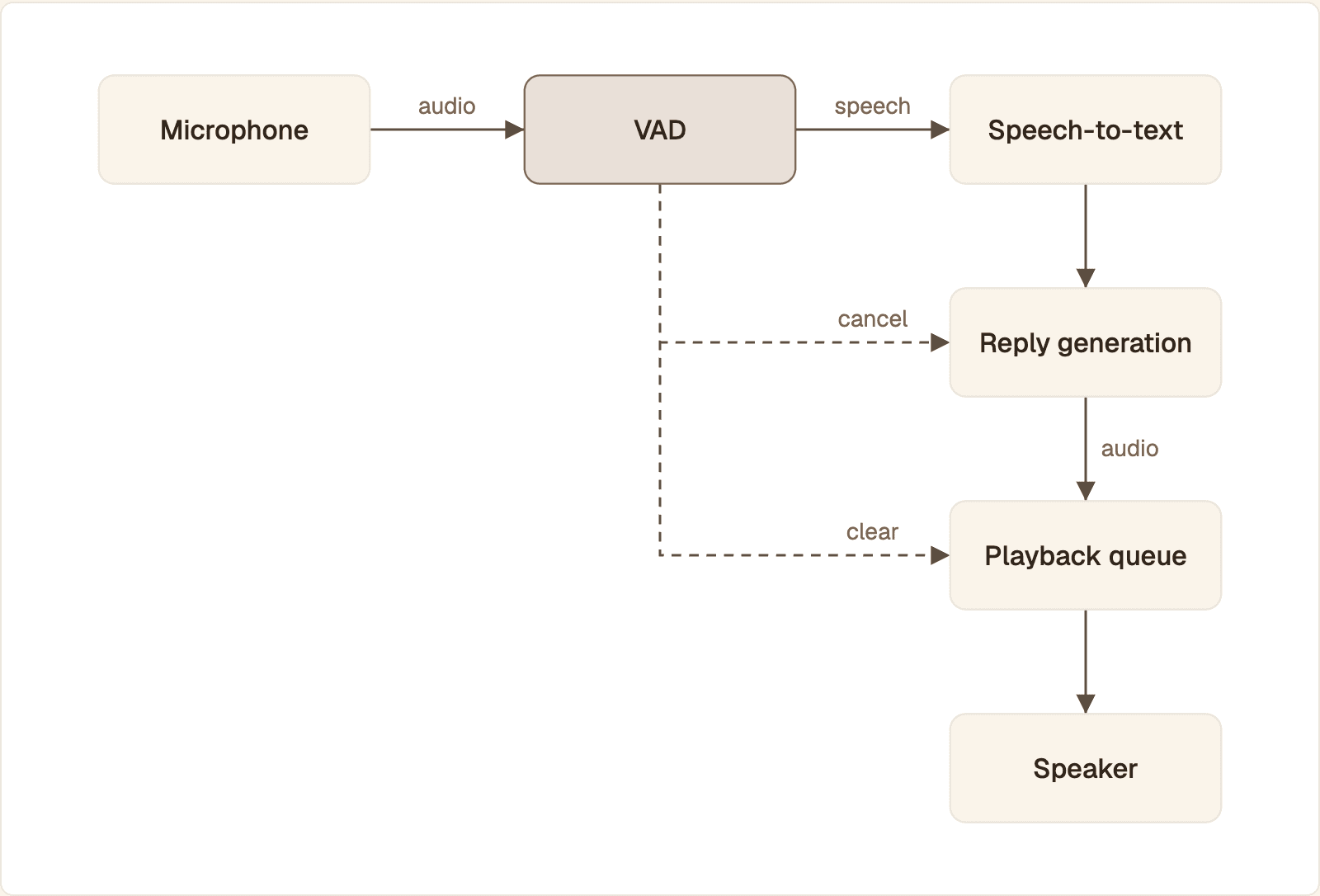
VAD gates the audio that reaches speech-to-text. When speech starts while the agent is talking, the same detector cancels the reply and clears queued audio.
Moment | VAD event | What the agent does |
|---|---|---|
User starts a question | Speech started | Streams audio to speech-to-text |
User pauses mid-sentence | None, the silence timer is still running | Keeps listening |
User finishes | Speech stopped | Commits the turn and starts generating |
User talks over the answer | Speech started while the agent is speaking | Stops speech, cancels the reply, listens |
End of turn
The silence duration is a direct trade. A short one makes the agent quick, and it cuts in when someone stops to think. A long one adds that wait to every reply. Silence alone cannot tell "I'd like to book for, um" from a finished request, which is why frameworks add a second check on the words. LiveKit's turn handling documentation lists a turn detector model that runs on top of VAD, and OpenAI's semantic mode has an eagerness setting for the same purpose.
Barge-in
Speech onset should count as an interruption only while the agent is producing audio, and only if it lasts long enough to be deliberate. A cough or "mm-hm" is speech to a VAD, so most stacks require a minimum duration, a minimum word count, or both.
Build interruption handling on top of VAD
When the VAD reports a barge-in, do three things as one unit: stop the audio that is playing, drop the audio that is queued, and cancel the response that is still generating. Miss one and the user hears the tail of an answer they already rejected.
Cancel by turn ID
Give every agent reply a number and tag each text and audio chunk with it. An interruption bumps the number, so anything still in flight from the old reply is stale and dropped.
start runs your generate-and-speak coroutine as a task. interrupt cancels it and invalidates its ID, and a second call does no harm. Every consumer, including the audio sender, checks is_current before it emits a chunk.
Clear the playback queue in the browser
Over a WebSocket, the browser owns the audio queue. OpenAI's Realtime conversations guide says the server cancels the in-progress response when it detects speech, and that a WebSocket client must stop playback itself and report how much audio was heard. Over WebRTC the server tracks the output buffer and truncates it for you.
The handler stops every scheduled source and sends conversation.item.truncate so the model's history holds only what the user heard. ws is your Realtime WebSocket and ctx your AudioContext. Your playback code fills playing, itemId and startedAt as it schedules a reply.
Let the framework do it
Agent frameworks ship this path. In LiveKit Agents, user speech interrupts the agent by default, and the conversation history is truncated to what was heard. You tune it on the session the avatar starts with:
The VAD values shown are the defaults in LiveKit's Silero VAD plugin reference, written out so you can see what to change. min_duration is how many seconds speech must last to count as an interruption, and 0.5 is also the default. resume_false_interruption decides whether the agent resumes after a false interruption. LiveKit resumes by default, and the Protoface quickstart sets it to False.
Keep the avatar on the same turn
A face that keeps moving after the voice stops is the most visible interruption bug. Drive the avatar from the agent's audio and nothing else, so canceling the audio cancels the face. Protoface Realtime renders the face from the audio your agent already produces, so make the interruption decision in your agent and confirm on a screen recording that the face stops with the audio. The same check applies on other platforms, including the Protoface integration for VideoSDK agents.
Cancel generation before you flush. Stop the model and the speech synthesis first, then clear the queues. In the other order, new chunks land in a queue you just emptied.
How to tune VAD and avoid false interruptions
Change one setting at a time and replay the same recordings after each change. Most false interruptions come from three sources: the agent hearing itself, short noises scored as speech, and other people in the room.
Setting | Raise it and | Lower it and |
|---|---|---|
Activation threshold | Noise is ignored, soft talkers are missed | Quiet speech is caught, so is noise |
Minimum speech duration | Coughs and clicks stop triggering, onset is reported later | The agent reacts sooner and to more non-speech |
Silence duration | Pauses are tolerated, every reply waits longer | Replies come sooner, slow talkers get cut off |
Prefix padding | First syllables are kept, more lead-in noise reaches the transcriber | Segments are tighter, first words may be clipped |
Minimum interruption length | Backchannels are ignored, real interruptions take longer to land | The agent stops at once, also for "mm-hm" |
The agent's own voice
On a laptop or a kiosk, the speaker feeds the microphone. Without echo cancellation the VAD hears the agent, and the agent interrupts itself. Fix the audio path before any threshold: how WebRTC echo cancellation works and where it fails covers the causes. Test with speakers, not headphones.
Background talkers and other languages
A VAD detects speech, not your user's speech. A television or a colleague passes it. Noise cancellation on the input and a minimum word count on the interruption both help. Word-based checks depend on language, so read handling mixed languages in voice agents if your callers switch mid-sentence.
Measure the cutoff
Log three timestamps per interruption: when the VAD reported speech, when the last audio chunk left your server, and when the avatar stopped moving in a screen recording. The gap between the first and the last is what your user feels. Repeat on a throttled network, where late chunks expose a cancel that is not tied to the turn ID.
Voice activity detection FAQ
VAD only reports that someone is speaking. Two neighboring detectors answer different questions.
How is VAD different from wake word detection?
VAD fires on any speech. A wake word detector fires only on one phrase, such as a product name, and ignores everything else. Assistants often run both: the wake word opens the session, then VAD manages the turns.
How is VAD different from speaker recognition and diarization?
VAD says that someone is speaking. Speaker recognition says who it is by comparing the voice to an enrolled sample, and diarization splits a recording into "speaker A" and "speaker B" segments. Both usually run VAD first to discard the silence.
Common questions
What does "voice detection" mean?
It means deciding whether a sound contains a human voice at all, which is the job of voice activity detection. It is separate from recognizing the words (speech recognition) and from recognizing the person (speaker recognition).
Which open-source voice activity detection model should I use?
Start with Silero VAD for a conversational agent: it outputs a probability you can tune and copes with noise better than a signal-processing detector. Pick the WebRTC VAD when you need the smallest footprint and clean audio.
How do I run voice activity detection in the browser?
Run a small model in the page with WebAssembly. The open-source ricky0123/vad package runs Silero VAD on ONNX Runtime Web and calls you back on speech start and speech end. If your audio already goes to an agent over WebRTC, run VAD on the server and keep the client thin.
What is the difference between server VAD and semantic turn detection?
Server VAD ends a turn after a fixed stretch of silence. Semantic turn detection also looks at the words, so it waits when a sentence sounds unfinished and answers sooner when it sounds complete. OpenAI's Realtime API offers both as server_vad and semantic_vad.
Which realtime avatar APIs support interruption and barge-in during a conversation?
Interruption is decided by the voice agent, not the avatar: LiveKit Agents, Pipecat and the OpenAI Realtime API each stop the reply when the user speaks. Protoface Realtime renders the face from the audio your agent produces, so interruption is set up in the agent. Confirm the cutoff on your own stack with a screen recording.
How do I measure VAD accuracy?
Label speech segments by hand in recordings from your own calls, run the detector over them, and count two errors per frame: noise marked as speech and speech marked as silence. For an agent, also count false interruptions and clipped first words per call, since those are what users notice.
Give your interruptible agent a face
Keep your VAD and turn handling where they are. Protoface Realtime renders a live avatar from the audio your agent already produces.