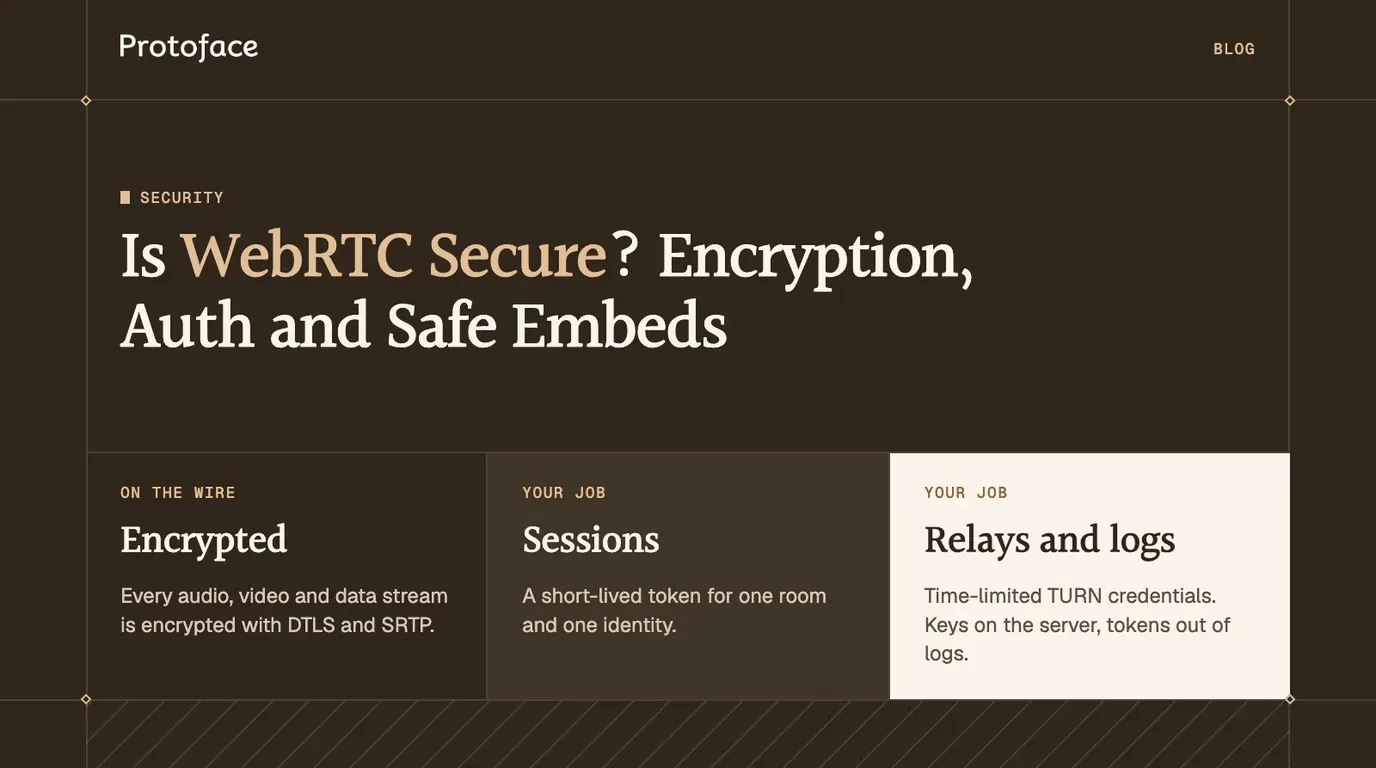
WebRTC security is strong on the wire and only as good as your application around it. Every WebRTC audio, video and data stream is encrypted with DTLS and SRTP, and browsers refuse to send it any other way. The risks that remain are yours: signaling, authentication, TURN credentials, IP exposure and what you log.
Is WebRTC secure?
Yes, at the transport layer. Encryption is mandatory, not a setting. RFC 8827, the WebRTC security architecture, says media must not be sent over plain RTP, DTLS-SRTP must be offered for every media channel, and all data channels must be secured with DTLS. The same RFC requires explicit user consent before a page gets the camera or microphone, and browsers expose that API only on HTTPS pages and localhost.
The standard does not give you identity or authorization. WebRTC encrypts a call to whoever your signaling server says is on the other end. Who may start a call, who may join it and what happens to the audio afterwards is your code.
In a realtime AI product the far endpoint is a server: a media server, a voice agent or an avatar worker. If you are still building the media side, start with how visemes drive real-time lip sync for AI avatars.
How WebRTC encrypts media: DTLS and SRTP
DTLS agrees the keys and SRTP encrypts the media with them. DTLS is TLS adapted for UDP. SRTP is RTP with an encrypted, authenticated payload. The keys are created between the two endpoints and never pass through your signaling server.
Each endpoint generates a certificate and puts its fingerprint in the session description.
Your signaling channel carries both session descriptions, fingerprints included.
ICE finds a network path between the endpoints.
The endpoints run a DTLS handshake over that path. Each side checks the certificate it receives against the fingerprint from signaling.
Both sides derive SRTP keys from the DTLS handshake.
Audio and video flow as SRTP. Data channels run inside the DTLS connection.
RFC 8827 sets the floor: every implementation must support DTLS 1.2 with an ECDHE key exchange and AES-128-GCM, and it must not offer SDES, the older scheme that sent media keys through signaling.
What end to end means with a media server or AI agent
DTLS-SRTP protects each hop, not the whole route. When a browser connects to a media server, the server is the other DTLS endpoint. It decrypts the stream and encrypts it again for the next participant. A voice agent is also an endpoint, and it has to hear the audio to answer.
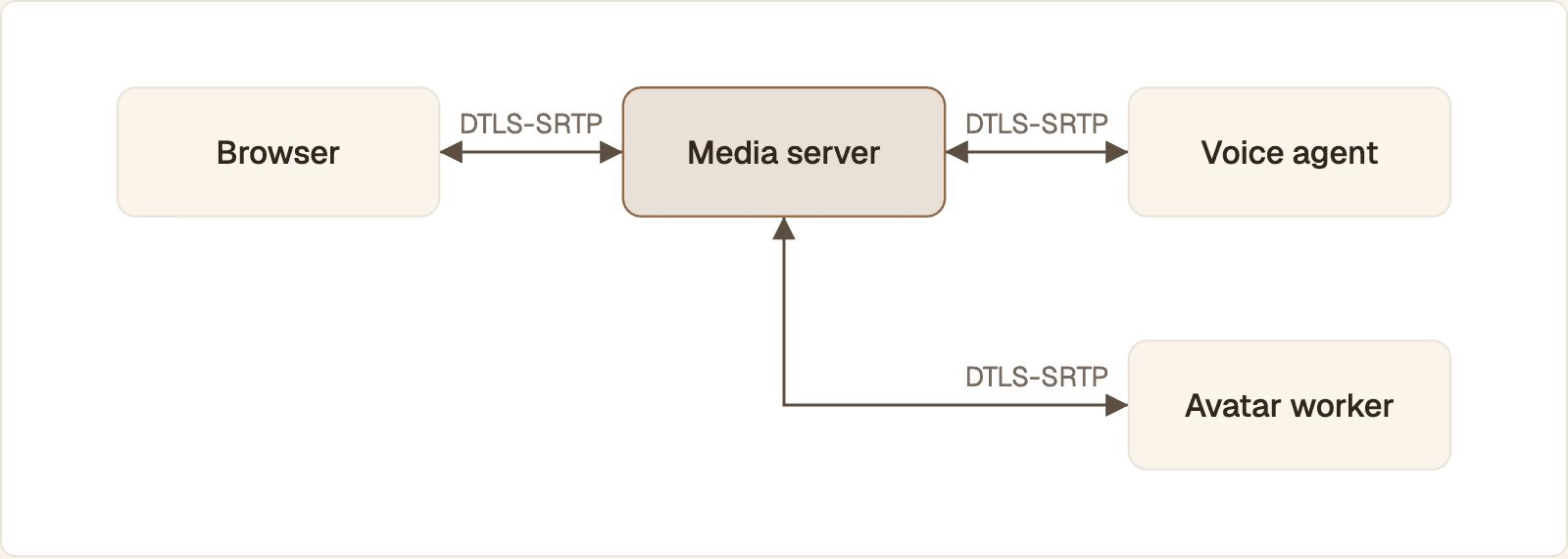
Each hop has its own keys. The media server decrypts the stream and encrypts it again, so every server on the route can read the audio.
So a call with an AI agent is encrypted in transit and readable by whatever runs the agent: media server, speech models, avatar renderer. Ask each vendor what it stores.
Where WebRTC security breaks: signaling, IP exposure and app logic
The practical attacks go around SRTP, through the parts the standard leaves to you.
Layer | Threat | Mitigation |
|---|---|---|
Signaling | Session descriptions read or altered, fingerprints swapped | TLS only, every connection authenticated |
Signaling | Anyone who knows a room name joins | Short-lived token for one room and one identity |
Media | A server or vendor reads decrypted audio | Vendor review, retention limits, recording off by default |
TURN | Static relay password copied from page source | Time-limited credentials per user |
ICE | Client IP addresses revealed | Relay-only policy where anonymity matters |
Application | API key in the browser, session spam, tokens in logs | Keys on the server, rate limits, redaction |
Embed | Your avatar hosted on someone else's site | Allowed origin list, per-embed limits |
Signaling is the weak point
The fingerprint check is only as trustworthy as the channel that delivered the fingerprint. RFC 8827 says that even over HTTPS, the signaling server can mount a man-in-the-middle attack unless keys are verified independently. So protect your signaling server like an auth server. Serve it over TLS, require a credential on every connection, and check that the caller may act on the room it names. CORS is not that check: it tells browsers which pages may read a response and does not stop a request sent from outside a browser.
The comparison of WebRTC vs WebSocket for realtime AI covers which transport carries what.
IP address exposure
ICE works by collecting the client's addresses and sharing them as candidates. RFC 8828 describes the privacy cost: a page can learn addresses beyond the one HTTP shows, and on a split-tunnel VPN that can include the address assigned by the internet provider. In a server-based call the remote peer is your media server, so other users do not see the address, but your infrastructure does.
Authenticate WebRTC sessions with short-lived tokens
Verify the user on your server, then hand the browser a token that is good for one session and expires in minutes. The API key and signing secret stay on the server, because anything shipped to a browser is readable.
The browser calls your backend with your app's own login credential.
The backend verifies it, checks that the user may start this call, and applies rate limits.
The backend mints a join token scoped to one room and one identity.
The browser connects with that token and can do nothing else with it.
A Flask endpoint for a LiveKit room, using PyJWT to verify your user and the livekit-api package to sign the room token:
The decode call checks the signature, expiry and audience, pins the algorithm, and rejects a token with no exp or sub claim. The room name comes from the verified user ID, not the request body, so nobody can ask for another user's room.
Rotate tokens and keys
Mint a fresh token for every join and do not cache it in localStorage. A short lifetime does not cut off a live call. LiveKit's tokens and grants reference states that expiry only affects the initial connection, and that the server issues refreshed tokens to connected clients so they can reconnect.
Long-lived keys rotate with overlap: create the new key, deploy it, confirm traffic has moved, then revoke the old one.
How this maps to Protoface
API keys are created and revoked in the dashboard, belong to one environment, and can be limited to named scopes. With the LiveKit plugin, AvatarSession.start(...) mints a short-lived room token inside your agent process and passes it to Protoface as worker_token, so your LiveKit secret never leaves that process. The field is write-only and reads back as "[redacted]". For Pipecat, POST /v1/pipecat/sessions returns short-lived WebSocket media credentials for the server-side package.
Session metadata is customer-owned JSON. Use it for correlation IDs and keep credentials and personal data out of it. For a worker that publishes its own tracks, see sending video frames over WebRTC from Python and Node.
Secure TURN and ICE configuration
Issue TURN credentials per user with an expiry, from the same backend that issues join tokens. A relay with one static password is free bandwidth for anyone who reads your page source.
The common scheme comes from the IETF draft A REST API for Access to TURN Services. The username is an expiry timestamp joined to a user ID with a colon. The password is a base64 HMAC of that username, keyed with a secret that only your backend and the TURN server hold.
The TURN server rejects the credentials once the timestamp passes, ten minutes after issue. The draft names HMAC-SHA1 as one acceptable algorithm and recommends a one-day lifetime. Shorter works, provided the TURN server shares the secret and algorithm.
To hide client addresses from the other peer, force every candidate through the relay. MDN's RTCPeerConnection constructor reference documents iceTransportPolicy: the default "all" considers every candidate, and "relay" considers only relayed ones.
The connection now uses TURN over TLS on port 443 and nothing else. Relay-only adds delay and relay traffic to every call, and the TURN server still sees the client's address, so do not make it the default.
Embed a realtime avatar in an iframe securely
An embed is safe when the frame gets only the device permissions it needs, only your origins can host it, and no long-lived secret appears in its markup or URL.
Delegate the microphone and camera
A cross-origin iframe cannot use the microphone unless the parent grants it. MDN's Permissions Policy guide explains the allow attribute: a feature listed there is allowed for the origin in the frame's src. Grant the camera only if the user is seen.
The parent fetches a join token from the Flask endpoint and posts it to the frame. The second argument to postMessage names the only origin allowed to receive it. Inside the frame, check event.origin before accepting the message. A token in the frame URL would land in history and server logs. The framed app controls who may host it by sending Content-Security-Policy: frame-ancestors https://app.example.com.
The Protoface embed
Protoface hosts the conversation, so the markup carries a public embed ID and no API key or token. Per the docs, that ID carries no account access.
A public ID can be copied, so the controls live in the dashboard:
Domain Restrictions. Add each origin under Allowed Website Origins: scheme, host and optional port. Wildcards and paths are rejected, and each subdomain is a separate origin. A new embed works on any origin until you turn this on.
Starts per Hour, Active per Visitor, Max Seconds. These cap what a copied embed can spend.
Regenerate Link. Issues a new public ID and breaks every copy of the old one.
Deactivate. Stops new conversations and keeps the settings.
The element fires a protoface-avatar:transcript event with the spoken text. If you listen for it, that text is in your page and under your data policy.
HIPAA and compliance considerations for WebRTC apps
WebRTC covers one item: encryption in transit. The HIPAA Security Rule's technical safeguards in 45 CFR 164.312 set five standards: access control, audit controls, integrity, person or entity authentication and transmission security. The rest comes from your application, your vendors and your policies. No transport makes an app compliant, so confirm your obligations with your compliance counsel.
Agreements. Every service that reads the decrypted call handles the data for you: media server, speech models, avatar, recording, logging. Under HIPAA that normally calls for a business associate agreement with each.
Recording and transcripts. If you keep them, set retention, encryption at rest and access rules.
Logs and identifiers. Keep tokens, prompts and transcript text out of logs. Use opaque IDs for room names and participant identities.
Consent. Tell the user they are talking to an AI, and whether the call is recorded, before the microphone opens.
The Protoface documentation does not mention HIPAA, business associate agreements or SOC 2, so do not assume any of them. Ask through the Protoface enterprise page before you send regulated data.
WebRTC security checklist
Run these before launch.
The site and signaling endpoint are HTTPS and
wss://only.Every signaling connection and session request is authorized on the server.
No API key, signing secret or TURN secret is in the browser or a mobile binary.
Join tokens and TURN credentials are issued per user and expire within minutes.
Session creation has a rate limit, a concurrency cap and a maximum duration.
Embeds are restricted to production origins, and iframes get only the permissions they use.
Key rotation has been rehearsed in staging.
Logs hold no tokens or transcripts, and every vendor that decrypts media is under contract.
Common questions
Is WebRTC a security risk?
Not on its own. The protocol encrypts all media and data and asks the user before a site can use the camera or microphone. The risk comes from the application: unauthenticated signaling, API keys in the browser, static TURN passwords, and recordings or transcripts stored without controls.
What is WebRTC protection?
It usually means a browser, VPN or extension setting that limits or disables WebRTC so websites cannot learn your IP addresses through ICE. It guards the visitor's privacy, not your application, and a strict setting can stop calls from connecting.
What are the downsides of using WebRTC?
Encryption is built in, but everything around it is yours: signaling, authentication, TURN servers and their credentials. A media server or AI agent in the call decrypts the audio, so the call is not end to end encrypted, and ICE can reveal client IP addresses.
Is WebRTC still used?
Yes. It is built into every major browser and is the standard way to carry live audio and video on the web, including browser voice agents and realtime avatars.
Is WebRTC end-to-end encrypted?
By default, only when two devices connect directly. DTLS-SRTP encrypts each hop, so a media server or AI agent in the path decrypts the stream. With a voice agent that is unavoidable, because the agent has to hear the audio.
Does WebRTC leak my IP address?
It can. ICE shares the client's addresses as connection candidates, and RFC 8828 notes that on a split-tunnel VPN this can reveal the address the VPN was meant to hide. A relay-only ICE policy sends everything through a TURN server so the other peer sees only the relay.
Have security questions before you embed an avatar?
Put them to the Protoface team: key scopes, embed origin restrictions, session limits and any compliance requirement the documentation does not cover.