To send video frames over WebRTC from a server, wrap your raw frames in a video track, add that track to a peer connection, and exchange an offer and answer with the browser. WebRTC then encodes, packetizes and paces the frames for you. In Python use aiortc, in Node use @roamhq/wrtc.
How to send video frames over WebRTC
You hand raw frames to a track at a steady rate. The peer connection pulls from that track, compresses each frame and ships it as RTP packets.
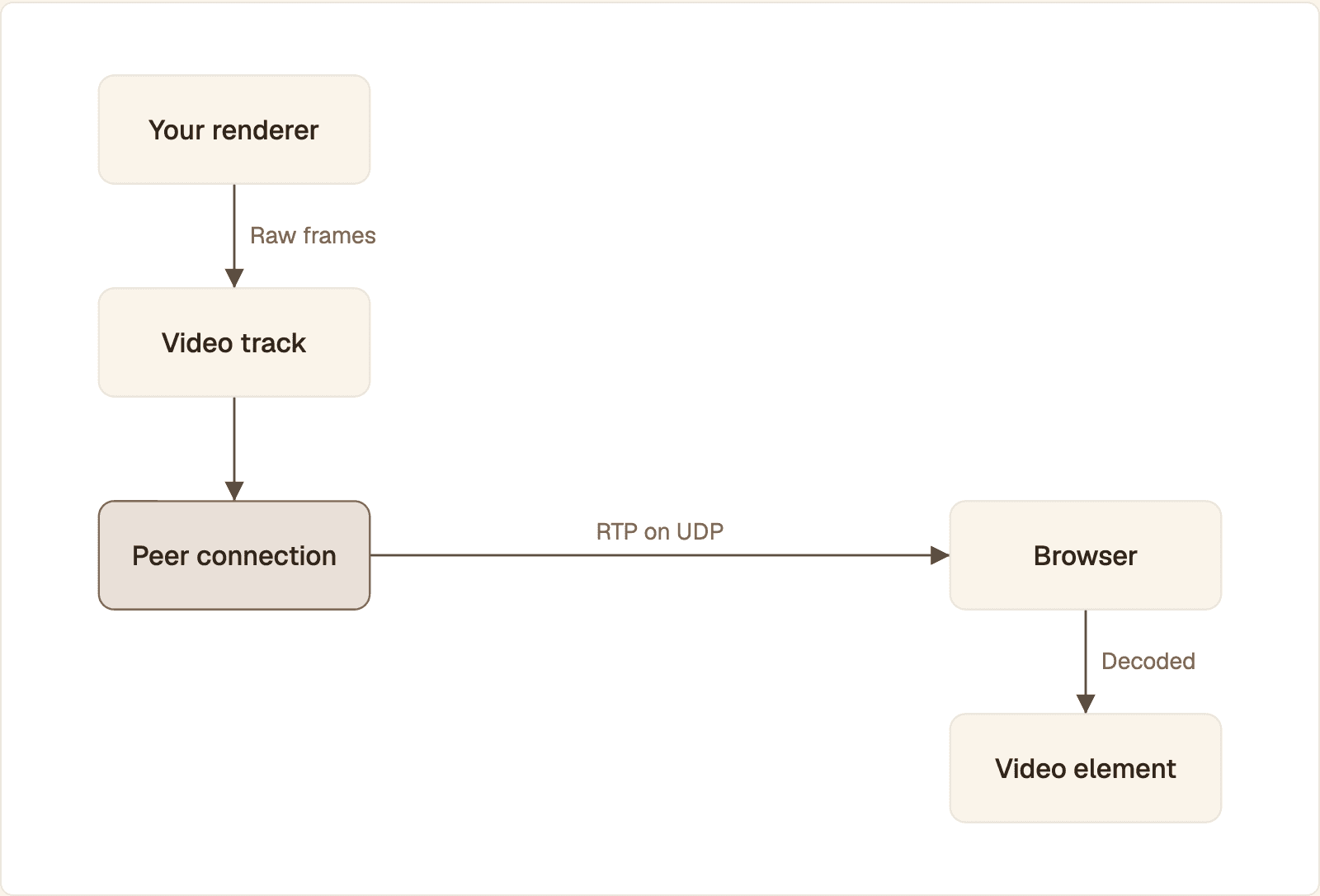
Your code stops at the video track. The peer connection encodes and packetizes each frame, and the browser reorders, decodes and plays it.
Produce a raw frame: a pixel buffer from your renderer, a model, a canvas or a file.
Convert it to a format the library accepts and stamp it with a timestamp.
Feed it to a video track (Python: return it from
recv(); Node: callonFrame()).Add the track to an
RTCPeerConnection.Exchange the offer and answer over any channel you like. An HTTP POST is enough.
The library encodes with VP8 or H.264, splits each encoded frame into RTP packets and sends them encrypted over UDP.
The browser reorders, decodes and plays the result in a
<video>element.
If the frames are a talking avatar, the mouth shapes come first: see how visemes drive real-time lip sync, then deliver the result this way.
Raw frames, encoded frames and video tracks
A raw frame is uncompressed pixels, an encoded frame is the compressed output of a codec, and a video track is the object that feeds raw frames to the encoder. You work with raw frames and tracks. The library owns encoded frames.
Raw frame. Renderers usually give you RGB, BGR or RGBA. Encoders want Y'CbCr 4:2:0, which RFC 7742 names as the default scan pattern for WebRTC video. The common layout is I420: a full-resolution brightness plane and two quarter-size color planes, so a frame takes
width * height * 1.5bytes.Encoded frame. RFC 7742 requires VP8 and H.264 Constrained Baseline in every WebRTC browser. Each encoded frame is either a key frame, which decodes on its own, or a delta frame, which needs the frames before it.
Video track. A
MediaStreamTrackwith a clock. The sender reads from it, so the rate you feed it becomes the frame rate.
Where RTCEncodedVideoFrame fits
RTCEncodedVideoFrame is the browser's handle on a frame after encoding or before decoding. It exposes type, timestamp, data and getMetadata(), and you reach it inside a dedicated worker through an RTCRtpScriptTransform. Use it to encrypt payloads end to end or attach bytes to a frame, not to inject your own pixels.
Send video frames from Python
With aiortc, subclass VideoStreamTrack and return one av.VideoFrame per call to recv(). Install with pip install aiortc aiohttp numpy.
The track draws a block moving across a black 640 by 480 image. Swap those lines for your renderer's output. next_timestamp() is the pacing: in the aiortc source it advances a 90 kHz timestamp by one thirtieth of a second and sleeps until that moment. The handler answers the browser's offer in one HTTP round trip, because aiortc gathers its ICE candidates inside setLocalDescription().
Send video frames from Node
In Node, @roamhq/wrtc gives you RTCPeerConnection plus a nonstandard RTCVideoSource that accepts I420 frames. Install with npm install @roamhq/wrtc. Its README confirms prebuilt binaries for Node 20 and 22.
Signaling matches the Python server: one POST carries the offer in and the answer out. You push frames with onFrame(), so your timer is the frame clock, and the source takes I420, so RGBA pixels go through rgbaToI420() first. The nonstandard API reference documents the frame shape: width, height and a Uint8ClampedArray of data. The while loop waits for ICE gathering so the answer already contains the server's candidates.
Receive and render the frames in the browser
The browser asks to receive one video stream, posts its offer, and attaches the incoming track to a <video> element. Save this as index.html next to either server, inside a <script type="module"> tag after <video autoplay muted playsinline></video>.
Open http://localhost:8080 to watch the block move. On a real network, pass STUN and TURN servers to both peer connections.
Read individual frames
When you need the pixels or the timing of each frame, register requestVideoFrameCallback(). It fires once per presented frame and passes metadata that includes the frame's rtpTimestamp, receiveTime and presentedFrames.
For a stream of VideoFrame objects without a canvas, MediaStreamTrackProcessor exposes the track as a readable stream. MDN lists it as limited availability and warns that browsers expose it in different contexts (window or dedicated worker), so feature-detect it and keep the canvas path as the fallback.
Frame rate, bitrate and keyframes
Bitrate is a budget that the frame rate divides. At a fixed bitrate, more frames per second means fewer bits per frame, so each frame is softer. The network sets the budget, not you: congestion control lowers the encoder's target when the path narrows.
Frame rate. Send the rate your renderer really produces. Duplicated frames spend encoder time and bits on nothing. RFC 7742 only requires receivers to decode at least 20 fps at 320 by 240, so verify anything higher on your target devices.
Bitrate. aiortc sets its encoder target from the receiver's bandwidth estimate. In a browser sender you cap it yourself: RTCRtpSender.setParameters() takes
maxBitratein bits per second andmaxFramerateper encoding, and adegradationPreferencethat picks which one gives way first.Keyframes. The first frame is a key frame, and the receiver asks for a new one after loss it cannot repair. RFC 8834 requires senders to react to Picture Loss Indication and Full Intra Request messages. A key frame is much larger than a delta frame, so repeated requests show up as bitrate spikes.
A talking head is a favorable case: only the face moves, so delta frames stay small. Read the real numbers from the receiver with pc.getStats() and look at the inbound-rtp video entry: framesPerSecond, framesDropped, freezeCount, keyFramesDecoded and pliCount. Raise resolution or frame rate until freezes appear on your worst target network, then step back.
Keep video frames in sync with audio and metadata
Timestamps keep streams aligned, not arrival order. Give audio and video timestamps from one clock, release both at the pace of that clock, and the receiver lines them up.
Audio and video
RFC 8834 requires senders to put correct synchronization information in RTCP Sender Reports so that receivers can implement lip sync. Those reports map each stream's RTP timestamps to wall-clock time. For generated speech, let audio be the master clock and derive each video timestamp from the audio position it belongs to:
Frame 25 covers the audio that starts at sample 48,000, so it gets a timestamp of 90,000: exactly one second on both clocks. In aiortc, set this value as frame.pts and sleep until that moment instead of calling next_timestamp(). Send the matching audio chunk at the same moment: a frame released early or late is a lip sync error whatever its timestamp says.
External data
To tie a caption or a bounding box to one exact frame, pick one of three methods:
Timestamp sidecar. Send the data over a data channel, keyed by the frame's timestamp, and match it against
rtpTimestampin the frame callback. RTP timestamps start at a random offset, so match on differences from a known first frame, not on absolute values.Marker in the pixels. Draw a frame counter into a strip of large black and white blocks along one edge, and read it back from the canvas. It survives every hop and gives the sidecar its known first frame.
Bytes on the encoded frame. With a browser sender, an encoded transform can append bytes to each
RTCEncodedVideoFrameand strip them on the receiver.
Media track, data channel or WebSocket: which to use for frames
Use a media track whenever a person watches the frames live. Use a data channel or a WebSocket only when you need every pixel intact, or when a program consumes the frames.
Property | Media track | Data channel | WebSocket |
|---|---|---|---|
Delay when packets drop | Stays low: late frames are skipped | Low only if set unordered and unreliable | Grows: TCP resends and everything waits |
Congestion control | Lowers the encoder bitrate for you | Slows delivery, your encoder never hears about it | Slows delivery, frames queue |
Encoding, playback, audio sync | Built in, plays in | You encode, chunk, decode and draw | You encode, decode and draw |
Effort | Signaling, ICE, a server library | All of that plus a frame protocol | Lowest to start, highest to make smooth |
Best for | Live avatars, cameras, screens | Lossless frames, per-frame data | Server-to-server feeds, low-rate previews |
Who may connect is a separate question: see WebRTC encryption, authentication and safe embeds.
Common errors when sending frames over WebRTC
Most failures trace to the pixel format, the frame clock, the first key frame or copies you did not know you were making.
Symptom | Cause | Fix |
|---|---|---|
Blue faces, swapped colors | RGB data labeled as BGR, or the reverse | Pass the true layout: |
Error or garbled picture in Node | I420 buffer of the wrong size | Allocate exactly |
Stutter, audio gaps, slow signaling | Rendering inside | Render in a thread or process and hand over the newest frame |
Delay grows over a session | Frames are queued faster than they are sent | Keep a queue of one and overwrite it. Drop, never backlog |
Black or frozen video | No decodable key frame, or autoplay blocked | Check |
Never connects | The answer was sent before ICE gathering finished, or no TURN | Wait for |
High CPU at low resolution | Per-frame allocations and color conversions | Reuse buffers and render straight to I420 if you can |
Timestamps must only move forward. A repeated or backward timestamp can make the encoder or the receiver drop frames. Derive every timestamp from one counter and never reset it mid-stream.
Running the sender in production
A peer connection is a long-lived, stateful object in one process.
Keep signaling thin. The HTTP layer only brokers the offer, the answer and a session record. Express, Fastify and FastAPI all do that equally well, because none of them is on the media path.
Route by session. You cannot move a live connection between workers. Record which worker owns each session in shared storage, route follow-up requests there, and let a dropped call reconnect with a fresh offer.
Warm the process. Loading the WebRTC and codec libraries takes time. Do it at startup and measure the time from offer to first frame.
Other languages. The same track model exists in Pion for Go, in libwebrtc for C++ and in its Android SDK for Java. For Rust, see streaming a realtime avatar with Rust WebRTC.
When the frames are an avatar
If the frames are a talking face for a voice agent, you can skip the renderer and the frame plumbing. Protoface Realtime is driven by the audio your agent already produces. With the LiveKit plugin, the avatar joins your room as a participant and publishes audio and video. With pipecat-protoface, the service emits synchronized audio and video frames to your pipeline's output transport. Start from the Protoface Python integration. If you run neither framework, the docs list protoface-sdk for realtime sessions from a Python service and protoface-client for rendering the avatar in the browser.
Common questions
Can I send video frames over a WebRTC data channel?
Yes, but you do the codec's work yourself: encode each frame, split it into messages, reassemble, decode and draw it. Set the channel to unordered with no retransmits if delay matters more than completeness, and use a media track whenever a person watches the result live.
Should I use WebRTC or WebSocket to stream video frames?
Use a WebRTC media track for anything a person watches live, because late frames are skipped and the bitrate follows the network. A WebSocket runs over TCP, so one lost packet holds back every frame behind it. Keep WebSockets for server-to-server feeds and signaling.
How do I get raw video frames from a WebRTC stream on the server?
Read them from the receiving track. In aiortc, await track.recv() inside the track event handler to get an av.VideoFrame and call to_ndarray(format="bgr24") on it. In Node, pass the track to the nonstandard RTCVideoSink and listen for its frame events, which carry I420 data.
How do I sync a WebRTC video frame with external data?
Send the data over a data channel keyed by the frame's timestamp and match it to rtpTimestamp from requestVideoFrameCallback(). RTP timestamps start at a random offset, so match on differences from a known first frame, or draw a frame counter into the pixels.
What frame rate should a WebRTC video stream use?
The rate your source really produces, capped by what the network can carry at a quality you accept. RFC 7742 only requires receivers to decode at least 20 fps at 320 by 240. Check framesPerSecond, framesDropped and freezeCount in getStats() and lower the rate if frames drop.
How do I send video frames over WebRTC in C++ or Java?
The model is the same: a video source feeds a track, and the track goes on a peer connection. In C++ you implement a video track source in libwebrtc and hand it I420 buffers. In Java on Android, the org.webrtc SDK gives you a VideoSource whose capturer observer accepts each frame.
Skip the frame pipeline for avatar video
If the frames you need are a talking face, Protoface Realtime renders it from your agent's audio and delivers the video through LiveKit or Pipecat.