A viseme is the mouth shape a speaker makes for one or more speech sounds. Sounds that look the same on the lips, such as p, b and m, share one viseme. To lip sync an avatar, you turn speech into a timed list of visemes and blend between those shapes on the audio's clock.
What does viseme mean?
A viseme is the visible form of a speech sound: the position of the lips, jaw and tongue while the sound is made. The word is modeled on "phoneme": a viseme is the visual counterpart of a phoneme. A viseme set is the small list of mouth shapes an animator or a speech engine uses to draw talking.
Say three shapes in a mirror:
Lips pressed shut. The start of "pat", "bat" and "mat". One shape, three sounds.
Lower lip against the upper teeth. The start of "fan" and "van".
Jaw dropped, lips relaxed. The vowel in "father".
Microsoft's speech documentation defines a viseme as "the visual description of a phoneme in spoken language" and uses it to drive 2D and 3D characters from synthesized speech.
What is the difference between a phoneme and a viseme?
A phoneme is a unit of sound, and a viseme is how that sound looks. The mapping is many to one: several phonemes share a viseme because the difference between them happens where you cannot see it, in the voice box or behind the teeth.
Take "pat" and "bat". The first sounds differ only in voicing, so a listener hears two words and a lip reader sees one. A lip sync system needs far fewer shapes than a speech recognizer needs sounds, which is why viseme sets run from about a dozen to about twenty entries.
Viseme chart: common mouth shapes and the sounds they cover
Every viseme set covers the same handful of consonant closures and vowel openings. The chart lists the shapes most sets agree on, with the identifier each vendor uses for US English.
Mouth shape and sounds | Azure ID | Meta | Polly |
|---|---|---|---|
Mouth at rest, silence | 0 | sil | none listed |
Lips pressed shut: p, b, m | 21 | PP | p |
Lower lip on upper teeth: f, v | 18 | FF | f |
Tongue between teeth: th | 17 (then), 19 (thin) | TH | T |
Tongue tip behind upper teeth: t, d, n | 19 | DD (t, d), nn (n) | t |
Tongue tip up, sides open: l | 14 | nn | l |
Back of tongue raised: k, g, ng | 20 | kk | k |
Teeth nearly closed, lips spread: s, z | 15 | SS | s |
Lips pushed forward: sh, ch, j | 16 | CH | S |
Lips slightly rounded: r | 13 | RR | r |
Jaw open wide: "father" | 2 | aa | a |
Jaw half open: "bed" | 4 | E | E |
Lips spread, jaw nearly closed: "see", "kit" | 6 | I | i |
Lips rounded, medium opening: "go" | 8 | O | o |
Lips rounded tight: "goose" | 7 | U | u |
Each row follows the vendor's own published table. Azure and Polly define more shapes than the chart shows, mostly extra vowels and diphthongs.
How viseme sets differ: Azure, Amazon Polly and Meta
The three sets disagree on size, on naming and on where the visemes come from. Azure and Polly emit visemes as a by-product of text to speech. Meta's set was built for a library that reads speech audio. Pick the set your speech source produces, then build your mouth shapes to match it.
Property | Azure Speech | Amazon Polly | Meta (Oculus Lipsync) |
|---|---|---|---|
Set size | 22 visemes | 17 symbols for US English | 15 visemes |
Identifier | Integer, 0 to 21 | Short symbol: | Name: |
Source | Event during synthesis | Speech marks request | Analysis of speech audio |
Timing | Audio offset in 100 ns ticks | Milliseconds from audio start | Follows the audio it analyzes |
Beyond IDs | SVG animation, 55 blend shapes | Word and sentence marks | None in the reference |
Azure. Microsoft's guide to getting facial position with visemes lists 22 viseme IDs. The same event can carry an SVG animation, for the en-US locale only, or frames of 55 blend shape values at 60 FPS. You request those with the mstts:viseme SSML element.
Amazon Polly. Polly publishes a phoneme and viseme table per language. The US English table groups sounds more coarsely than Azure does: k covers k, g, ng and h, and a covers the vowel in "trap" and the diphthongs in "price" and "mouth".
Meta. The Oculus Lipsync viseme reference defines 15 shapes and points to the MPEG-4 viseme standard for how they were selected. Meta marks the page as no longer updated, but VRChat avatars still use the same fifteen visemes.
IDs are not portable. Viseme 19 in Azure is not viseme 19 anywhere else. Write one mapping table from your speech source's identifiers to your character's shape names, and keep it next to the rig.
How visemes drive lip sync
Lip sync from visemes is a lookup plus a blend. Each viseme event names a shape and a start time. Your renderer shows that shape at that time and eases from the previous one so the mouth does not snap.
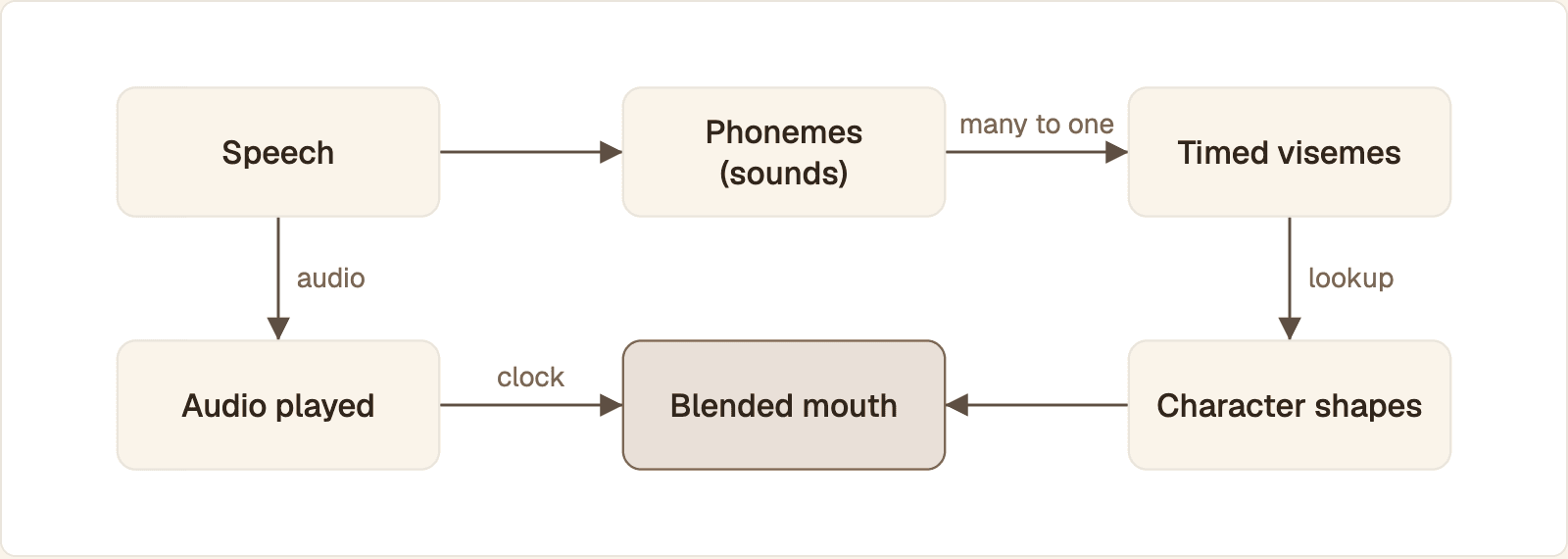
Many sounds collapse into one viseme. Each timed viseme picks a shape your character has, and the audio that has played decides which shape the blend is moving toward.
Speech is produced, as audio plus a list of viseme events with start times.
Each event is mapped to a shape your character has: a drawn mouth frame in 2D, or a blend shape (also called a morph target or shape key) in 3D.
On every rendered frame, you read how much audio has played and find the current viseme.
You blend from the previous shape to the current one over a short window.
On silence, or when the agent is interrupted, the mouth returns to rest.
2D frames
A 2D character needs one mouth drawing per viseme. Swapping drawings on each event already reads as speech for cartoon styles. Cross-fading two drawings removes the flicker.
3D blend shapes
A 3D face stores each mouth shape as a blend shape with a weight from 0 to 1. Lip sync sets those weights every frame. Fade the outgoing shape down while the incoming shape rises, so the two weights always sum to 1.
Blending in code
The function takes a sorted timeline of (start_ms, shape) pairs and the audio playback position, and returns the weights to apply on this frame.
blend_ms is a starting value to tune by eye: too short and the mouth snaps, too long and fast consonants never fully close. Shapes for p, b, m, f and v should reach full weight, or the mouth never visibly closes.
Audio to viseme: getting visemes from text to speech or live audio
You get visemes from one of two places. A text to speech engine that knows the phonemes it is speaking can hand you timed visemes for free. If you only have audio, you have to analyze the signal.
Viseme events from Azure text to speech
The Azure Speech SDK raises a viseme event for every shape while it synthesizes. Connect a callback before you start.
timeline ends up as pairs of milliseconds and viseme ID, measured from the start of audio. Passing audio_config=None keeps the audio in memory for your own player or transport.
Viseme speech marks from Amazon Polly
Polly returns visemes as speech marks. Its speech marks documentation states that a speech marks request returns the metadata instead of synthesized speech, so you make two calls with the same text and voice: one for marks, one for audio.
The response is line-delimited JSON. Polly's speech mark output reference defines time as milliseconds from the beginning of the audio stream and value as the viseme name. Either timeline feeds mouth_at once you map the identifiers to your shape names.
Visemes from live audio
Speech-to-speech models and many text to speech APIs return audio and nothing else. Check your provider's reference for timing data before you assume it exists. Without it, you have three options, in order of effort:
Loudness only. Open the jaw in proportion to the signal level. It gives a "jaw flap", not real shapes, and it suits simple or stylized characters.
Phoneme recognition. Run a speech recognizer or forced aligner that outputs timed phonemes, then map them through a phoneme-to-viseme table. The recognizer adds delay and is tied to a language.
A trained audio-to-viseme model. Libraries in the mould of Oculus Lipsync map the audio signal straight to visemes, with no text step.
The loudness method needs only the standard library. This function turns one frame of 16-bit mono PCM into a jaw weight.
floor and ceiling are placeholders. Set them from the RMS of your own audio's quiet and loud passages. Smooth the result over a few frames, or the jaw will tremble.
Choosing a text to speech engine for lip sync
Voice quality is the wrong first question. Ask whether the engine returns timing data, how soon the first audio chunk arrives, whether chunks come at a steady pace, and whether the sample rate matches the rest of your pipeline. An engine without viseme or phoneme timestamps pushes you to audio analysis or to a renderer that works from audio alone.
More than one language
Viseme tables are per language. Azure and Polly both publish separate mappings per locale, and a table built for English will mislabel sounds English lacks. If your agent switches language mid-call, switch tables with it, or drive the face from audio so no table is involved.
Real-time lip sync: keeping visemes in step with audio
Lip sync holds when the mouth is positioned from the audio that has actually been played, not from when an event arrived or when a timer fired. Most drift bugs are a second clock sneaking in.
Timestamps, not arrival order
A viseme event is a media timestamp: "this shape starts at 460 ms of this utterance". Carry that timestamp end to end, with an utterance ID. At the renderer, compute the playback position from samples played, then call mouth_at with it. Never schedule shapes with sleep or with the time a message was received.
Jitter buffers
Packets do not arrive evenly, so every receiver holds a little audio before playing it. That hold is the jitter buffer. A deeper buffer hides bigger network gaps and adds delay to every frame.
What matters for the mouth is that it follows the audio out of the buffer, not into it. If you send viseme events on a WebSocket or data channel beside a WebRTC audio track, the events often reach your code before the matching audio has left the jitter buffer. Queue them, and release each one when the audio playback clock reaches its timestamp. Over a plain WebSocket you own the whole buffer: order chunks by timestamp, cap the queue length, and drop a viseme that has missed its slot instead of showing it late.
When the avatar is rendered on a server and sent as a video track, the browser does this work. RFC 3550 explains why it can: RTP timestamps from different streams have independent offsets, so each sender report pairs an RTP timestamp with a shared reference clock, and the receiver uses the pair to line audio up with video. The guide to sending video frames over WebRTC from Python and Node covers the publishing side.
What causes drift
Symptom | Likely cause | Fix |
|---|---|---|
Mouth is early or late by a fixed amount | Events and audio take different paths with different delay | Schedule events against the audio playback clock |
Offset grows through a long answer | Animation runs on a wall-clock timer, or audio is played at a different sample rate than it was made | Count samples played; resample once, explicitly |
Offset jumps after a network stall | A queue grew and never drained | Bound every queue and drop stale items |
Mouth keeps moving after the user interrupts | Audio was canceled but queued visemes were not | Clear audio and viseme queues in one step |
Mouth stutters while audio is smooth | Render loop blocked by other work on the main thread | Move decoding and network handling off the render thread |
Interruptions deserve their own test. The article on voice activity detection and barge-in explains how the agent decides the user has started talking. Your lip sync code has to react to the same signal.
Measure the offset yourself
No published number will match your stack, so measure. Have the agent say a phrase full of lip closures, such as "baby, maybe, paper". Record the screen and the speaker output together, open the recording in a video editor, and compare the frame where the lips close with the dip in the waveform.
For a WebRTC session, also log the receiver's buffer. MDN documents the inbound RTP statistics. Divide jitterBufferDelay by jitterBufferEmittedCount to get the average time media waited in the buffer. The walkthrough on measuring and reducing WebRTC latency covers the rest of the delay budget.
In production, log four timestamps per turn with a turn ID: text to speech requested, first audio chunk, first viseme or first video frame, and playback start.
Visemes versus generated video for AI avatars
Use visemes when you own a rigged character and want to render it on the user's device. Use a model that generates the face video from audio when you want a realistic face from a photo and do not want to build or maintain a rig.
Question | Viseme pipeline | Generated video |
|---|---|---|
What you need to start | A 2D or 3D character with a shape per viseme | A portrait image |
What drives it | Timed viseme events | The speech audio itself |
Where it renders | On the client, in your engine | On a server, delivered as video |
Who keeps it in sync | Your code | The media transport |
New language or new voice | New mapping table, sometimes new shapes | No change if the model works from audio |
Best fit | Games, VR, stylized mascots, offline use | Realistic presenters and voice agents on the web |
The viseme route gives you full control of the look and sends only audio and small events. Its ceiling is the rig: cheeks, eyes and head stay still unless you animate those too. The generated route moves the whole face and removes your sync code, and in exchange you depend on a rendering service and on video bandwidth to each viewer.
Protoface Realtime takes the second route. The avatar is built from a portrait you upload and is driven by the audio your agent already produces, across languages, whether that audio comes from a speech-to-speech model or from separate speech to text, language model and text to speech stages. The integration guides have no viseme step: audio goes in, video comes out. In a LiveKit Agents app, the plugin adds the avatar to the room as a participant that publishes audio and video:
The avatar session starts before the agent session, and the plugin then routes the agent's audio to the avatar. In a Pipecat pipeline, ProtofaceVideoService from pipecat-protoface sits after text to speech and before transport.output(), and emits synchronized audio and video frames. Starters for Agora, Vapi, ElevenLabs Agents, OpenAI Realtime and VideoSDK are listed in the Protoface docs. The docs also list a Python SDK for sessions from a Python service and a JavaScript client for rendering the avatar in the browser.
If you do not run an agent at all, an embed puts a hosted conversation on your page with a public embed ID and no API key. Restrict it to your own origins before launch: see WebRTC encryption, auth and safe embeds.
The rule that survives either route. Audio is the clock. Whether you blend shapes yourself or receive finished video, position the face from audio that has been played, and clear everything queued the moment the user interrupts.
Common questions
How do you pronounce "viseme"?
It is usually said VIZ-eem, with the stress on the first syllable and an ending that rhymes with "phoneme", the word it is modeled on.
What do visemes mean in VRChat?
In VRChat, visemes are the 15 mouth shapes an avatar uses for lip sync: sil, pp, ff, th, dd, kk, ch, ss, nn, rr, aa, e, i, o and u. The VRChat wiki explains that VRChat analyzes your microphone audio and writes the current shape, 0 to 14, to the built-in Viseme animator parameter.
How many visemes does English need?
There is no fixed number. Azure uses 22 visemes, Amazon Polly uses 17 symbols for US English and Meta's Oculus Lipsync set uses 15. A stylized character can use fewer: merge shapes that look alike on your rig.
How do I get viseme events from Azure speech synthesis?
Connect a callback to the synthesizer's viseme_received event before you call speak_text_async. Each event carries a viseme ID from 0 to 21 and an audio offset in ticks of 100 nanoseconds, so divide by 10,000 for milliseconds.
How do I set up visemes on a Blender model?
Add one shape key to the face mesh for each viseme in your target set, and sculpt the mouth pose for it. For VRChat, name the 15 shape keys after the viseme codes so the SDK can detect them, then set the avatar's lip sync mode to Viseme Blend Shape.
What causes lip sync to drift out of step with audio?
A second clock. Drift appears when the mouth is timed by a wall-clock timer or by message arrival instead of by audio played, when audio is resampled without the timeline being adjusted, or when a queue grows after a network stall and never drains.
Give your voice agent a face without building a rig
Protoface Realtime turns the audio your agent already produces into live avatar video. Start with the stock avatar in a LiveKit or Pipecat app.