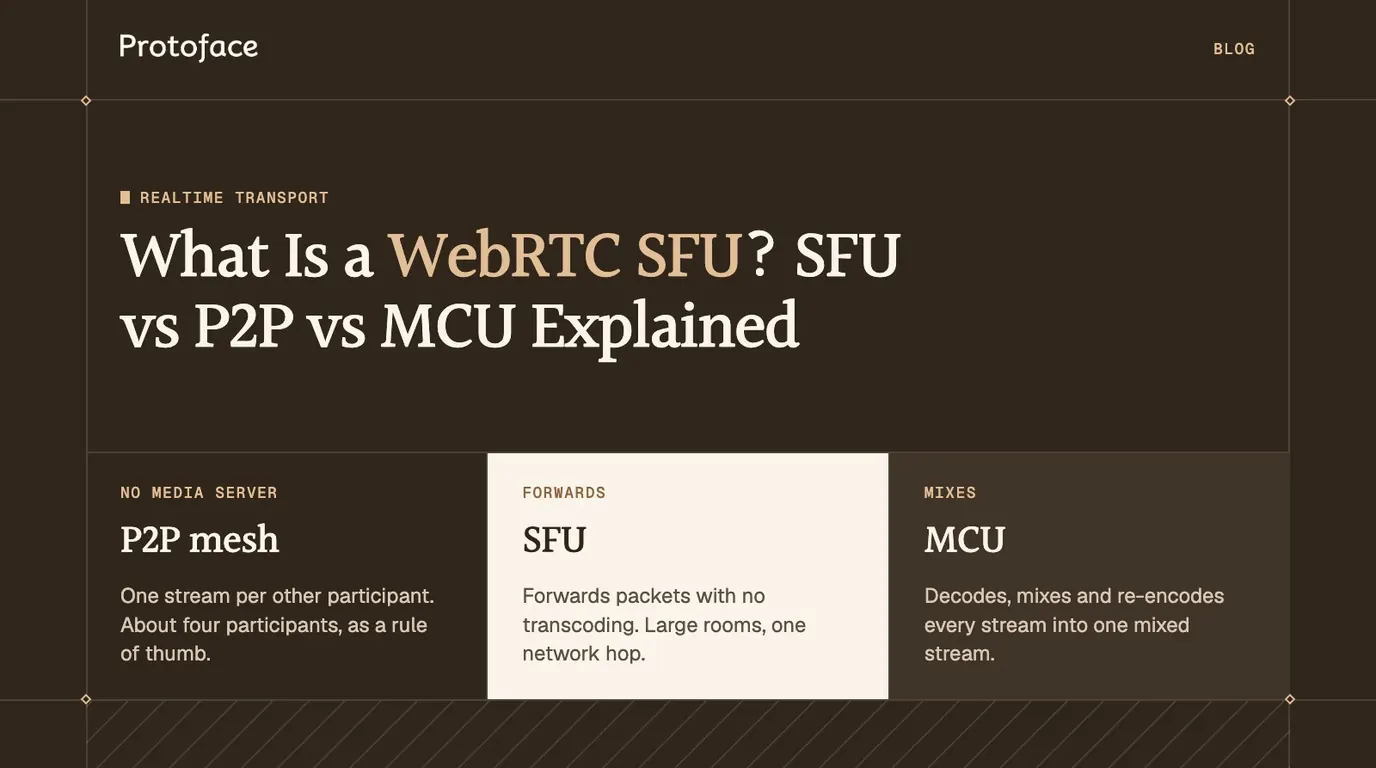
A WebRTC SFU (selective forwarding unit) is a media server that receives each participant's audio and video once and forwards those streams to everyone subscribed, without decoding or mixing them. You need one when a call grows past three or four people, or when one participant is a server-side agent or avatar.
What is a WebRTC SFU?
An SFU is a router for live media. Each participant opens one WebRTC connection to it, sends its streams up once, and receives the other participants' streams as separate tracks. The server decides which packets go to whom, and never decodes the picture or the sound.
The IETF describes the design in RFC 7667 as a Selective Forwarding Middlebox, which selects the active sources sent to each endpoint. "SFU" is the industry's name for it.
A session needs an SFU when the group grows past a few people, when the call is recorded or observed, or when a program on a server joins as a participant. If you are still deciding whether the media should travel over WebRTC at all, start with WebRTC vs WebSocket for realtime AI.
How an SFU forwards media
An SFU works in three steps: a participant publishes, the server forwards, and other participants subscribe.
Publish. Your browser negotiates one peer connection with the SFU and sends its microphone and camera as RTP packets. With simulcast on, it sends the same video at two or three resolutions.
Forward. The SFU reads each packet's header, picks the subscribers that should get it, rewrites header fields such as the sequence number for each one, and sends it on. It does not decode frames.
Subscribe. Every other participant receives your streams as separate tracks over its own connection to the SFU.
The "selective" part is the per-subscriber decision. The SFU estimates each subscriber's downlink, then chooses which simulcast layer to forward. Some SFUs also pause a video that no subscriber is displaying. The article on WebRTC simulcast and bandwidth adaptation covers how layers are encoded and switched.
Streams per participant in a four-person call
The three architectures differ in what each device sends and receives.
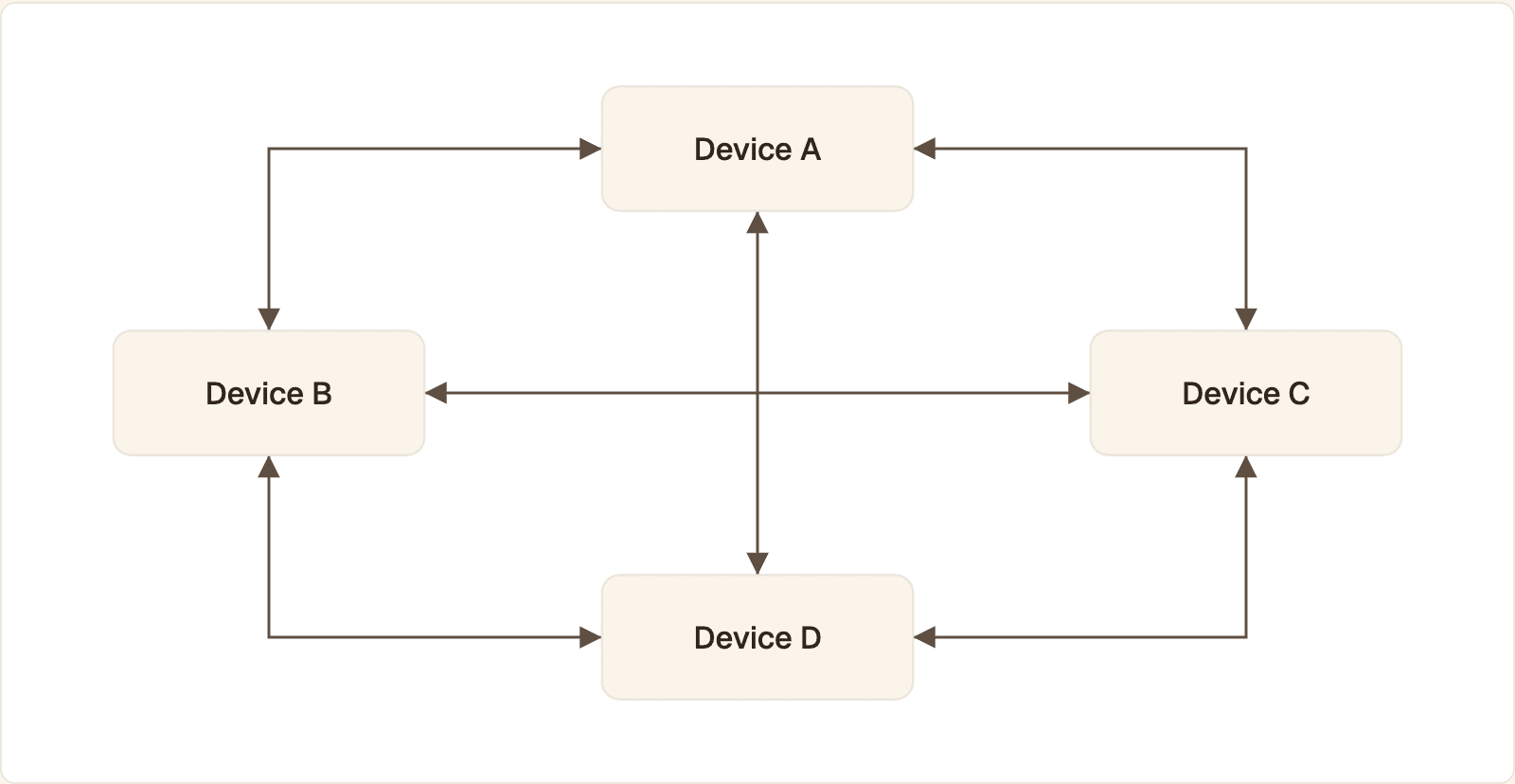
P2P mesh: six connections for four devices. Each device encodes and uploads its video three times, once per other participant.
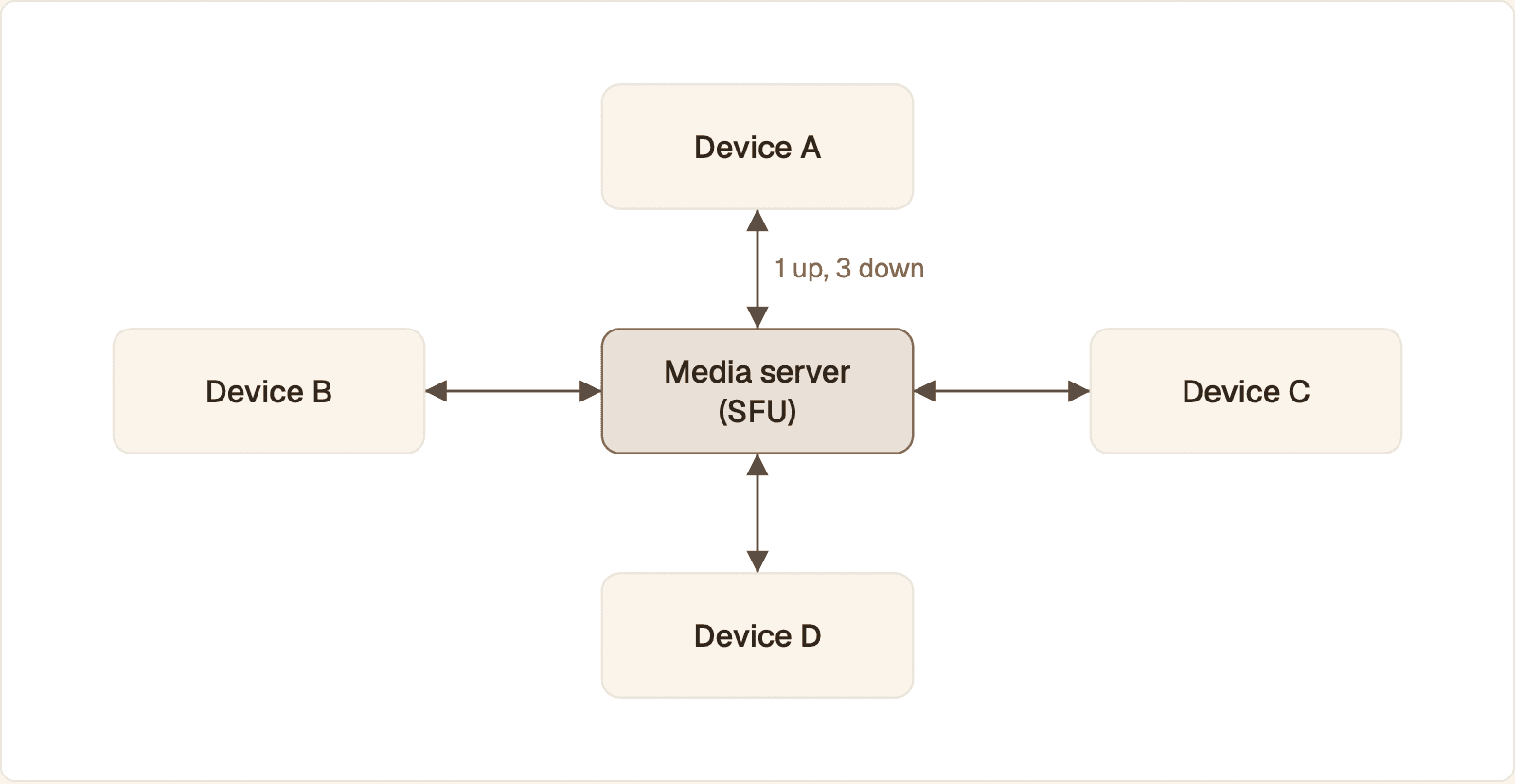
SFU: four connections in total. Each device uploads its video once, and the server forwards it to the other three as separate streams.
P2P mesh. Every device connects to every other device: 6 connections in total. Each device encodes and uploads its video 3 times and downloads 3 streams.
SFU. Every device connects to the server: 4 connections in total. Each device uploads once and downloads 3 streams.
MCU. Every device connects to the server: 4 connections in total. Each device uploads once and downloads 1 stream, a single picture the server composed from the other three.
SFU vs P2P vs MCU compared
P2P costs nothing in media servers and the most in client upload. An MCU is lightest on the client and heaviest on server CPU. An SFU sits between: cheap forwarding, one upload, and a separate track per participant.
Factor | P2P mesh | SFU | MCU |
|---|---|---|---|
Server work | None for media. Signaling, STUN and TURN only | Forwards packets, no transcoding | Decodes, mixes and re-encodes every stream |
Client upload | One stream per other participant | One stream, or a few simulcast layers | One stream |
Client download | One stream per other participant | One stream per subscribed participant | One mixed stream |
Added latency | None on a direct path | One network hop | One hop plus decode, mix and encode time |
Scales to | About four participants, as a rule of thumb | Large rooms, limited by server bandwidth | Limited by server CPU per room |
Layout control | Each client decides | Each client decides | The server decides, same for everyone |
What is the difference between an SFU and an MCU?
An SFU forwards the original encoded streams, and an MCU produces a new one. RFC 7667 calls the MCU design a media-mixing mixer: it receives streams from several endpoints and creates a single outgoing stream from the mix. An MCU still fits when the receiver can take only one stream, such as a phone dial-in or a SIP room system.
Does P2P have lower latency than an SFU?
Only when the two peers reach each other directly. Otherwise the call falls back to a TURN relay, which is a server hop anyway. An SFU close to your users adds one short hop and no transcoding, and in a voice agent that is small next to the time spent in speech recognition, the language model and speech synthesis. Read getStats() on a live call to see your real round-trip time.
Which architecture to choose by participant count
Pick by the number of endpoints that send or receive media, and count server-side programs as endpoints.
Session | Choose | Why |
|---|---|---|
Two people, nothing recorded | P2P | Shortest path, no media server to run |
Three or four people | P2P works, SFU is safer | Upload on the weakest device becomes the limit |
Five or more people | SFU | Mesh upload and CPU grow with every person added |
One presenter, large audience | SFU, cascaded if needed | One upload fans out to every viewer |
Any size, with an agent, avatar or recorder | SFU | Server-side participants join like any client |
The rule in one line. Two people and nothing else: P2P. A group of five or more, or any call with an avatar, a recorder or a supervisor in it: SFU.
SFU or P2P for an AI agent or avatar
Use an SFU. A voice agent is a program on a server, and a talking avatar is a second program, so a "one-to-one" conversation with an AI face already has three endpoints: the user, the agent and the avatar renderer.
P2P to a server works for a single audio agent: the browser opens a peer connection straight to your agent process. Add a face and the avatar has to receive the agent's speech and return video in sync, so you end up writing a small media server.
With an SFU, each of the three joins the same room as a participant. With the Protoface plugin for LiveKit, the flow is:
The user's browser joins the room and publishes the microphone.
Your agent joins the same room, subscribes to the user's audio and produces a spoken reply.
The plugin starts a Protoface session and joins the avatar to the room as its own participant.
The plugin routes the agent's audio to the avatar participant over a LiveKit data stream.
The avatar participant publishes audio and video into the room, and the user's browser subscribes to both.
The avatar participant publishes both the audio and the video, so the browser only has to render two tracks. A supervisor view or a recorder later is one more subscriber, not a new topology.
Agent side: add the avatar participant
Install the plugin with pip install livekit-plugins-protoface, then start the avatar before the agent session. The call creates the Protoface session and joins the avatar to the room.
Setup steps are on the Protoface LiveKit integration page.
Browser side: render what the SFU forwards
This sample uses the livekit-client package: it attaches every track the SFU delivers to the page, then joins the room with a token your server issued.
LiveKit's track subscription docs note that new tracks are delivered automatically by default, and that adaptive stream only takes effect when you render with track.attach().
Next.js, SvelteKit and other web frameworks
The framework changes two things. Mint the room token in a server route, because the LiveKit API secret must never reach the browser. Run the connection code only on the client, because RTCPeerConnection does not exist during server rendering.
Unity, Unreal and other game engines
Keep media and game state on separate transports. A game networking layer such as Unity Transport moves packets you define and has no codecs, jitter buffer or audio and video sync. A streamed talking face belongs on WebRTC through an SFU, decoded into a texture in the scene. LiveKit maintains an official Unity SDK. Its SDK list has no official Unreal SDK, so for Unreal confirm which C++ SDK or community plugin fits your media server before you commit.
When you do not want to run an agent at all
For an avatar on a marketing or course site, you may not need your own room. Protoface embeds host the conversation: you paste an iframe embed with a public embed ID, with no agent to build and no API key on the page.
Scaling an SFU: cascading and multiple regions
You scale in two directions: more nodes for more rooms, and linked nodes for rooms too big or too spread out for one.
Single SFU
Every participant in a room connects to the same server. LiveKit works this way: its docs say it can run on one node or a hundred with the same configuration, needs Redis for multi-node setups, and routes all clients joining a room to the same node. Capacity grows by spreading rooms across nodes, covered in load balancing WebRTC sessions across servers.
Cascaded SFUs
In a cascade, SFUs forward streams to each other. Each participant connects to a nearby node, and a stream crosses between nodes only when someone on the other node subscribes to it. That lifts the size limit of one machine and shortens the first hop for distant users. The price is an extra server-to-server hop and more state to keep consistent, so wait until a room outgrows one node.
Regional placement
Put the SFU near the people in the call. For an AI session, the agent and the avatar renderer are in the call too, so every turn travels from user to SFU to agent and back. Run them in the same region as the SFU.
How many participants can a single SFU handle?
There is no fixed number. Load is the count of forwarded streams, roughly publishers multiplied by subscribers, times their bitrate. One presenter with a large audience is light. A room where everyone publishes video and subscribes to everyone else is heavy. Load test with synthetic publishers and subscribers at your real bitrates, and watch bandwidth and CPU on the node until packet loss appears.
Open source and managed SFU options
Choose by how much of the stack you want to own: a full server with rooms and SDKs, a library that only forwards, or a managed service.
Option | What it is | Suited to |
|---|---|---|
Open source SFU in Go with rooms, client SDKs and an agents framework. Also a cloud service | Voice agents, avatars, apps that want a complete stack | |
Open source SFU shipped as a Node.js module. Low-level and signaling agnostic | Teams building their own signaling and room logic | |
Open source general purpose WebRTC server in C. The VideoRoom plugin is its SFU | SFU rooms alongside SIP or streaming plugins | |
Open source SFU in Java, the media router in the Jitsi Meet stack | Self-hosted meetings with a ready-made UI | |
Managed SFU. Your app supplies signaling, permissions and the idea of a room | Forwarding as a service, with your own session layer |
How do I build a simple SFU server?
Build on a WebRTC library such as Pion in Go or mediasoup in Node.js, not on raw sockets. Accept one peer connection per participant, and for each incoming track create an outgoing track on every other connection and copy RTP packets across. The hard parts, and the reason most teams adopt an existing SFU, come next: keyframe requests when a subscriber joins, per-subscriber bandwidth estimation, simulcast layer selection and renegotiation.
Common questions
What does SFU stand for in WebRTC?
SFU stands for selective forwarding unit. It is a media server that receives each participant's streams and forwards them to the other participants without decoding or mixing them. RFC 7667 describes the same design as a Selective Forwarding Middlebox.
What does WebRTC stand for?
WebRTC stands for Web Real-Time Communication. It is the set of browser APIs and network protocols that carry live audio, video and data between endpoints.
Is WebRTC a security risk?
The protocol is secure by design: RFC 8827 requires all media to be encrypted with SRTP and requires explicit user consent before a page can use the camera or microphone. The risks to manage are IP address exposure during connection setup and, with an SFU, the fact that the server can read the media unless you add end-to-end encryption.
Which is faster, WebRTC or WebSocket?
On a clean network the difference is small. WebRTC is faster where it matters for live media, on lossy Wi-Fi and mobile links, because it sends over UDP and skips late packets, while a WebSocket runs on TCP and stalls until a lost packet is resent.
Do I need an SFU for a one-to-one call?
No. Two browsers can connect peer to peer with only signaling, STUN and TURN servers. A single audio agent can also be the second peer. Move to an SFU when the call adds a recorder, an avatar next to the agent, or more people.
Is LiveKit an SFU?
Yes. LiveKit's documentation describes it as an opinionated, horizontally-scaling WebRTC Selective Forwarding Unit, written in Go on the Pion WebRTC library. Rooms, client SDKs and the agents framework are built around that server.
Put a face in the room your agent already uses
The Protoface LiveKit plugin starts a session and joins the avatar to your room as a participant, driven by your agent's audio.