WebRTC simulcast means the sender encodes one video source at several resolutions and bitrates at the same time and sends them all to a media server. The server forwards one layer to each viewer, chosen to fit that viewer's bandwidth and screen size, so one slow connection never drags down everyone else.
What is WebRTC simulcast?
Simulcast is one camera or video source encoded several times, usually at three sizes, and sent as separate RTP streams. Each viewer receives the single layer its connection can carry. RFC 8853 defines it as "simultaneously sending multiple different encoded streams of the same media source".
The problem it solves is the slow viewer. A WebRTC sender has one encoder per stream. With five viewers and one encoding, you either match the weakest link and everyone gets a soft picture, or match the strongest and the weak link freezes. Simulcast gives the server something to choose from.
Simulcast is a video technique for calls that pass through a server. It does nothing for a direct browser-to-browser call, and it is not a replacement for a media transport. If you are still choosing one, start with WebRTC vs WebSocket for realtime AI.
How simulcast works with an SFU
The publisher uploads every layer, and a selective forwarding unit (SFU) picks one per subscriber and forwards its packets without decoding them. The SFU never re-encodes, which is why it stays cheap to run and adds almost no delay.
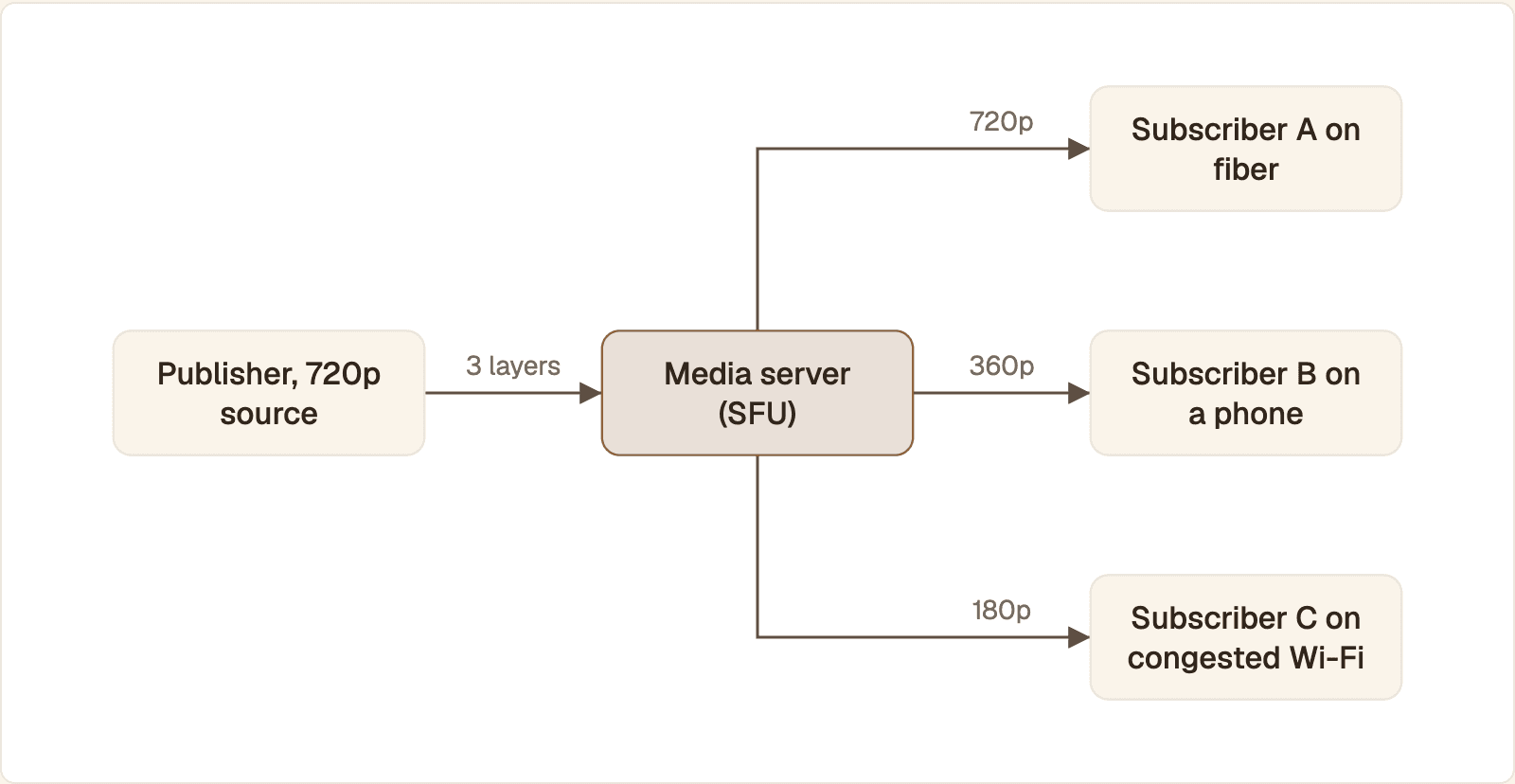
The publisher uploads all three layers. The SFU forwards one to each subscriber, chosen by that subscriber's connection and tile size.
The publisher captures one 720p source and encodes it three times: 720p, 360p and 180p.
Each encoding goes to the SFU as its own RTP stream, tagged with a stream ID (
rid) such asf,handq.Subscriber A is on fiber with a large video tile. The SFU forwards the 720p layer.
Subscriber B is on a phone with the video in a small tile. The SFU forwards 360p.
Subscriber C is on congested Wi-Fi. The SFU forwards 180p, and moves C up when the link recovers.
Each subscriber sees one ordinary video track. The switching happens inside the SFU. The article on SFU, P2P and MCU architectures covers when you need that server at all.
Simulcast layers: resolution, bitrate and frame rate
Three layers, each half the width and height of the one above, is the common ladder. The values in the table are the ones LiveKit uses in its publish settings example for a 720p camera. Treat them as a starting point, then tune against your own content.
Layer | Resolution | Max bitrate | Max frame rate |
|---|---|---|---|
High ( | 1280 x 720 | 1.5 Mbps | 30 fps |
Medium ( | 640 x 360 | 500 kbps | 20 fps |
Low ( | 320 x 180 | 150 kbps | 15 fps |
High is for a full-size tile on a good connection.
Medium is for grid tiles, phones and average home Wi-Fi.
Low is the survival layer: thumbnails and links that can carry little more than audio.
The lower layers are cheap. LiveKit's introduction to simulcast uses a ladder of 2.5 Mbps, 400 kbps and 125 kbps. The two lower layers add 525 kbps, about a fifth more upload than the top layer alone. The larger cost is CPU, because the publisher runs three encoders.
For a talking face, be careful with frame rate. Lip movement reads badly when frames are sparse, so lower the resolution of the small layers before you cut their frame rate hard, and check the result by eye.
How to enable simulcast in the browser
Pass a sendEncodings array with one entry per layer when you add the video transceiver. You must do it at creation: the number of encodings cannot change afterwards, and a rid cannot be edited.
pc is your RTCPeerConnection to the SFU. scaleResolutionDownBy divides the source width and height, so 4 turns 720p into 180p. maxBitrate is in bits per second. MDN documents each field under RTCRtpSender.setParameters(). List the layers from smallest to largest. A browser that cannot send every encoding tends to stop the last one in the list first, so the largest belongs at the end.
The offer now carries an a=simulcast:send q;h;f line. Layers are only sent if the remote side accepts them in its answer, which an SFU does and a plain browser peer does not.
Change a layer during the call
You can retune or pause a layer without renegotiating. Read the parameters, edit them, and write them back.
Verify the layers are being sent
Start the call and wait a few seconds for the bandwidth estimate to ramp up.
Call
getStats()on the sender and keep theoutbound-rtpreports. You should see one perrid.Check
frameWidth,frameHeightandframesPerSecondon each. A layer with no frames is not being sent.Read
qualityLimitationReason.bandwidthorcputells you why a layer is missing or smaller than configured.
The fields are listed in MDN's RTCOutboundRtpStreamStats reference. In Chrome you can watch the same numbers live at chrome://webrtc-internals.
Fewer layers than you configured? Browsers generally fund layers from the smallest up. When the upload estimate or the CPU cannot cover all three, the top layer stops first. A small capture resolution can have the same effect, so do not expect three useful layers from a 360p source.
H.264 vs VP8 for simulcast
Both work, and every WebRTC browser must implement both, so pick by device. Choose H.264 when viewers and publishers are mostly on iPhones and iPads, and VP8 when you want the same software encoder behavior everywhere.
Property | VP8 | H.264 |
|---|---|---|
Browser support | Mandatory in WebRTC | Constrained Baseline is mandatory |
Hardware on iOS | None, so more CPU and battery | Hardware encode and decode |
Simulcast transport | One SSRC per layer | One SSRC per layer |
Scalability inside a layer | Temporal only | Temporal only |
Licensing | No licensing requirements | Patented codec |
The support, hardware and licensing rows come from MDN's guide to codecs used by WebRTC. With VP8, each simulcast layer can also carry temporal layers, which lets the SFU drop frame rate without switching resolution.
H.264 simulcast depends more on the encoder you get. Hardware encoders differ in how many parallel encodes they allow, and a browser may encode some layers in software instead. Browser support also arrived later: MDN lists H.264 simulcast in Firefox from version 136. Do not assume: negotiate H.264 on your target device and run the same stats check. If three outbound-rtp reports show frames, it works there.
The codec does not fix lag or lip-sync drift. Audio and video stay aligned because they travel in one peer connection with shared timing, and delay comes from buffering and the network. If the mouth is late, measure before changing codec: the steps are in how to measure and reduce WebRTC latency.
Simulcast vs SVC
Simulcast sends several independent streams. Scalable video coding (SVC) sends one stream built in layers, where the SFU strips the upper layers for weaker viewers. SVC is the better option when every publisher can encode VP9 or AV1.
The W3C Scalable Video Coding extension for WebRTC adds a scalabilityMode field to each encoding. L3T3 means three spatial and three temporal layers in one stream. The same document states that VP8 and H.264 support only temporal scalability, so full SVC means VP9 or AV1.
Pick SVC for large rooms on modern devices. It uses the upload more efficiently, and the SFU can step a viewer down by dropping the upper layers, with no keyframe to wait for.
Pick simulcast when you need VP8 or H.264 for reach, or hardware encoding on phones. A switch between simulcast layers needs a keyframe on the new layer, so it takes a moment longer.
Bandwidth estimation and layer switching
The SFU estimates each subscriber's downlink from RTCP feedback and forwards the highest layer that fits. It steps down quickly when loss or delay rises and steps up cautiously, because a layer that flaps looks worse than one that stays slightly low.
LiveKit's simulcast introduction describes the rule as the minimum of two things: the layer the subscriber wants and the layer its bandwidth allows. The estimate draws on receiver reports, transport-wide congestion control feedback and REMB messages.
To watch a switch from the viewer's side, poll getStats() on the receiving connection and read frameWidth, frameHeight and framesPerSecond on the inbound-rtp video report. Then limit the downlink with an operating system tool such as tc on Linux or Network Link Conditioner on macOS. The throttle in browser developer tools does not apply to WebRTC media. The resolution should drop within seconds while audio carries on. If video freezes instead, the publisher is not sending a lower layer.
Simulcast for a realtime AI avatar stream
An avatar stream benefits from simulcast whenever it reaches the viewer through an SFU, even with one viewer. A single adaptive encoding is enough only when the generator and the viewer share a direct peer connection.
On a direct connection the viewer's feedback reaches the encoder, which lowers its own bitrate and resolution. Extra layers would waste upload and CPU. Through an SFU that loop is split in two. The SFU cannot shrink a stream it does not decode, so with one layer it can only keep forwarding, drop frames if the stream has temporal layers, or pause. A low layer gives it a step down that keeps the face moving.
The difference from a webcam is who publishes. The avatar is rendered on a server, so there is no sendEncodings for you to write. With Protoface Realtime on LiveKit, a protoface-avatar-agent participant joins your room and publishes the avatar's audio and video. The Protoface docs do not say whether that video is simulcast or which layers it has, so read what arrives from the viewer with the same inbound-rtp check.
What you control is the subscriber. In the LiveKit JavaScript SDK, turn on adaptive stream and attach the track to a video element. When the track has simulcast layers, the SDK asks the server for the one that matches the element's size. It also pauses the video while the element is hidden.
livekitUrl and token come from your own backend. LiveKit's guide to subscribing to tracks notes that adaptive stream in JavaScript only works when you use attach(). The same page shows setVideoQuality for capping the layer by hand, for example when the avatar sits in a small corner widget. An avatar in a 320-pixel tile does not need a 720p layer, and not pulling one leaves more room for audio.
Common questions
What is the difference between simulcast and streaming?
Streaming is any continuous delivery of media. Simulcast is one way to publish a live WebRTC stream: several encodings of the same source sent at once, with a server forwarding one to each viewer. Adaptive bitrate streaming over HLS or DASH also uses several renditions, but the player pulls stored segments and switches between them itself, several seconds behind live.
Do I need simulcast for a one-to-one call?
Not on a direct peer-to-peer call. The sender's encoder already adapts its bitrate and resolution to the one receiver. It helps once the call passes through an SFU, because the SFU cannot re-encode and needs a lower layer to fall back to.
How many simulcast layers should I send?
Three for a 720p source: full, half and quarter resolution. Use two for a 360p or 480p source, and one when the video is only ever shown small. Each extra layer costs encoder CPU on the publisher.
What is WebRTC used for?
Live audio, video and data between browsers, mobile apps and servers with delay low enough for conversation: video calls, voice agents, live avatars, screen sharing and remote control.
What are the downsides of using WebRTC?
You have to build or buy signaling, run STUN and TURN servers, and add a media server for calls with more than a few people. Problems often appear only on other people's networks, so you need stats collection to debug them.
Is WebRTC free or paid?
WebRTC is free. It is an open standard built into every major browser with no license fee. What you pay for is the infrastructure around it: TURN relays, an SFU, and the bandwidth they use, whether you host them or use a provider.
Put a live face in the room you already run
Protoface Realtime joins your LiveKit room as a participant and turns your agent's audio into avatar video. Your viewers subscribe to it like any other track.