Code-switching in voice agents is handled in three places. Set speech recognition to a multilingual mode limited to the languages you expect, tell the LLM to reply in the language the caller used most in their last turn, and use one multilingual TTS voice so a reply can hold both languages without a voice change.
What code-switching is and why it breaks voice agents
Code-switching is a speaker moving between two languages in one conversation, often inside one sentence. It breaks voice agents because most pipelines treat language as a setting fixed for the whole session, and every stage then guesses wrong in its own way.
Take a bilingual caller who says: "Quiero cancelar my subscription antes del next billing cycle." The sentence is Spanish with two English islands. A recognizer locked to Spanish mangles the English words. One locked to English mangles the rest.
Two patterns matter, and they need different handling:
Between turns. The caller greets you in Spanish and asks the next question in English. One language label per utterance is enough.
Inside a sentence. The cancellation example. One label per utterance is wrong whichever language it names. You need a language tag on each word.
A speech-to-speech model handles language inside one model, so you steer it with instructions. A chained pipeline gives you a setting at each stage. The comparison of OpenAI Realtime API vs STT + LLM + TTS pipelines covers that choice. The steps that follow assume the chained pipeline.
Where code-switching fails: STT, LLM and TTS
Each stage fails differently, and an error early in the chain is passed on.
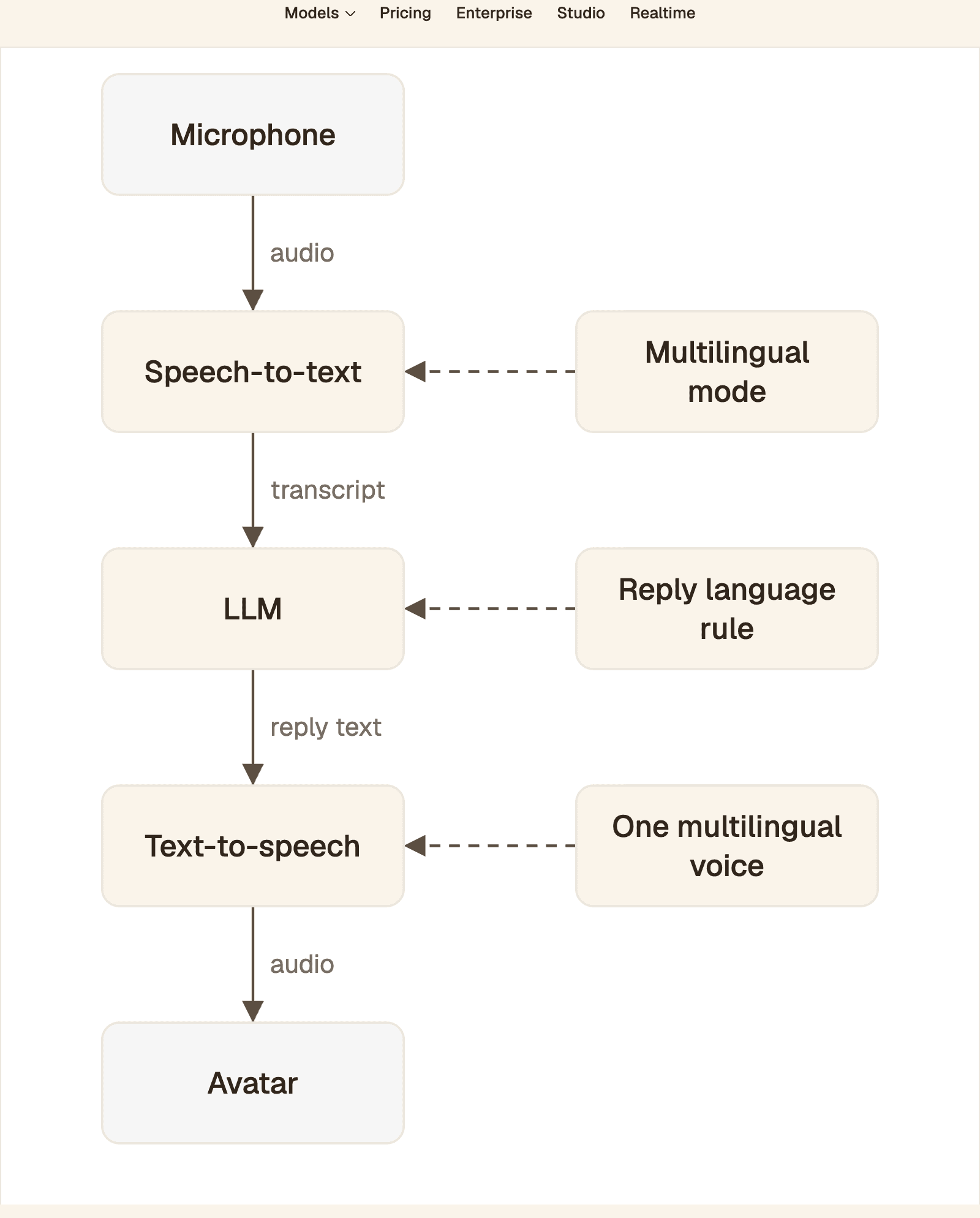
Language is decided at three stages, each with its own setting. The avatar makes no language decision: it follows the audio from text-to-speech.
Microphone to speech-to-text. Failure: words from the second language are replaced by similar-sounding words in the first.
Transcript to LLM. Failure: the model answers in the wrong language, or translates a term the caller wanted kept.
Reply text to text-to-speech. Failure: the voice reads the second language with the first language's pronunciation rules.
Audio to avatar. No language decision is made here. The face is driven by the audio from step 3, so watch for gaps or restarts in that audio.
Speech-to-text
A recognizer set to one language expects every word to be in that language, so it tends to map a foreign word to the nearest-sounding word it knows. Automatic detection with no limits fails the other way: a short or accented phrase gets assigned to a third language nobody in the call speaks.
LLM
The LLM only sees the transcript. If one stray English word leads it to answer a Spanish speaker in English, the caller hears an agent that stopped listening.
Text-to-speech
A voice built for one language applies that language's letter-to-sound rules to everything. Spanish names come out anglicized, and numbers are read in whichever language the text normalizer assumes.
Handling code-switching in speech recognition
Turn on the model's multilingual or code-switching mode, and tell it which languages to expect. Then read the language tag on each word, not only the one on the utterance.
Deepgram documents multilingual code-switching for Nova-2, Nova-3 and Flux Multilingual. On the Nova models you pass language=multi, it works over a streaming WebSocket, and Deepgram recommends endpointing=100 with it. Each word in the result carries its own language field.
In a LiveKit agent the same setting is one argument. LiveKit's Deepgram plugin reference describes the multi language code as detecting the language of each segment of speech in one audio stream. The same page notes that multi covers fewer languages than the model supports one at a time, so confirm your pair is on Deepgram's list first.
Gladia's code-switching configuration takes an explicit language list, and its transcript messages include the detected language per utterance and per word:
Soniox tags every token. Its language identification docs enable this with one flag, and hints bias the model toward your pair:
Restrict detection to the language pair you expect
Restrict detection whenever you know the pair. Gladia's docs warn against enabling code-switching with an empty language list, because the detector then scores every utterance against more than 100 languages and misdetects often, mostly between languages that sound alike.
Soniox's language hints bias recognition toward the listed languages and do not block others. Its separate language restrictions flag, language_hints_strict, is described as best-effort and works best with a single language. Treat a list of two as a strong preference, not a wall.
When per-utterance detection is not enough
Per-utterance detection fails as soon as the switch happens inside the sentence, because one label cannot describe two languages. Three signs you need word-level tags:
Callers borrow nouns: product names, plan names, street names.
Numbers and dates are spoken in a different language from the sentence around them.
Your reply-language rule flips on single words such as "okay" or "sí".
Realtime detection is also less stable than batch. Soniox notes that in realtime a language tag can be wrong for a moment and then be revised as more speech arrives. Decide the reply language from the final transcript, never from interim results.
A test per speech model you can rerun
A published benchmark rarely matches your language pair, your accents and your phone audio, so a borrowed score can mislead you. Record one set of utterances, send the same files to each candidate, and fill in the result column yourself.
Model | Documented setting | Language data returned | Check in your run |
|---|---|---|---|
Deepgram Nova-3 |
| Per word | Are the English islands tagged |
Gladia |
| Per utterance and per word | Does a third language ever appear? |
Soniox |
| Per token | Do realtime tags settle before the turn ends? |
AssemblyAI Universal-3.5 Pro |
| Check the response schema | Documented for recorded audio: use as your offline reference |
OpenAI |
| None for this model | Is the transcript right without tags? |
AssemblyAI documents code switching for pre-recorded audio, where Universal-3.5 Pro follows speakers who shift language mid-sentence across 18 languages. OpenAI's realtime transcription guide says to pass languages for the expected input languages and to add context in prompt when more than one language is expected. It also states that gpt-live-transcribe does not return detected-language predictions, so your reply-language rule has to work from the text alone.
A reusable English and Spanish test set
Each line targets one failure. Have at least two bilingual speakers record all of them.
Utterance | What it tests |
|---|---|
Quiero cancelar my subscription antes del next billing cycle. | English islands in a Spanish sentence |
I need to change my address, es que me mudé la semana pasada. | Switch at a clause boundary, English first |
¿Me puedes mandar el tracking number por email? | Borrowed product terms |
My order number is cuatro cinco siete, nine two. | Digits in both languages |
I'm calling about the store on Calle Ocho. | A proper noun from the other language |
Okay, perfecto, gracias. | A short turn with almost no context |
Hola, buenas tardes. (next turn) Can you check my refund? | A switch between turns |
Keeping the LLM and TTS in step with the speaker
Give the LLM an explicit language rule, and give the TTS one voice that can speak both languages.
Prompt rules for the reply language
Put the policy in the system instructions as rules, in this order:
Reply in the language the user spoke most in their last turn.
If the last turn is one or two words, keep the language of your previous reply.
Repeat product names, plan names, addresses and quoted on-screen text exactly as the user said them. Do not translate them.
Never comment on the user's choice of language.
If your recognizer returns word tags, count the dominant language in code and pass it to the model as a plain line such as "Reply language: Spanish".
Can a TTS voice switch languages in the middle of a sentence?
Yes, if the voice is multilingual. A single-language voice will read the foreign words with its own pronunciation rules. Microsoft's SSML voice reference states that Azure's multilingual voices detect the language of the input text automatically, and that the <lang xml:lang> element can set the speaking language at sentence or word level. It also notes that non-multilingual voices do not support that element.
The sample keeps one voice and marks the Spanish spans. Pick the locale your callers speak, es-MX or es-ES: regional variants differ in pronunciation, and a mismatch is audible.
Avoid swapping between two single-language voices inside one reply. The caller hears a different person, and the handover adds a gap. Separate voices per language suit agents that change language between turns, as in the setups for Pipecat multilingual voices in English, Spanish and French and Vapi multi-voice setup for realtime avatars.
Code-switching with a realtime avatar
The avatar does not need to know which language is being spoken. Protoface Realtime drives the face from the audio your agent already produces, and its docs state that it works across languages and with any pipeline, speech-to-speech or separate STT, LLM and TTS.
Because the face is driven by that audio, treat any gap, restart or voice swap in the TTS stream as something that can show on screen. To keep the face aligned:
Send one continuous audio stream per reply, from one voice.
Decide the reply language before synthesis starts. Do not regenerate a reply that has begun playing.
Keep the avatar as the last step before output. In Pipecat, the Protoface service sits after TTS and before
transport.output(), and it emits synchronized audio and video frames.
In LiveKit, the avatar is added to the session you configured for multilingual recognition:
The avatar session starts before the agent session, and none of the plugin's documented options names a language. For a bilingual tutor that mixes the learner's first language into a lesson, see Protoface avatars for language learning.
How to test code-switching before launch
Build a recorded test set that covers both directions of each language pair, score it on every model change, and track four numbers.
Write 30 to 50 utterances per pair, starting from the seven in the test set and adding your own account numbers, dates, addresses and product names.
Record each one with several bilingual speakers, including on a phone line if you serve calls.
Have a bilingual reviewer write the reference transcript, keeping each word in the language it was spoken.
Run the files through each recognizer, then through the full agent.
Track these per run:
Word error rate, split by language. An overall score hides the damage, because the embedded language is a small share of the words.
Island recall. The share of embedded-language words that survive in the transcript.
Reply language accuracy. The share of turns where the agent answered in the language your rule requires.
Entity accuracy. Numbers, names and addresses that came through exactly.
Word error rate is the word-level edit distance divided by the number of reference words. This function computes it with no dependencies:
The transcript in hyp is invented to show the arithmetic, not taken from any model. The script prints a word error rate of about 0.22 and an island recall of 0.6: two of nine words are wrong, and both are English islands. Score a monolingual set from the same speakers too. The difference between the two is what code-switching costs you on that model.
Common questions
Which speech-to-text model handles code-switching best?
It depends on your language pair, accents and audio path, so a published ranking will not settle it. Shortlist models with a documented code-switching mode and word-level language tags, such as Deepgram's multilingual mode, then score the same recordings on each.
How much does code-switching increase word error rate?
There is no fixed figure: it varies by model, language pair and how often speakers switch. Measure it by scoring a code-switched set and a monolingual set recorded by the same speakers, and compare the two word error rates.
Should I restrict language detection to two languages?
Yes, when you know the pair. Gladia's docs advise limiting the list to the languages you expect, because open detection across 100+ languages misdetects often. Check whether your vendor treats the list as a hint or a hard limit.
Does realtime or async transcription handle code-switching better?
Async has the advantage, because the model sees the whole utterance before it decides. Soniox notes that realtime language tags can be wrong briefly and are revised as more speech arrives. Use realtime for the live turn and batch transcripts for scoring.
How do I test a voice agent with bilingual customers?
Record a fixed set of mixed-language utterances from several bilingual speakers, covering both directions of each pair. Score word error rate per language, how many embedded words survive, and whether the agent replied in the right language.
Does an AI avatar need to know which language is spoken?
Not with Protoface Realtime. Its docs say the face is driven by the audio your agent already produces and that it works across languages, and the plugin options include no language setting. Keep the reply as one continuous audio stream from one voice.
Put a face on your bilingual agent
Keep your multilingual STT, LLM and TTS. Protoface Realtime turns the audio your agent already produces into a live avatar, in whichever language it speaks.