Pipecat multilingual voices need three settings to agree on every turn. Run speech-to-text in a multilingual mode that labels each transcript with its language, tell the LLM to reply in that language, and send the TTS service a matching voice and language code with a TTSUpdateSettingsFrame before the reply is spoken.
How multilingual voices work in a Pipecat pipeline
The STT service detects the language or is told it, the LLM answers in it, and the TTS service has to be given a voice and a language code that match. Pipecat does not pick the voice for you. An English voice left in place will read French text with an English accent, so your code owns the switch.
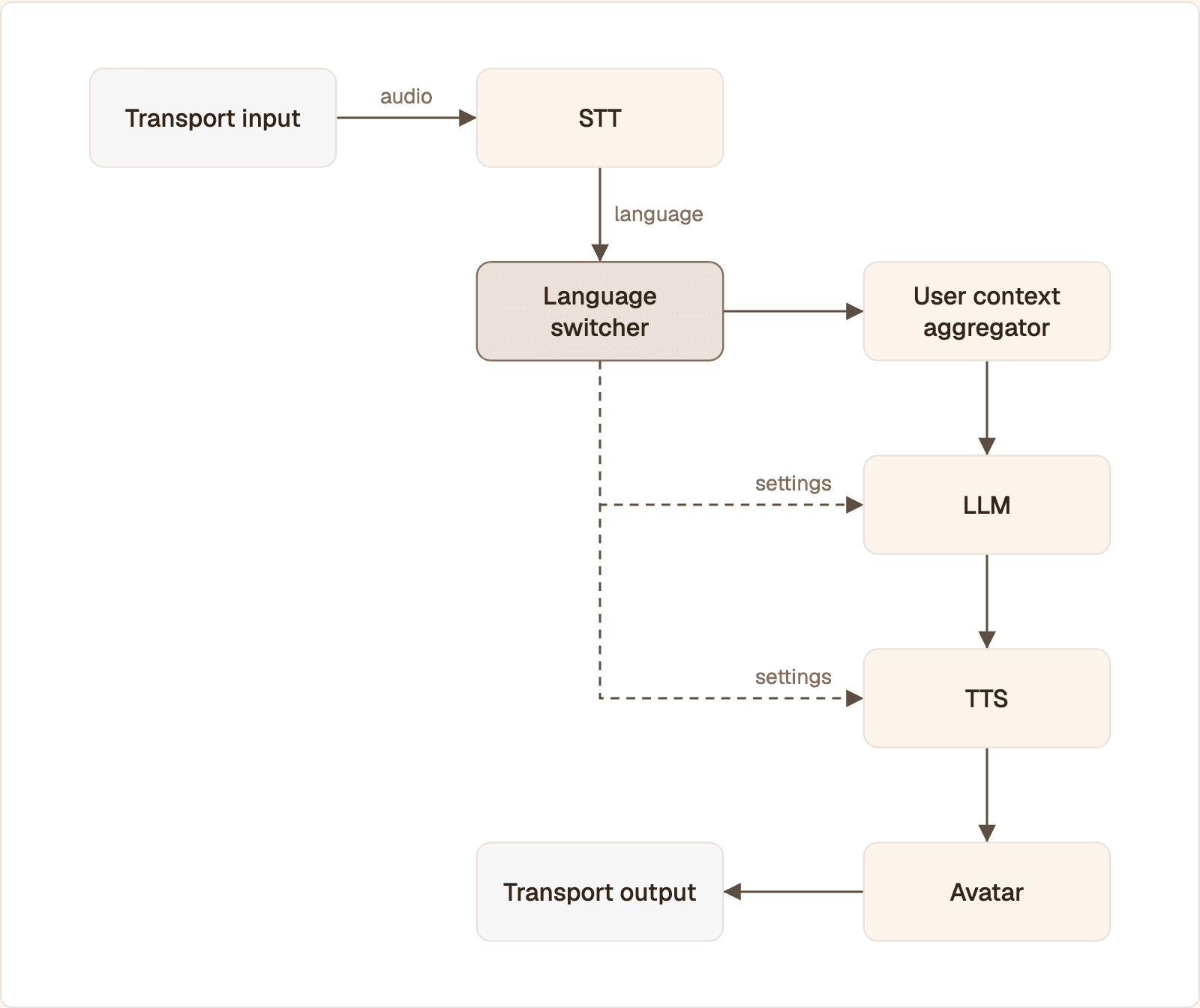
STT labels each transcript with its language. The language switcher reads that label and updates the LLM and TTS settings before the reply is written and spoken.
One user turn moves through the pipeline in this order:
Transport input receives the caller's audio.
STT emits a
TranscriptionFrame. Itslanguagefield holds the detected or configured language.Language switcher, a small processor you add, reads that field and pushes new TTS and LLM settings when the language changes.
User context aggregator adds the transcript to the conversation.
LLM writes the reply.
TTS speaks it with the voice set in step 3.
Avatar turns that audio into synchronized video and audio.
Transport output sends both to the caller.
That layout assumes separate STT, LLM and TTS services. A single speech-to-speech model handles language inside the model and gives you less control over the voice. The comparison of the OpenAI Realtime API against an STT, LLM and TTS pipeline covers that trade-off.
Choosing STT and TTS services for English, Spanish and French
Pick an STT service that both transcribes the three languages in one stream and reports which one it heard. Transcribing without reporting is not enough, because the voice switch needs a language label on every transcript.
STT service in Pipecat | Multilingual setting | Language on the transcript |
|---|---|---|
Deepgram Nova-3, |
| Yes, on each result |
Deepgram Flux, |
| Yes, on each turn |
ElevenLabs realtime STT |
| When the API returns one. Log it and check |
Whisper on Groq or OpenAI |
| Not set in the current Pipecat source |
Pipecat's speech-to-text guide documents the three ways services expose detection: no language for Whisper-based services and ElevenLabs, "multi" for Deepgram, and "any" for Gradium. Detecting is not the same as labeling: the Whisper-based services leave the transcript's language empty, so they cannot drive a voice switch. Deepgram's language table lists English, Spanish and French among the ten languages its multilingual mode covers, so one connection handles all three. The Pipecat Deepgram reference describes both the Nova and the Flux settings.
For TTS, the model must speak all three languages and you need a voice for each.
TTS service | English, Spanish, French | What you set per language |
|---|---|---|
Cartesia Sonic, | Yes: |
|
ElevenLabs, | Yes, on Multilingual v2 and Flash v2.5 |
|
Cartesia's Sonic model page lists the three codes. The ElevenLabs model list shows which of its models cover which languages. The code samples use Deepgram Nova-3 and Cartesia. Any pair from the tables works with the same pattern.
Voice IDs belong to your provider account, so keep them in configuration, one per language:
Language | Pipecat value | Cartesia code | Voice variable |
|---|---|---|---|
English |
|
|
|
Spanish |
|
|
|
French |
|
|
|
Choose each voice in the provider's voice library by listening to it in that language. If you want one persona across all three, pick voices with a similar pitch and pace.
Setting up the pipeline and API keys
Install Pipecat with the extras for your services and transport, put the keys in the environment, and start from a three-service pipeline. Every later step adds one processor to it.
The pipeline code uses Pipecat's development runner and its built-in WebRTC transport. The imports come from pipecat.frames.frames, pipecat.pipeline.pipeline, pipecat.pipeline.worker, pipecat.workers.runner, pipecat.runner.utils, pipecat.transports.base_transport, pipecat.audio.vad.silero and the two aggregator modules. The services stt, llm and tts are built in the next two steps.
Run it with uv run bot.py -t webrtc and open http://localhost:7860/client. Older samples use PipelineTask and PipelineRunner. Current Pipecat keeps both as deprecated aliases for PipelineWorker and WorkerRunner, so that code still runs, but write new code with the worker names.
Enabling multilingual transcription and language detection
Turn on multilingual mode in the STT settings, then read frame.language on each TranscriptionFrame. With Deepgram that is one setting.
The STT service now transcribes all three languages on one connection. The TTS service starts in English, which is the language of the greeting. In multilingual mode Pipecat's Deepgram service fills frame.language with the dominant language of each result, as a Language value such as Language.ES.
Detect per turn, or lock the language after the first turns
Per-turn detection suits callers who change language mid-call. If your callers pick one language and stay in it, detect on the first turns and then lock it. Pipecat ships an STTUpdateSettingsFrame for that: push one with a fixed language, or with narrower language_hints on Deepgram Flux, and the service stops guessing. Callers who mix two languages inside one sentence need more care, which the article on code-switching in voice agents covers.
Switching the voice when the language changes
Add a processor between STT and the user aggregator that compares each transcript's language with the current one and pushes a TTSUpdateSettingsFrame when they differ. The frame travels down the pipeline ahead of the transcript, so the TTS service has the new voice before the LLM's reply reaches it.
The processor follows Pipecat's custom FrameProcessor pattern: call the parent, act on the frames you care about, and always push every frame on. It reduces en-US to en, ignores languages you have no voice for, and skips transcripts shorter than MIN_WORDS. Three is a starting value. Tune it against your own recordings.
Put it in the pipeline as stt, LanguageSwitcher(), user_aggregator. Pipecat's service settings guide defines the update frames: a delta carries only the fields you want to change, and settings frames are processed even when the user interrupts.
The cost of a switch depends on the TTS service. In Pipecat's source, the Cartesia service flushes the current synthesis context when voice or language changes, and the next sentence opens a new one. The ElevenLabs WebSocket service reconnects, because voice, model and language are part of its connection URL. Either way the switch lands between replies, not in the middle of a sentence.
Change voice and language together. Send both fields in one settings frame. A Spanish voice with the language still set to English, or the reverse, produces the accent problem you are trying to remove.
If your platform is Vapi instead of Pipecat, the same idea is configured differently. The article on multi-voice setup in Vapi walks through it.
Keeping the LLM reply in the user's language
State the reply language in the system instruction and update it when the language changes. A model that is only told to "be multilingual" has to guess on a short or ambiguous turn, and a wrong guess is spoken in the wrong voice.
The switcher already pushes an LLMUpdateSettingsFrame with the same prompt in the new language, so the instruction and the voice change in the same turn. Three rules keep the context clean:
Name the language. "Reply only in Spanish" is checked by the model on every turn. "Match the user" is not.
Leave the history alone. Earlier English turns can stay in the context. The instruction decides the output language.
Protect literals. Tell the model to keep names, email addresses, order numbers and product terms unchanged, or it will translate them.
If your STT service does not label transcripts, the switcher never fires. In that case ask for the language at the start of the call, or let the user pick it in your interface, and push the two settings frames from that event with worker.queue_frames.
Adding the avatar to the multilingual pipeline
The avatar goes after TTS and before the output transport, and nothing about it changes per language. Protoface drives the face from the audio the pipeline already produces, and its docs state that it works across languages, so the English, Spanish and French voices all animate the same avatar.
ProtofaceVideoService opens a hosted session when the pipeline starts, takes the TTS audio, and emits synchronized audio and video frames to the transport. Speech produced before the avatar is live is buffered and then streamed. The transport must send video, so add video_out_enabled=True, video_out_is_live=True and a width and height to TransportParams. Pipecat's Protoface service page links a complete example with those values.
Two things stay on your side. The voice comes from your TTS service in this setup, so the language switch needs no avatar call. And the session runs for the whole pipeline, so a language change does not restart it. The Protoface Pipecat integration page has the setup steps and options.
Testing each language and common failures
Test each language alone, then test the switches between them, and log the detected language on every turn. Most failures show up in the log before you hear them.
Add one log line inside the switcher, for example logger.info(f"{frame.language} | {frame.text}"), and say these in order:
English: "What time do you open on Saturday?" Expect
enand the English voice.Spanish: "Necesito cambiar la fecha de mi reserva." Expect
es, one settings change, a Spanish reply in the Spanish voice.French: "Est-ce que je peux payer par carte ?" Expect
frand the French voice.A short turn after French: "OK." Expect no change of voice.
Back to English with a full sentence. Expect the English voice again.
Interrupt a Spanish reply in French. Expect the next reply in French.
Symptom | Likely cause | Fix |
|---|---|---|
Voice flips on "sí", "OK" or a name | Detection is unreliable on one or two words | Raise |
Right language, wrong accent | Voice changed without the language code, or the reverse | Send |
Reply in English after a Spanish turn | System instruction does not name the language | Push the |
Voice never changes |
| Use a service that labels transcripts, or set the language from the UI |
A fourth language is transcribed | Multilingual mode covers more than three languages | Keep the |
For timing, read your own numbers. PipelineParams(enable_metrics=True) makes each service report its time to first byte. Compare the TTS figure on a turn with a voice switch against a turn without one, in each language, on the network your callers use.
Common questions
Is there a list of multilingual voices that work with Pipecat?
Pipecat does not keep its own voice list. Voices come from the TTS provider you plug in, so browse that provider's voice library, pick one voice per language and pass its ID in the service's Settings.
Can Pipecat detect the spoken language automatically?
Yes, when the STT service supports it. Deepgram's language="multi" mode and Deepgram Flux's multilingual model label each TranscriptionFrame with the detected language, which your code can read to switch the voice.
How do I change the TTS voice in Pipecat during a call?
Push a TTSUpdateSettingsFrame whose delta holds the new voice and language, for example CartesiaTTSService.Settings(voice=..., language=Language.ES). The service applies it to the next reply.
Which speech-to-text service is best for multilingual Pipecat agents?
Choose one that transcribes all your languages on one connection and reports the language of each transcript. For English, Spanish and French, Deepgram Nova-3 in multilingual mode and Deepgram Flux both do that in Pipecat. Test accuracy on recordings of your own callers before you commit.
Are there free multilingual voices for Pipecat?
Pipecat itself is open source, and it includes services that run on your own hardware, such as local Whisper for transcription and a Coqui XTTS server for multilingual speech. Hosted providers set their own plans, so check each provider's pricing page.
Does adding more languages increase voice agent latency?
Not by itself. The extra delay comes from the turn where the voice changes, because the TTS service opens a new synthesis context or connection. Turn on enable_metrics and compare time to first byte on turns with and without a switch.
Give your multilingual agent a face
Add ProtofaceVideoService after TTS in your Pipecat pipeline. The avatar follows the audio, so the same face speaks English, Spanish and French.