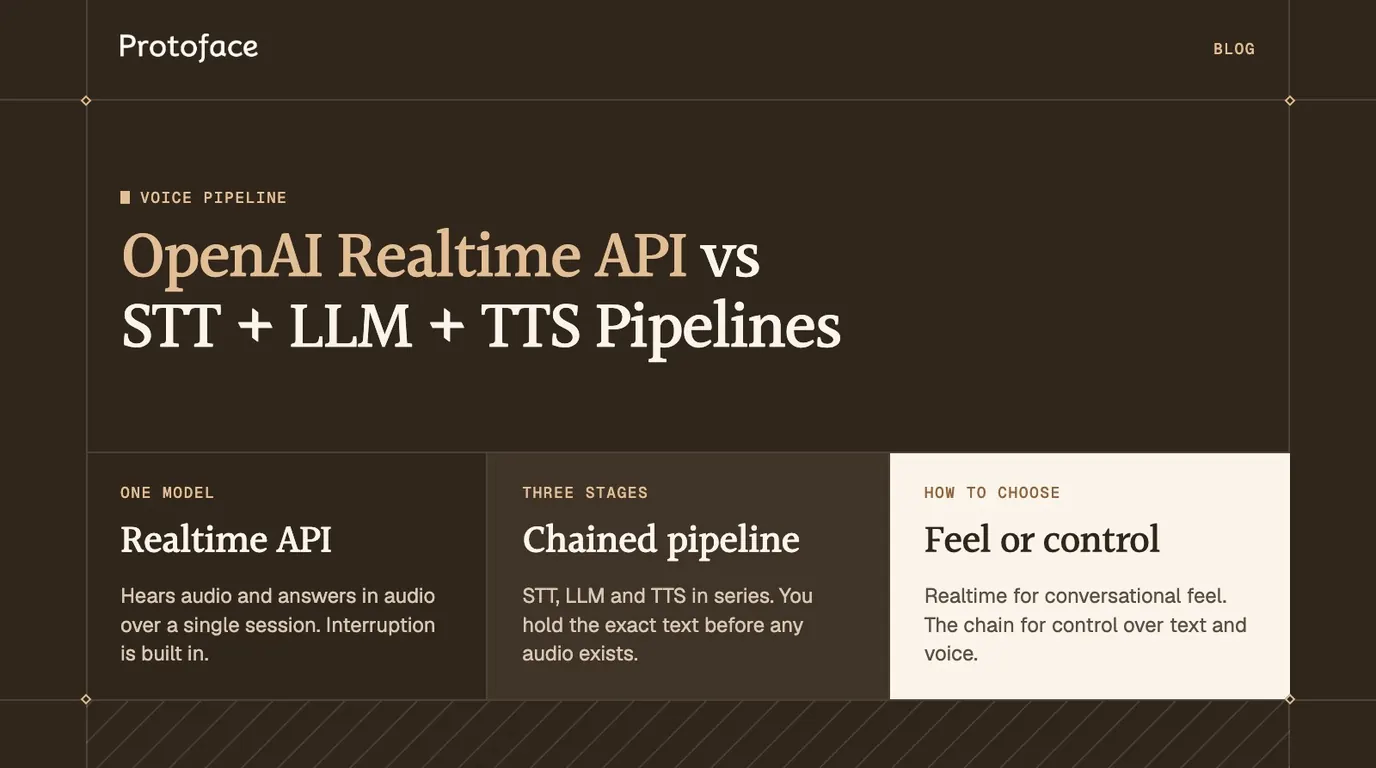
The OpenAI Realtime API is a speech-to-speech interface: one model hears audio, keeps the conversation state, calls tools and answers in audio over a single WebRTC or WebSocket session. A chained STT, LLM and TTS pipeline splits that work into three stages you control. Choose Realtime for conversational feel, and the chain for control over text and voice.
What the OpenAI Realtime API does
It runs a whole voice turn inside one model and one connection. OpenAI's Realtime API guide describes a model that works directly with audio, maintains conversation state and can call tools, and recommends it for agents that need barge-in, low first-audio latency and natural turn taking.
Model. The current guides use
gpt-realtime-2.1. Check the guide before you pin a name.Connection. WebRTC from a browser or mobile app, WebSocket from a server, SIP for telephony. Browser clients authenticate with a short-lived client secret your server mints, so the API key stays on the server.
Session. You send JSON events and receive JSON events. One
session.updateevent sets instructions, voice, audio formats, turn detection and tools.Tools. Function calls and remote MCP servers are configured on the session, and the model decides when to call them mid-conversation.
Limits. The Realtime conversations guide caps a session at 60 minutes, so long-running agents need a reconnect path.
Does the Realtime API convert speech to text first or work on audio directly?
It works on audio directly. The conversations guide describes voice-to-voice interaction without an intermediate text-to-speech or speech-to-text step, which lowers latency and lets the model hear tone and inflection. A transcript of the user's speech is optional. You enable input transcription, and a separate transcription model produces it asynchronously. Treat it as a guide to what was said, not as exactly what the model heard.
How a chained STT, LLM and TTS pipeline differs
A chained pipeline puts text between three separate services, and your code owns every handoff. OpenAI's voice agents guide recommends this path when you want to inspect or transform text between speech recognition, the agent and speech generation, or replace a stage independently.
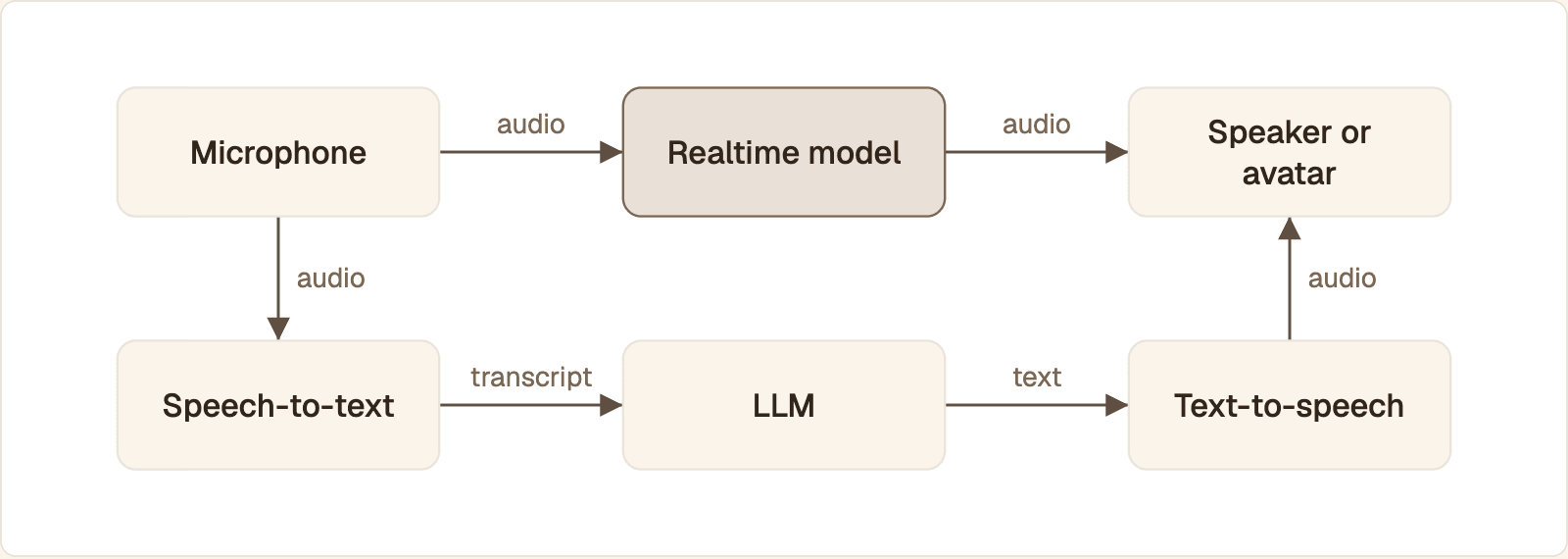
Top row: one model takes audio in and sends audio out. Bottom row: three services with text between them, and your code owns each handoff.
Speech-to-speech. Microphone audio goes to the Realtime model. The model detects the end of the turn, reasons, calls tools and streams audio back. Your code forwards that audio to the speaker or the avatar.
Chained. Microphone audio goes to speech-to-text, which returns a transcript. Your code detects the end of the turn and sends the transcript to an LLM. The LLM streams text. Your code passes that text to text-to-speech, which streams audio to the speaker or the avatar.
Every handoff in the second path is a place to log, filter or swap a vendor. It is also a network hop and a buffer.
Streaming TTS or chunked TTS
Stream it. Streaming TTS returns audio while the sentence is still being synthesized, so the first sound arrives early. Chunked TTS waits for a complete file per reply, which is simpler to retry but adds a full synthesis wait to every turn. A workable middle: split the LLM's token stream at sentence boundaries and send each sentence to a streaming TTS call.
Cloud TTS or on-device audio
A Unity build or a kiosk can synthesize speech on the device. That removes a network hop but costs voice quality and device load. For a server-rendered avatar it rarely helps, because the audio has to reach the avatar service anyway.
A managed orchestrator or your own chain
Platforms such as Vapi run the chain for you and let you pick the STT, LLM and TTS providers in one agent config. The article on setting up multiple Vapi voices for a realtime avatar covers that route.
OpenAI Realtime API vs a chained pipeline: decision table
Realtime wins on response feel and on how little you have to build. The chain wins wherever you need to see, change or own a stage.
Factor | Realtime API | Chained STT, LLM, TTS |
|---|---|---|
Latency | One model, one hop, audio streams as it is generated | Three services in series; every stage must stream to stay conversational |
Voice choice | OpenAI's realtime voices, fixed once the session has spoken | Any TTS vendor and voice, changeable per sentence |
Control over the words | Shaped by instructions; you read the transcript as or after it is spoken | You hold the exact text before any audio exists |
Interruption | Built in: server or semantic VAD cancels the response | You build VAD, cancellation and buffer flushing |
Languages | Whatever the one model handles, steered by instructions | Pick STT and TTS per language and route between them |
Cost model | Audio and text tokens for the whole conversation, per response | Three separate meters, one per vendor |
On cost, OpenAI's Realtime cost guide explains that the entire conversation is sent to the model for each response, so later turns consume more input tokens than early ones, and that prompt caching applies automatically. Current rates sit on OpenAI's model pages. A chain is billed in each vendor's own unit, so compare the two on your real average call length.
Latency: where each approach spends time
Speech-to-speech spends its time in two places: waiting to be sure the user has finished, and generating the first audio. A chain adds a final transcript, an LLM first-token wait and a TTS first-byte wait in series. The avatar adds one more stage to both.
Stage | Realtime API | Chained pipeline |
|---|---|---|
End of turn | VAD silence window or semantic check | Your VAD or the STT vendor's endpointing |
Understanding | Inside the model | Final transcript from STT |
Reasoning | Inside the model, plus tool calls | LLM time to first token, plus tool calls |
Speech | First audio delta | TTS time to first byte |
Face | First avatar frame for that audio | First avatar frame for that audio |
No published figure will match your model, region, prompt length and tools, so measure the stages on your own calls. For a Realtime session over WebSocket, two server events bracket the model's share:
The listener prints the time from the API deciding the user stopped to the first audio chunk of the reply. With server VAD that decision comes only after the silence window, so add your silence_duration_ms to get what the user actually waited. In a chain, record four marks per turn instead: end of speech, final transcript, first LLM token, first TTS byte. The largest gap is the stage to fix.
The voice agents guide gives the method for comparing runs: keep the caller, recording, model, prompt and transport fixed, change one factor at a time, and compare the median and the 95th percentile across similar calls. The guide to instrumenting a voice and avatar app with OpenTelemetry shows how to carry one trace from microphone to first frame. The same marks work as Prometheus histograms on a Grafana dashboard if you prefer metrics.
Session start is its own budget
The first reply is slow for a different reason: nothing is connected yet. Open the model session, the media room and the avatar session concurrently. A Protoface session moves through queued, starting and running, and first_frame_at on the session records when the first frame reached the room. Subtract created_at from it to get your avatar startup time.
Voice choice and control over the output
Speech-to-speech ties the voice to the model. A chain lets you put any voice on any text, and read that text first.
The Realtime conversations guide lists ten built-in voices: alloy, ash, ballad, coral, echo, sage, shimmer, verse, marin and cedar. Once the model has produced audio in a session, the voice cannot be changed for that session. OpenAI's custom voices guide adds one exception to the fixed list: eligible customers can create a voice from a consent recording and a sample, then pass its ID to a Realtime session. That guide names gpt-realtime-2 for Realtime use, so check your model first. A voice from another vendor cannot be plugged in.
In a chain, the voice is a parameter on a TTS request. OpenAI's own text-to-speech guide lists 13 built-in voices, a slightly different set from the realtime one, and you can swap the whole stage for another provider without touching the rest.
Reading the text before it is spoken
A chain hands you the reply as a string. You can block a claim, fix a pronunciation or redact a number, and only then synthesize. With Realtime, the audio and its transcript stream together, so a transcript check runs while the user is already hearing the words. The closest Realtime equivalent is to keep VAD on but set create_response and interrupt_response to false, validate the user's turn in your own code, then send response.create yourself. That guards the input, not the output.
Choosing a TTS vendor for a chain
Whether you are weighing PlayHT against ElevenLabs or any other pair, compare them on four things: time to first audio byte on a streaming request from your region, whether a request can be canceled mid-sentence, the raw PCM formats offered, and voice coverage for your languages.
Voices across languages
A chain can route each reply to a voice built for its language: see English, Spanish and French voices in a Pipecat avatar pipeline. Users who switch language mid-sentence are harder for both designs; handling code-switching in voice agents covers the choices involved.
What the model sets and what the avatar sets
Voice and persona belong to the voice pipeline. Looks belong to the avatar. The Realtime session's instructions and voice decide what is said and how it sounds. The face comes from the avatar_id you pass when the avatar session starts: a stock avatar or one built from a portrait you upload. The model cannot change the face. Hosted Protoface embeds work differently: Protoface hosts the conversation, and voice and instructions live on the avatar.
Turn detection and interruption in each design
The Realtime API detects turns and cancels interrupted responses for you. In a chain, each of those is code you write.
OpenAI's voice activity detection guide documents the two built-in modes. server_vad, the default, ends a turn after a period of silence and is tuned with threshold, prefix_padding_ms and silence_duration_ms. semantic_vad uses a classifier that scores whether the user has finished the thought, so a trailing "and then, um" waits longer than a clear statement. Its eagerness setting accepts low, medium, high or auto.
That event switches the session to semantic VAD and makes it wait longer before taking the turn. For push-to-talk, set turn_detection to null, then send input_audio_buffer.commit and response.create when the user releases the button.
What happens when the user interrupts
With VAD on, the API detects the user's speech, cancels the response in progress and starts a new one. What is left to you depends on the connection. Over WebRTC and SIP the server manages the output buffer and truncates the unplayed audio itself. Over WebSocket your code owns playback, so on input_audio_buffer.speech_started you stop playback and send conversation.item.truncate with the milliseconds actually played. Skip that step and the model believes the user heard a sentence they never did.
In a chain you build all of it: a VAD on the incoming audio, a rule for what counts as a real interruption, cancellation of the LLM stream and the TTS request, and a flush of every buffer between the TTS and the listener. An avatar is one of those buffers. The article on voice activity detection and barge-in handling walks through thresholds, false triggers and the flush order.
Connecting either approach to a realtime avatar in Node.js
The avatar sits at the end of both designs and consumes the same thing: the agent's output audio. Produce 24 kHz PCM from either path, publish it into a LiveKit room, and start a Protoface session that reads that track.
Realtime API: audio out of one WebSocket
The function opens a server-side session, sets the persona and voice, and returns a sender you call with each chunk of microphone audio once the socket is open. Reply audio arrives as base64 PCM in response.output_audio.delta events and is passed to onAudio. onInterrupt fires when the user starts speaking, which is your cue to stop publishing and truncate.
Chained pipeline: three calls per turn
One call transcribes a finished user turn, one generates the reply as text, and one streams speech. The pcm response format is raw 24 kHz 16-bit audio, the same shape the Realtime sample emits, so both paths feed the same publisher. The sample waits for the full reply before synthesis to stay short. In production, stream the LLM output sentence by sentence into TTS.
Starting the avatar on that audio
The request asks Protoface to join your LiveKit room and render the stock avatar from one participant's audio track. workerToken is a short-lived room token you mint with your LiveKit credentials, so your LiveKit secret never leaves your server. The response returns with status set to queued, and GET /v1/sessions/{id} reports progress. Your agent then joins the same room under agentIdentity and publishes the PCM from onAudio as an audio track. Protoface converts track input to 16 kHz mono itself, so you do not resample. Protoface publishes the avatar's video and audio as its own tracks in that room. Have the user's app play those, not the agent's raw audio, or the user hears every reply twice.
Clear the avatar on barge-in. In track mode, stop or clear your audio publisher first, then call the lk.clear_buffer RPC so the avatar drops the speech it has not rendered yet. Otherwise the face keeps talking after the voice pipeline has stopped.
Shorter routes if you use an agent framework
Your stack | Package | Where the avatar goes |
|---|---|---|
LiveKit Agents (Python) |
| Start |
Pipecat, chained (Python) |
| After TTS, before |
Pipecat, speech-to-speech |
| After the realtime model, before the output transport |
Your own Node.js server | REST API |
|
The Pipecat service buffers speech produced before the avatar is live and then streams it, so the first words are not lost. For a complete OpenAI example, the Protoface integration for OpenAI Realtime links a starter project you clone, add keys to and run. Mobile clients, including Flutter apps, follow the same split: session creation and every API key stay on your server, and the app only joins the room and renders its tracks.
Which approach to choose for your use case
Start from what would hurt most if it went wrong: a slow reply, a wrong word or the wrong voice.
Use case | Choose | Why |
|---|---|---|
Customer support with tool calls | Realtime API | Interruptions and tool use are handled in the session; short replies keep token use low |
Regulated or scripted answers | Chained | You approve the exact text before it is spoken and store it as the record |
Branded voice from a specific TTS vendor | Chained | Realtime accepts only OpenAI's built-in or custom voices |
Language learning | Realtime API, or chained for per-language voices | The model hears tone and inflection directly; a chain lets you pin a native voice per language |
An existing text agent you already trust | Chained | Keep the agent, add STT in front and TTS behind |
The two can share a product. You can run Realtime for the open conversation and route specific turns, such as a legal disclosure, through fixed text and TTS.
Decide with a measurement, not a guess. Build both paths behind the same onAudio callback, replay the same recorded user turns through each, and compare first-audio time and answer quality.
Common questions
How much does the OpenAI Realtime API cost compared with separate STT, LLM and TTS?
The Realtime API bills audio and text tokens per response and resends the whole conversation each turn, so long calls cost more per turn than short ones. A chain bills three vendors in their own units. OpenAI's Realtime cost guide explains the accounting and points to current rates; compare both on your real average call.
Can I use the OpenAI Realtime API from Python as well as Node.js?
Yes. It is a WebSocket and WebRTC protocol of JSON events, so any language with a WebSocket client works, and OpenAI's WebSocket guide shows Python next to Node.js. Agent frameworks such as LiveKit Agents and Pipecat wrap the session for you in Python.
Is the Azure OpenAI Realtime API the same as OpenAI's?
It serves the same realtime models with the same event model over WebRTC, WebSocket and SIP. The differences are operational: per Microsoft's Realtime API documentation, you call your own Azure resource on an /openai/v1 endpoint, address a model by its deployment name, and can authenticate with Microsoft Entra ID.
Can I use my own voice with the OpenAI Realtime API?
Only through OpenAI's custom voices, which are limited to eligible customers and need a consent recording plus a matching sample. Otherwise you choose from the built-in realtime voices. To use a voice from another TTS vendor, run a chained pipeline.
Should I connect to the Realtime API over WebRTC or WebSocket?
Use WebRTC when the other end is a user's browser or phone: OpenAI recommends it over WebSocket for client devices because performance is more consistent. Use WebSocket when your server holds the session, for example when it forwards the audio to an avatar or a phone bridge.
Put a face on the voice pipeline you chose
Speech-to-speech or chained, Protoface Realtime turns your agent's audio into a live, lip-synced avatar. Start from the OpenAI Realtime starter.