Vapi voices are the text-to-speech options you set on an assistant's voice property. You can pick one of Vapi's own curated voices, such as the default Elliot, or a voice from a supported provider such as ElevenLabs, Cartesia or Deepgram. Each assistant has one voice, so several voices means several assistants.
What Vapi Voices are and which voices you can use
"Vapi Voices" is Vapi's own short, curated set of voices, selected with "provider": "vapi". Every other voice comes from a third-party text-to-speech provider that Vapi supports, selected with that provider's string and a voice ID.
Vapi's Vapi Voices reference listed 22 active voiceId values when this was written. The list changes: eight older voices were retired earlier in 2026, so read the live table before you hard-code a name.
Group | Voice IDs | Languages |
|---|---|---|
Version 2 supported | Clara, Elliot, Emma, Godfrey, Kai, Layla, Naina, Neil, Nico, Sagar, Savannah, Sid | 40+, detected automatically by default |
Version 1 only | Dan, Gustavo, Jess, Leah, Leo, Mia, Rohan, Tara, Zac, Zoe | 30+, set with a language code |
The accent in Vapi's table (American, British, Canadian, Indian American, Latin American) describes the voice's character. It does not limit the language the voice can speak.
What changed in Vapi Voices V2
Version 2 is a newer text-to-speech model behind the same voice names. Vapi describes it as more realistic and consistent, and it adds automatic language detection. It is opt-in per assistant: an existing assistant keeps its current behavior until you add "version": 2 to its voice.
Voices from other providers
Vapi's voice provider list gives the exact string to pass in voice.provider. Besides vapi, it lists Azure, Cartesia, Deepgram, ElevenLabs (11labs), Hume, Inworld, LMNT, MiniMax, Neuphonic, OpenAI, Rime AI, Smallest AI, WellSaid and xAI.
The voice is one of three parts in a Vapi assistant: a transcriber, a model and a voice. If you are still deciding between that chain and a single speech model, read the comparison of the OpenAI Realtime API and STT, LLM and TTS pipelines first, because it changes where the voice is chosen.
How to choose a Vapi voice
Choose by constraint, in this order: the languages your users speak, whether the voice has to be yours, then tone. Compare latency and cost last, on your own calls, because both depend on the provider and model behind the voice.
Your situation | Voice to start with | Why |
|---|---|---|
English support or booking agent, shipping soon | A Version 2 Vapi voice, such as Clara or Kai | Vapi lists Clara as natural and professional, and Kai as natural and helpful |
Users who may speak any of several languages | Any Version 2 Vapi voice with | The voice detects and speaks the conversation's language |
One fixed language that is not English | A Version 2 Vapi voice with a code such as | Holds one language instead of detecting it on each call |
A brand voice or a cloned voice | A custom voice from your provider, for example | Vapi's own set is fixed. Your voice lives in the provider account |
A specific character, such as deep or soothing | A Version 1 voice, such as Leo or Zoe | Those traits are on Version 1 only voices, so set the language code yourself |
An avatar with a visible face | A voice whose gender and age fit the portrait | A mismatch between face and voice is the first thing a viewer notices |
Measure latency and cost on your own calls
Vapi publishes current rates on its pricing page, and the dashboard keeps a log of every completed call. For latency, place the same scripted test call with each candidate voice and time the gap between the end of your sentence and the first audible syllable of the reply.
Setting the voice in an assistant configuration
Set voice.provider and voice.voiceId on the assistant. For a Vapi voice, add version and, if you need it, language.
The request updates a saved assistant to the Savannah voice on the Version 2 model with automatic language detection. Leave language out and Version 2 behaves the same way. Replace auto with a code such as es to hold one language.
A custom voice from another provider
Vapi's Custom voices page is short because the shape is the same: the provider string plus the ID of your voice in that provider's account. ElevenLabs has one extra step in Vapi's setup guide: save your ElevenLabs API key under Integrations in the Vapi dashboard, and the voice library syncs. Use a key without endpoint restrictions, or a cloned voice may not appear.
The fallbackPlan is optional and worth adding. Vapi's voice fallback documentation says a call ends with an error if the voice provider fails and no fallback is configured. With a plan, Vapi moves through your list in order. Pick a fallback that sounds close to the primary, because a fallback is also a voice change in the middle of a call.
Using several voices in one deployment
Give each role its own assistant with its own voice, then group the assistants in a squad so one call can pass between them. One assistant cannot hold two voices at once.
Three patterns cover most deployments:
Per role. A greeter, a support agent and a sales agent each get a fixed voice.
Per tenant. One saved assistant, with a different voice applied for each customer through
assistantOverrideswhen the call starts.Per language. One Version 2 voice with automatic detection. No second voice is needed.
Vapi's squads documentation defines a squad as a list of members, where the first member starts the call and a handoff tool names the assistants it can pass the call to. The squad object goes in the request that starts the call.
The call opens with the Greeter in the Savannah voice. When the model decides the destination's description matches, it calls the handoff tool and the Billing assistant continues in the Kai voice. Each assistant also needs its own system prompt, left out to keep the sample short. Tell the Greeter in that prompt when to hand off, because a handoff that never fires is usually a prompt problem.
The same page documents the reverse case. assistantOverrides on a member changes one saved assistant's voice for that squad only, and memberOverrides on the squad forces one voice onto every member.
Switching voice or language during a conversation
A language change needs no switch: a Version 2 Vapi voice with language set to auto follows the speaker. A change of voice is a handoff to another assistant, either triggered by the model through the handoff tool or pushed by your server.
Switch from your server with Live Call Control
A call started through Vapi's /call endpoint returns a monitor object with a controlUrl. Vapi's Live Call Control reference lists the messages that URL accepts: say, add-message, control, end-call, transfer and handoff. None of them edits the voice of the assistant that is already speaking, so use handoff. Assistants on GPT-Live accept only a subset of these messages.
Set CONTROL_URL to the call's monitor.controlUrl. The request hands the live call to an assistant defined inline, with the Kai voice, and content carries the line for the handoff. Add a model and prompt to the inline assistant the same way you would in a squad member.
What to check before you rely on it
The seam. Listen for which voice speaks the handoff line and how long the silence is before the new voice starts. With the handoff tool, Vapi says a short filler such as "One moment" unless you set a
request-startmessage.Context. By default the whole conversation history goes to the next assistant. Set
contextEngineeringPlanon the destination to send less. Confirm the new assistant does not greet the user again.Interruptions. Talk over the handoff line. Speech should stop, and the new assistant should answer what you said.
Language. Automatic detection covers the voice. The transcriber must detect languages too, and Vapi advises listing the supported languages in the system prompt.
Frequency. Switch at a clear boundary, such as a new topic or a new role. A voice that changes every few turns reads as a fault.
The article on code-switching in voice agents covers speakers who change language inside one sentence. If you build on Pipecat instead of Vapi, see the walkthrough for Pipecat multilingual voices in English, Spanish and French.
Connecting a Vapi voice to a realtime AI avatar
The avatar does not need to know which voice is active. Protoface Realtime drives the face from the audio your agent already produces, so the face follows whichever Vapi voice is speaking, before and after a handoff. The Protoface docs say Realtime works across languages.
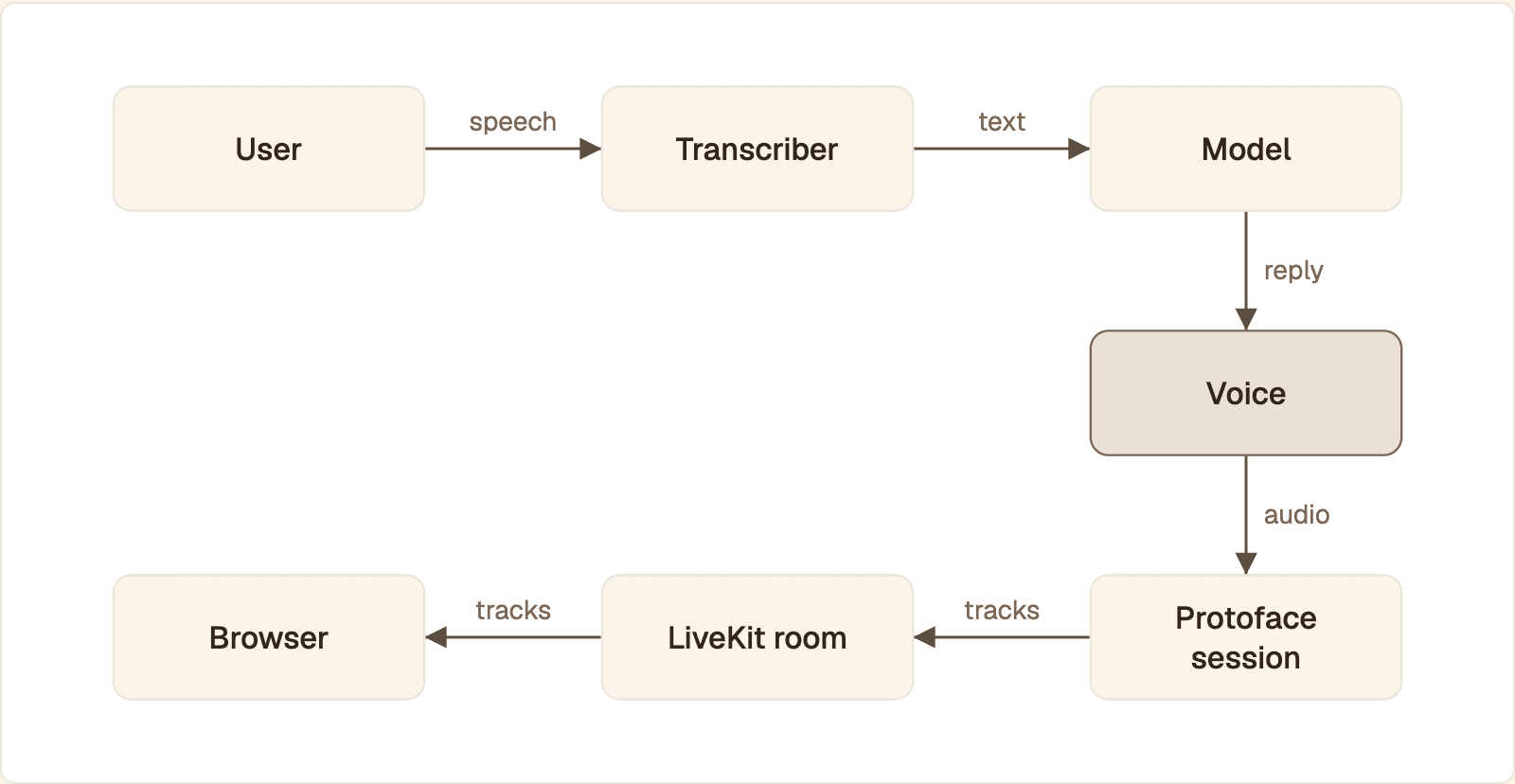
The voice is the only step a voice change touches. Its audio drives the Protoface session, which publishes the avatar's video and audio to your LiveKit room.
The flow from microphone to face:
The user speaks. Vapi's transcriber turns the speech into text.
The model writes the reply.
The assistant's voice turns the reply into audio. This is the only step a voice change touches.
That audio goes to a Protoface session.
Protoface joins your LiveKit room and publishes a
protoface-avatarvideo track and aprotoface-avatar-audiotrack.The browser plays the two tracks together.
Play the avatar's audio track with its video, and keep it the only copy of the assistant's speech the user hears. Two copies of the same sentence, slightly out of step, sound like an echo.
Start from the Vapi starter
Protoface publishes a runnable project for this pairing. Clone the Protoface Vapi starter on GitHub, add your Protoface, LiveKit and Vapi keys to the environment file, and run it. The Protoface integration for Vapi describes the result: your Vapi assistant speaks through a realtime avatar.
The session behind it
Outside a plugin, an avatar session is one request from your server. The body names an avatar and a transport. It has no voice field, because the voice stays on the Vapi assistant.
The request asks Protoface to join the LiveKit room demo-room with the stock avatar. You own the room and mint worker_token yourself, so your LiveKit API secret never leaves your server. The response comes back with status: queued. Poll GET /v1/sessions/{id} until its status is running.
What a voice switch means for the avatar
One avatar per session. Every realtime session runs one avatar. Two voices on one session means one face speaking in two voices. If each role should have its own face, that takes a session per avatar, and a custom avatar must reach
status: "ready"before a session accepts it.Idle timeout. A session ends after
idle_timeout_secondswithout received audio. The default is 30 and the maximum is 600. In LiveKit track mode, every received audio frame resets the timer, silence included. In other modes, compare the gap around your handoff against that value.Keep the session for the whole call. Sessions count against your plan's concurrency cap, and when no worker is free the API returns a 503 with a
Retry-Afterheader. Creating a new session at each voice change adds a wait and a way to fail.Keys stay on the server. Create the session from your backend. The Protoface API key does not belong in the browser.
Test the switch with the face on. Run three calls with the avatar visible: a plain back and forth, an interruption during a long answer, and a handoff between two voices. Watch the mouth at the moment the voice changes.
Common questions
How much does Vapi cost per minute?
It depends on the transcriber, model and voice you choose, because provider costs are added to Vapi's own platform fee. Rates change, so read Vapi's pricing page for current figures.
What does VAPI stand for?
Vapi's documentation does not spell the name out. It is commonly read as short for voice API, which matches what the product is: a developer platform for building voice AI agents.
Are Vapi voices free to use?
Not beyond the free credits a new account starts with. Vapi bills calls by usage, and the voice is one of the billed parts. Vapi says Version 2 voices cost less than the original model, and Vapi's pricing page has current figures.
Where can I find the full list of Vapi voices?
The Vapi Voices reference has the active voice IDs with gender, accent and sample recordings. The Voice Library in the Vapi dashboard lists every voice available to your organization, across all providers.
Can I use an ElevenLabs or other custom voice in Vapi?
Yes. Set voice.provider to the provider's string, 11labs for ElevenLabs, and voice.voiceId to your voice's ID, as the Custom voices page shows. For ElevenLabs, save your API key under Integrations in the Vapi dashboard first.
Can one Vapi assistant use more than one voice?
Not at the same time. An assistant has one voice plus optional fallback voices that take over only when the provider fails. For a second speaking voice, add a second assistant and hand the call off to it.
Put a face on your Vapi assistant
Keep the voices you chose. Protoface Realtime turns your Vapi assistant's speech into a live avatar that follows whichever voice is active.