An AI NPC is a non-player character whose lines or behavior are generated by an AI model while you play, so it can answer things no writer scripted. To build one, turn the player's speech into text, send it to a language model with a character sheet and the current game state, then speak and animate the reply.
What an AI NPC is
An AI NPC is a game character whose dialogue or behavior is produced by an AI model at play time. A scripted NPC picks from lines a writer recorded in advance; an AI NPC composes a new reply to whatever the player says.
The term covers two things:
Conversation. The character talks: it hears or reads the player, and answers in its own voice.
Behavior. The character decides what to do: follow, trade, attack, open a door. The model picks from actions your game supports.
How AI NPCs work
Every AI NPC runs the same loop: capture what the player said, add what the character knows, generate a reply, then voice and animate it.
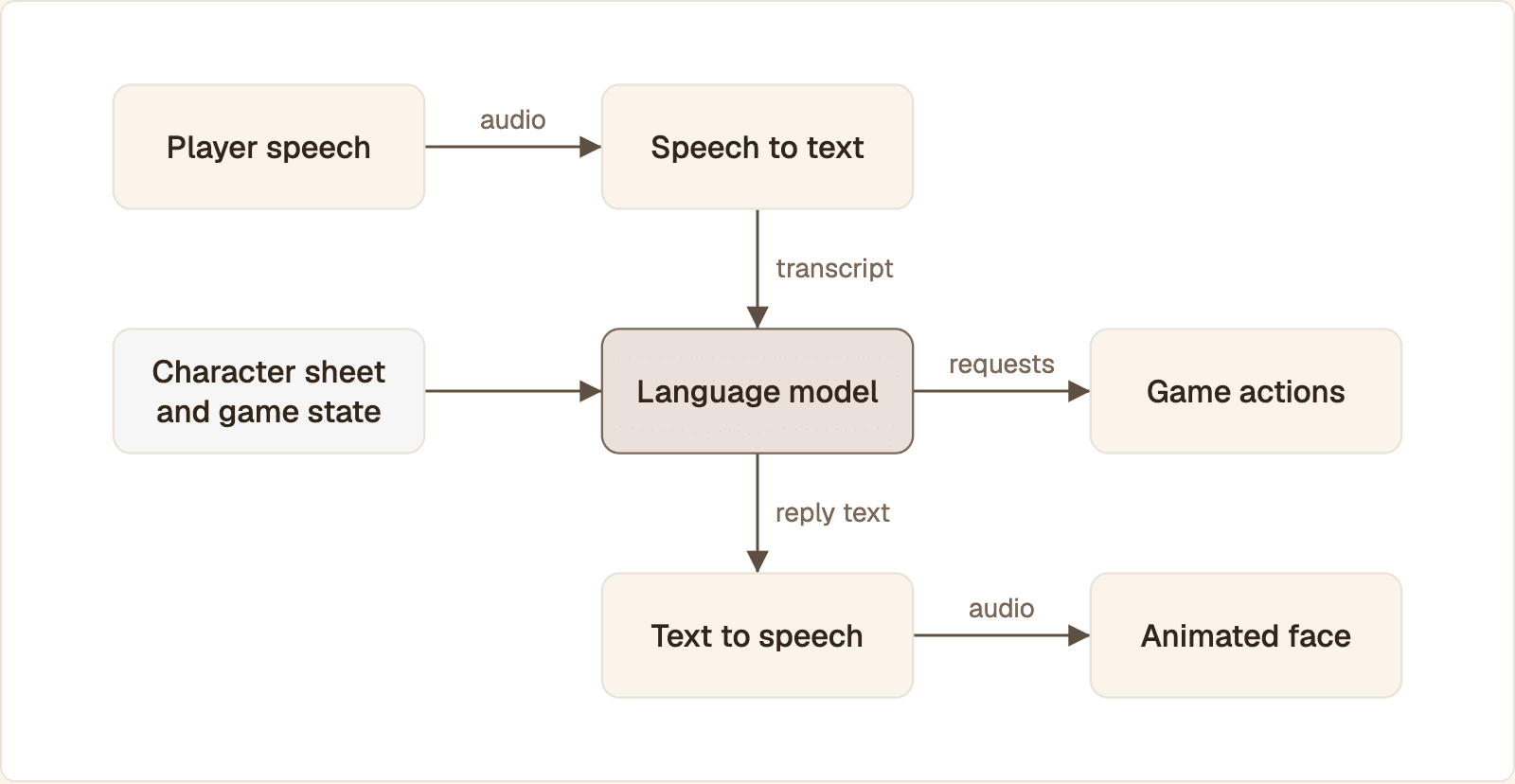
The language model sits in the middle. It reads the transcript with the character sheet and game state, then sends words to the voice and action requests to your game code.
Player input. A typed line, a push-to-talk recording or an open microphone.
Speech to text. The audio becomes a transcript. A speech-to-speech model replaces steps 2 to 4.
Language model. The transcript goes in with a character sheet, recent conversation and a snapshot of game state. Text and requested game actions come out.
Text to speech. The reply is synthesized in the character's voice and streamed as it is produced.
Animation. The audio drives the mouth and face, on a 3D rig in the engine or as a video of a talking face.
Game actions. Your code validates the actions and applies them: hand over the item, set the quest flag, open the gate.
Steps 2 to 4 belong on a server, because that is where the model keys live. If your character lives in a web page, the walkthrough on adding a realtime AI avatar to a React or Angular app covers the front end around this loop.
AI NPC games and mods you can try
Fortnite creators can build AI NPCs in Epic's editor, and community mods add them to Skyrim, Fallout 4 and Minecraft.
Fortnite (UEFN). Epic's LLM conversations documentation describes a creator feature, tagged experimental: you write a persona prompt, and players speak to the character over voice chat. Epic states that Gemini 3.1 Flash-Lite processes the audio and writes the reply, and ElevenLabs' Eleven v3 voices it.
Skyrim and Fallout 4. Mantella is a mod that lets you speak to NPCs through a speech-to-text, language model and text-to-speech chain. Its repository lists Moonshine or Whisper for recognition and Piper, xVASynth or XTTS for voices.
Minecraft. CreatureChat is a mod for chatting with any mob. Its README says creatures make decisions on their own and can follow, flee, attack or protect. It runs on a local model, with Ollama behind a LiteLLM proxy, or on your own API key from a provider such as OpenAI.
How to build an AI NPC
Build the text loop first, add a voice second and a face last.
1. Write the character and the server call
The server holds the character sheet and calls the model. This Python function uses the tool format from OpenAI's function calling guide.
The function returns the spoken line and a list of requested actions. Set NPC_MODEL to a model you have access to. When the model only calls a tool, output_text is empty, so give the character a fallback line.
2. Listen and speak in the browser
Expose npc_turn at a route such as /npc that returns { reply, actions }. The browser's Web Speech API is enough for a prototype that listens and talks:
A click on #talk records one utterance, posts it and reads the reply aloud. Not every browser has speech recognition, so the code falls back to a text field with the id line. applyAction is the handler that checks each action against game data.
3. Move to streaming voice
The prototype waits for the whole reply before it speaks. For a real conversation, run the character as a voice agent on a framework such as LiveKit Agents or Pipecat, which streams speech both ways. Your character sheet and tools carry over.
4. Add the face
Protoface Realtime turns the audio your agent already produces into live avatar video. In a LiveKit agent it is two lines before the agent session starts:
The plugin, installed with pip install livekit-plugins-protoface, joins the avatar to your room as a participant that publishes audio and video. av_stock_001 is the stock avatar. For your own character, upload a portrait to POST /v1/avatars and wait for status: "ready".
Connect the NPC to game state
Pass world facts into the prompt on every turn, and let the model change the world only through actions your code checks.
Send a small snapshot, not the save file
The model needs only what this character would know right now:
Rebuild this object from game data each turn. Keep the last few exchanges as history and fold older ones into summary, so the prompt does not grow with play time.
Treat every action as a request
The model will sometimes ask for an item that does not exist. Look each action up in a fixed table and check it against game data:
Unknown action names are ignored, and a known action still has to pass the game's own rule. In a multiplayer game, run this check on the server.
Keep an AI NPC in character
A character stays in character when the prompt tells it what it does not know, and when the game, not the model, is the source of truth.
Set knowledge limits. Say in the character sheet that this person knows only what is in
WORLD, and give it an in-world way to decline.Let facts come from data. Prices, quest steps and names go into the snapshot. A model asked to remember a price will eventually invent one.
Handle made-up answers. Rewards only move through validated actions, so the worst case is a wrong line, not a broken quest. Tell the character never to promise anything outside its tool list.
Add guardrails outside the prompt. Filter input and output on the server, as Epic does: its documentation describes safety layers and filters on top of the model.
Give the NPC a face: React, canvas, WebGL or streamed video
Pick the renderer by what the face is. A talking video needs a <video> element, a 2D portrait needs a canvas, and a rigged 3D head needs WebGL. React manages the interface around all three and should not run the frame loop.
Option | What it draws | Use it when |
|---|---|---|
React (DOM) | Dialogue box, subtitles, mic button, connection state | Always, for the UI. Keep per-frame animation out of component state |
Canvas 2D | A sprite or layered portrait with a few mouth shapes | The character is stylized 2D and you drive the mouth from timing data |
WebGL | A rigged 3D head with blend shapes, lit by your scene | The face must sit inside a 3D world and you have the art pipeline |
Streamed video | A finished talking face, rendered on a server | You want lip sync without building a rig or an animation system |
Canvas and WebGL faces animate from mouth-shape timing you produce yourself. The article on visemes and real-time lip sync for AI avatars explains how to get that timing from audio.
Streamed video and WebGL also combine. MDN's tutorial on animating textures in WebGL passes a <video> element straight to texImage2D() on each frame, so a streamed face can play on a surface inside your scene.
For a web game that needs one talking character and no agent code, a Protoface embed hosts the whole conversation. The <protoface-avatar> element dispatches a protoface-avatar:transcript event your page can read.
Unity and Unreal Engine: what changes
The server side stays the same. The engine work is putting audio and video on a surface in the scene and keeping API keys out of the build.
No engine SDK is listed. The Protoface docs list LiveKit, Pipecat and other voice platforms, a Python SDK and a browser client. They list no Unity or Unreal SDK, so receive the avatar through your media platform's engine client.
Unity
With the LiveKit plugin, the avatar is an ordinary room participant, so Unity only has to subscribe to its tracks. The LiveKit Unity SDK lists Windows, macOS, Linux, iOS, Android and WebGL, and its README shows a remote video track drawn onto a RawImage:
The README plays remote audio through an AudioSource on a new GameObject, which you can place at the NPC's position.
Unreal Engine
Unreal can animate a MetaHuman from speech, with a catch. Epic's audio driven animation documentation says generating animation through a Performance asset is an offline process, even with the Realtime Audio Solver, and that real-time animation comes from a MetaHuman Audio Live Link Source. Work out how your text-to-speech output reaches that source before you commit.
The other route is a streamed face on a video texture, as in Unity. Rendering in Unreal gives you your own lighting, rig and camera, and a GPU to run for every concurrent conversation if you render in the cloud. A streamed avatar removes that fleet and leaves you a video rectangle to place.
Godot, iOS and other clients
The same rule applies. The client receives the avatar as audio and video through the client your media platform offers for that engine or device. Check that one exists before you pick the platform.
FastAPI or Node.js for the backend
Use Python when the backend also runs the agent, because the Protoface LiveKit plugin and Pipecat plugin are Python packages. Use Node.js when the backend only mints room tokens and relays game events.
Many players, many NPCs
Each live conversation is its own session. Start it as the player approaches and end it when the player walks away. A Protoface session also ends after an idle timeout, 30 seconds without inbound audio by default, and each plan limits concurrent sessions and session length. Size those against peak simultaneous conversations, not player count.
Limits of AI NPCs today
Three things hold AI NPCs back: the pause before a reply, the cost of every spoken line, and players who doubt generated dialogue is worth having.
Response delay
The player waits for recognition, the model and the voice in sequence, plus the network each way. Measure it: log a timestamp when the player stops speaking and another when reply audio starts, then repeat on a slow connection. Streaming every stage, keeping replies short and connecting before the dialogue opens all shorten it. The breakdown of how to measure and reduce WebRTC latency covers the media leg.
Running cost at scale
A recorded line costs nothing to replay. A generated line is paid for every time. Estimate conversations per player per day, times average talk time, times the combined rate of your speech, model and avatar providers.
Player skepticism
In Aftermath's 2024 report on AI NPC demos from Nvidia, Convai and Inworld, CD Projekt Red's Pawel Sasko, quest director on Cyberpunk: Phantom Liberty, says "there is a visible gap between authored content" and what AI can provide. Give the character a job scripted lines cannot do, such as reacting to the player's own choices, and keep authored writing for the story.
Common questions
Which games have AI NPCs right now?
Fortnite creators can build talking characters with Epic's LLM conversations feature in UEFN. Skyrim and Fallout 4 have the Mantella mod and Minecraft has CreatureChat, both community mods that add generated dialogue.
Can I add AI NPCs to Skyrim or Minecraft with a mod?
Yes. Mantella adds spoken conversations with NPCs to Skyrim and Fallout 4, and CreatureChat lets you chat with any mob in Minecraft. Both need a language model, either hosted or on your own machine.
How do AI NPCs stay consistent with the game world?
The game sends a snapshot of current facts with every turn, and the character sheet tells the model it knows nothing outside that snapshot. Changes to the world go through actions the game validates, so a wrong line cannot break a quest.
Do players actually want AI NPCs?
Not all of them. In Aftermath's report on AI NPC demos, CD Projekt Red's Pawel Sasko describes a visible gap between authored and generated content. Use generated lines where a script cannot reach, and keep written ones for the plot.
Can an AI NPC run locally without a cloud model?
Yes. CreatureChat, for example, supports free local models through Ollama and a LiteLLM proxy. Its README warns that a local model needs a powerful GPU, and that GPU is shared with the game.
Give your NPC a face that talks
Run the character as a voice agent, then add Protoface Realtime to turn its audio into live, lip-synced avatar video.