
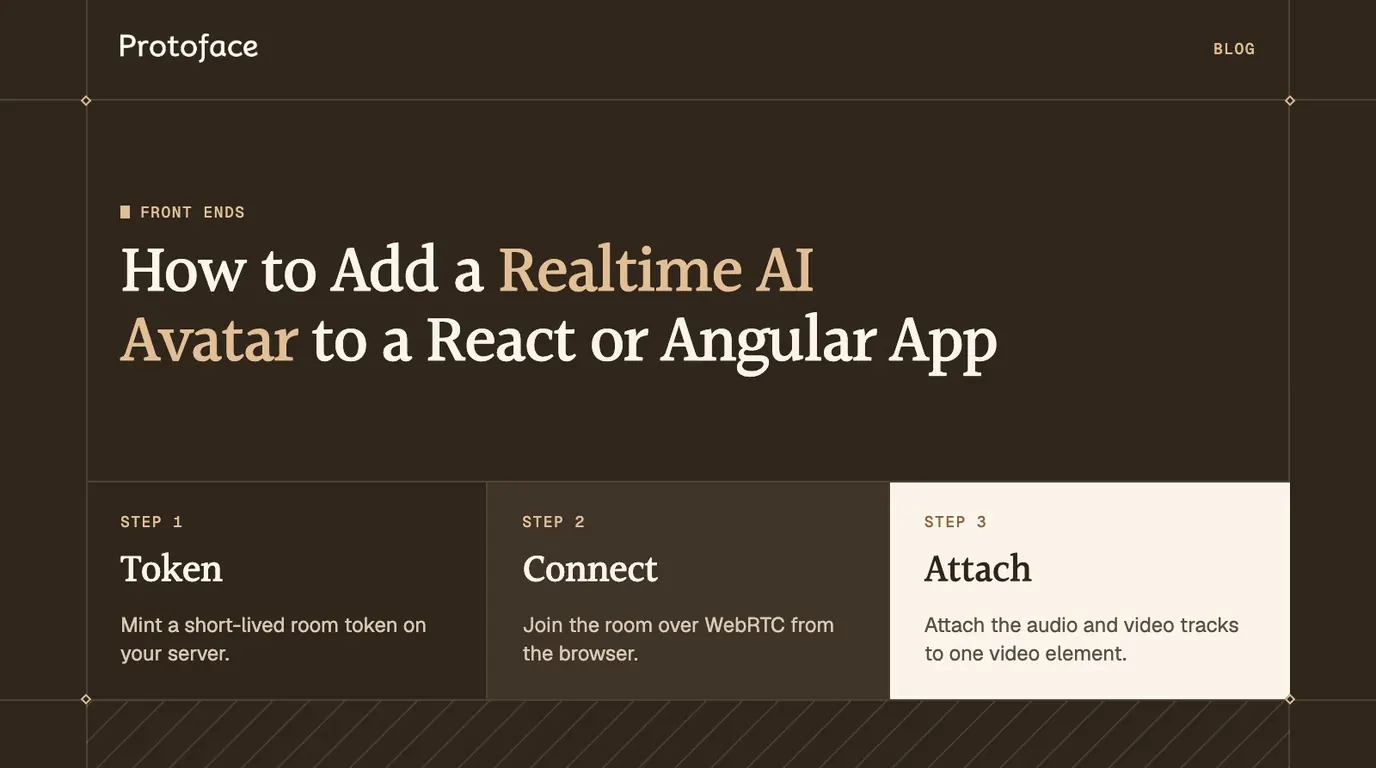
How to Add a Realtime AI Avatar to a React or Angular App

You have a voice agent and a front end. Give the agent a live face with one token endpoint, one hook or service, and one video element.

Michael Trehan

Founder, Protoface

Published

July 7, 2026

Updated

October 2, 2026

Cover showing the three steps to add a realtime AI avatar to a React or Angular app: token, connect, attach
On this page

To add a realtime AI avatar in React and Angular apps, mint a short-lived room token on your server, connect to the room over WebRTC from the browser, attach the avatar's audio and video tracks to one video element, and disconnect on unmount or destroy. Both frameworks use the same client SDK. Only the lifecycle code differs.

How to add a realtime AI avatar to a React or Angular app

The work is five steps, and four of them are identical in both frameworks. The avatar arrives as an ordinary WebRTC video track, so your component holds a connection and a <video> element, nothing more.

  1. Create the session on your server. Your agent process starts the avatar with your API key. A small endpoint hands the browser a short-lived token for one room.

  2. Connect over WebRTC in the client. On a button click, fetch the token, connect, and turn on the microphone.

  3. Attach the media. When the avatar's tracks arrive, attach them to a single <video> element.

  4. Handle state. Map connecting, live, speaking, reconnecting, ended and error to visible UI.

  5. Clean up. Disconnect when the component unmounts in React or is destroyed in Angular.

Embed or custom component: decide before you write code

A contained feature, such as a support widget or a landing page demo, may not need a component at all. Protoface embeds host the whole conversation: no agent to build and no API key on the page, only a public embed ID. Write your own connection code when you run your own voice agent.

Path

What you write

Pick it when

Share link

Nothing. Protoface hosts the page

You want to send someone a working avatar today

iframe embed

Two lines of HTML

Support widget, landing page, Webflow or any site without a build step

Custom UI with protoface-client

Your own layout, controls and transcript

You want your design, but not your own agent

Your agent in a LiveKit room

Agent, token endpoint, hook or service

You own the agent logic, tools and data

The embed code from the dashboard is the same in every framework:

<protoface-avatar embed-public-id="emb_..."></protoface-avatar>
<script src="https://app.protoface.com/embed-widget.js"

<protoface-avatar embed-public-id="emb_..."></protoface-avatar>
<script src="https://app.protoface.com/embed-widget.js"

<protoface-avatar embed-public-id="emb_..."></protoface-avatar>
<script src="https://app.protoface.com/embed-widget.js"

In React, drop the tag into JSX and load the script once. In Angular, add CUSTOM_ELEMENTS_SCHEMA to the component's schemas so the compiler accepts the unknown tag, and put the script tag in index.html. In Vue 3, mark the tag as a custom element with compilerOptions.isCustomElement.

The embed reports state through DOM events such as protoface-avatar:live, protoface-avatar:transcript and protoface-avatar:ended, but those events do not steer it. Voice and instructions live on the avatar, not on the page. The rest of the steps assume the fourth path: an agent you run, with the avatar added through one of the Protoface Realtime integrations.

How a realtime avatar session works in the browser

The browser never talks to the avatar service. It joins a media room, and the avatar joins the same room as another participant that publishes audio and video.
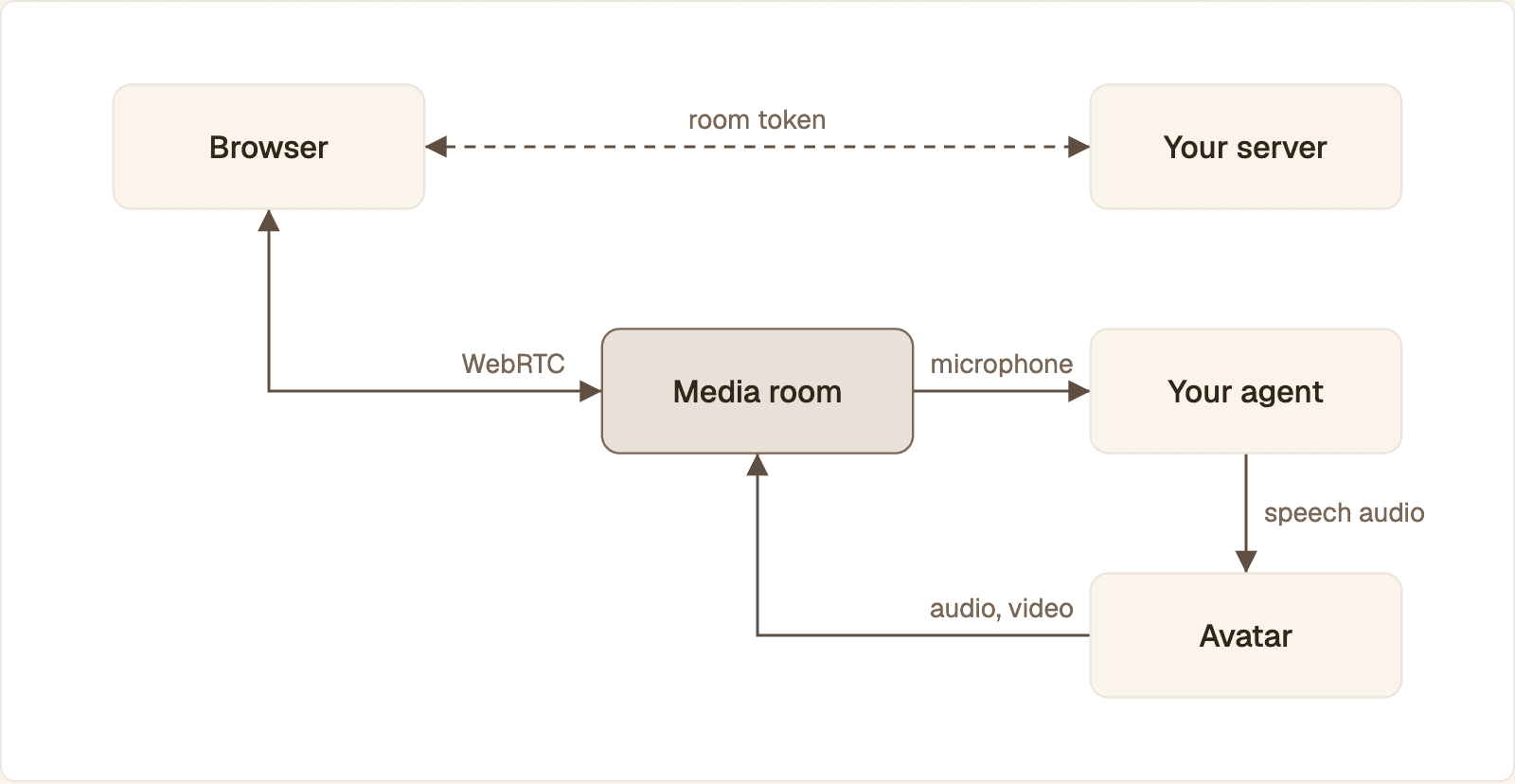
The browser gets a token from your server and joins a media room, where the agent and the avatar are also participants

Your server only hands out a room token. The browser, the agent and the avatar all meet in the room, and the avatar publishes the audio and video the browser plays.

  1. The user clicks your start button. The browser asks your server for a token.

  2. Your server checks the user, then signs a token that allows one identity into one room. It returns the token and the room URL.

  3. The browser connects to the room over WebRTC and publishes the microphone.

  4. Your agent is dispatched to the room. It starts an avatar session with your Protoface API key, which never leaves the agent process.

  5. The session moves through queued, starting and running. A participant named protoface-avatar-agent joins and publishes audio and video.

  6. The browser receives both tracks and attaches them to a <video> element.

  7. The agent listens to the microphone track, produces speech, and streams that audio to the avatar, which turns it into synchronized video.

  8. On disconnect, the browser leaves the room. The avatar session ends when the agent stops, when it is closed, after an idle period with no audio from the agent, or at your plan's duration cap.

Lip sync is not your job: the avatar publishes audio and video that are already synchronized. You only need mouth shapes in the client if you render your own 3D head, the case covered in visemes and real-time lip sync for avatars. The agent and the avatar are also separate participants: LiveKit's virtual avatar overview describes the avatar worker as a secondary participant publishing on the agent's behalf.

Create the session on your server

Two pieces run on the server: the agent that starts the avatar, and an endpoint that mints the browser's room token. Neither the Protoface API key nor the LiveKit API secret is ever sent to the client.

Start the avatar from the agent

With the LiveKit plugin, the avatar is two lines added before the agent session starts, plus one option on that session. The plugin reads PROTOFACE_API_KEY from the agent's environment.

from livekit.agents import room_io
from livekit.plugins import protoface

avatar = protoface.AvatarSession(avatar_id="av_stock_001")
await avatar.start(session, room=ctx.room)

await session.start(
    agent=agent,
    room=ctx.room,
    # Let Protoface publish the assistant audio.
    room_options=room_io.RoomOptions(audio_output=False),
)
from livekit.agents import room_io
from livekit.plugins import protoface

avatar = protoface.AvatarSession(avatar_id="av_stock_001")
await avatar.start(session, room=ctx.room)

await session.start(
    agent=agent,
    room=ctx.room,
    # Let Protoface publish the assistant audio.
    room_options=room_io.RoomOptions(audio_output=False),
)
from livekit.agents import room_io
from livekit.plugins import protoface

avatar = protoface.AvatarSession(avatar_id="av_stock_001")
await avatar.start(session, room=ctx.room)

await session.start(
    agent=agent,
    room=ctx.room,
    # Let Protoface publish the assistant audio.
    room_options=room_io.RoomOptions(audio_output=False),
)

avatar.start creates the session and joins the avatar to the room. Setting audio_output=False stops the agent from publishing its own audio, so the user hears the voice once, from the avatar participant. av_stock_001 is the stock avatar. Without the plugin, the same avatar ID goes to POST /v1/sessions together with a transport object that names the room and carries a worker token you mint.

How do I keep the API key out of the front end?

Give the browser a room token, never a key. A token is signed by your server, names one identity and one room, and expires. This Express endpoint uses the LiveKit server SDK, following LiveKit's token and grant reference:

import express from "express";
import { randomUUID } from "node:crypto";
import { AccessToken } from "livekit-server-sdk";

const app = express();

app.post("/api/avatar-token", async (req, res) => {
  // Check the visitor's login or your rate limit before minting anything.
  const at = new AccessToken(
    process.env.LIVEKIT_API_KEY,
    process.env.LIVEKIT_API_SECRET,
    { identity: `visitor-${randomUUID()}`, ttl: "10m" },
  );
  at.addGrant({ room: `avatar-${randomUUID()}`, roomJoin: true });
  res.json({ url: process.env.LIVEKIT_URL, token: await at.toJwt() });
});

app.listen(3000);
import express from "express";
import { randomUUID } from "node:crypto";
import { AccessToken } from "livekit-server-sdk";

const app = express();

app.post("/api/avatar-token", async (req, res) => {
  // Check the visitor's login or your rate limit before minting anything.
  const at = new AccessToken(
    process.env.LIVEKIT_API_KEY,
    process.env.LIVEKIT_API_SECRET,
    { identity: `visitor-${randomUUID()}`, ttl: "10m" },
  );
  at.addGrant({ room: `avatar-${randomUUID()}`, roomJoin: true });
  res.json({ url: process.env.LIVEKIT_URL, token: await at.toJwt() });
});

app.listen(3000);
import express from "express";
import { randomUUID } from "node:crypto";
import { AccessToken } from "livekit-server-sdk";

const app = express();

app.post("/api/avatar-token", async (req, res) => {
  // Check the visitor's login or your rate limit before minting anything.
  const at = new AccessToken(
    process.env.LIVEKIT_API_KEY,
    process.env.LIVEKIT_API_SECRET,
    { identity: `visitor-${randomUUID()}`, ttl: "10m" },
  );
  at.addGrant({ room: `avatar-${randomUUID()}`, roomJoin: true });
  res.json({ url: process.env.LIVEKIT_URL, token: await at.toJwt() });
});

app.listen(3000);

The endpoint grants roomJoin for one fresh room and returns the token with the room URL. LiveKit notes that the expiry applies to the initial connection, not to later reconnects, so a short lifetime does not cut off a long call. Put authentication and rate limiting in front of it: anyone who can call it can start a session on your account. The article on WebRTC encryption, token auth and safe embeds goes further into what to lock down.

Add the avatar to a React app

Put the connection in a custom hook, keep the room object in a ref, and keep only the status in state. The room is a long-lived imperative object, so it must not be recreated when the component re-renders.

import { useCallback, useEffect, useRef, useState } from "react";
import { Room, RoomEvent, Track } from "livekit-client";

export function useAvatarSession(tokenUrl: string) {
  const videoRef = useRef<HTMLVideoElement>(null);
  const roomRef = useRef<Room | null>(null);
  const [status, setStatus] = useState("idle");

  const start = useCallback(async () => {
    if (roomRef.current) return;
    const room = (roomRef.current = new Room());
    setStatus("connecting");
    room
      .on(RoomEvent.TrackSubscribed, (track) => {
        if (videoRef.current) track.attach(videoRef.current);
        if (track.kind === Track.Kind.Video) setStatus("live");
      })
      .on(RoomEvent.Reconnecting, () => setStatus("reconnecting"))
      .on(RoomEvent.Reconnected, () => setStatus("live"))
      .on(RoomEvent.Disconnected, () => {
        roomRef.current = null;
        setStatus("ended");
      });
    try {
      const res = await fetch(tokenUrl, { method: "POST" });
      if (!res.ok) throw new Error("token request failed");
      const { url, token } = await res.json();
      await room.connect(url, token);
      await room.localParticipant.setMicrophoneEnabled(true);
    } catch {
      await room.disconnect();
      roomRef.current = null;
      setStatus("error");
    }
  }, [tokenUrl]);

  const stop = useCallback(() => roomRef.current?.disconnect(), []);
  useEffect(() => () => void roomRef.current?.disconnect(), []);
  return { videoRef, status, start, stop };
}
import { useCallback, useEffect, useRef, useState } from "react";
import { Room, RoomEvent, Track } from "livekit-client";

export function useAvatarSession(tokenUrl: string) {
  const videoRef = useRef<HTMLVideoElement>(null);
  const roomRef = useRef<Room | null>(null);
  const [status, setStatus] = useState("idle");

  const start = useCallback(async () => {
    if (roomRef.current) return;
    const room = (roomRef.current = new Room());
    setStatus("connecting");
    room
      .on(RoomEvent.TrackSubscribed, (track) => {
        if (videoRef.current) track.attach(videoRef.current);
        if (track.kind === Track.Kind.Video) setStatus("live");
      })
      .on(RoomEvent.Reconnecting, () => setStatus("reconnecting"))
      .on(RoomEvent.Reconnected, () => setStatus("live"))
      .on(RoomEvent.Disconnected, () => {
        roomRef.current = null;
        setStatus("ended");
      });
    try {
      const res = await fetch(tokenUrl, { method: "POST" });
      if (!res.ok) throw new Error("token request failed");
      const { url, token } = await res.json();
      await room.connect(url, token);
      await room.localParticipant.setMicrophoneEnabled(true);
    } catch {
      await room.disconnect();
      roomRef.current = null;
      setStatus("error");
    }
  }, [tokenUrl]);

  const stop = useCallback(() => roomRef.current?.disconnect(), []);
  useEffect(() => () => void roomRef.current?.disconnect(), []);
  return { videoRef, status, start, stop };
}
import { useCallback, useEffect, useRef, useState } from "react";
import { Room, RoomEvent, Track } from "livekit-client";

export function useAvatarSession(tokenUrl: string) {
  const videoRef = useRef<HTMLVideoElement>(null);
  const roomRef = useRef<Room | null>(null);
  const [status, setStatus] = useState("idle");

  const start = useCallback(async () => {
    if (roomRef.current) return;
    const room = (roomRef.current = new Room());
    setStatus("connecting");
    room
      .on(RoomEvent.TrackSubscribed, (track) => {
        if (videoRef.current) track.attach(videoRef.current);
        if (track.kind === Track.Kind.Video) setStatus("live");
      })
      .on(RoomEvent.Reconnecting, () => setStatus("reconnecting"))
      .on(RoomEvent.Reconnected, () => setStatus("live"))
      .on(RoomEvent.Disconnected, () => {
        roomRef.current = null;
        setStatus("ended");
      });
    try {
      const res = await fetch(tokenUrl, { method: "POST" });
      if (!res.ok) throw new Error("token request failed");
      const { url, token } = await res.json();
      await room.connect(url, token);
      await room.localParticipant.setMicrophoneEnabled(true);
    } catch {
      await room.disconnect();
      roomRef.current = null;
      setStatus("error");
    }
  }, [tokenUrl]);

  const stop = useCallback(() => roomRef.current?.disconnect(), []);
  useEffect(() => () => void roomRef.current?.disconnect(), []);
  return { videoRef, status, start, stop };
}

start creates one Room, registers its listeners, fetches the token, connects and enables the microphone. Both tracks attach to the same <video> element. The calls come from the LiveKit JavaScript client SDK.

The last effect has an empty dependency list and returns only a cleanup function, which disconnects when the component leaves the DOM. React's useEffect reference explains why this matters in development: Strict Mode runs one extra setup and cleanup cycle. Because the connection opens on a click and not inside the effect, that extra cycle cannot open a second session.

import { useAvatarSession } from "./useAvatarSession";

const ACTIVE = ["connecting", "live", "reconnecting"];

export function AvatarPanel() {
  const { videoRef, status, start, stop } = useAvatarSession("/api/avatar-token");
  return (
    <section>
      <video ref={videoRef} playsInline />
      <p role="status">{status}</p>
      {ACTIVE.includes(status) ? (
        <button type="button" onClick={stop}>End conversation</button>
      ) : (
        <button type="button" onClick={start}>Talk to the assistant</button>
      )}
    </section>
  );
}
import { useAvatarSession } from "./useAvatarSession";

const ACTIVE = ["connecting", "live", "reconnecting"];

export function AvatarPanel() {
  const { videoRef, status, start, stop } = useAvatarSession("/api/avatar-token");
  return (
    <section>
      <video ref={videoRef} playsInline />
      <p role="status">{status}</p>
      {ACTIVE.includes(status) ? (
        <button type="button" onClick={stop}>End conversation</button>
      ) : (
        <button type="button" onClick={start}>Talk to the assistant</button>
      )}
    </section>
  );
}
import { useAvatarSession } from "./useAvatarSession";

const ACTIVE = ["connecting", "live", "reconnecting"];

export function AvatarPanel() {
  const { videoRef, status, start, stop } = useAvatarSession("/api/avatar-token");
  return (
    <section>
      <video ref={videoRef} playsInline />
      <p role="status">{status}</p>
      {ACTIVE.includes(status) ? (
        <button type="button" onClick={stop}>End conversation</button>
      ) : (
        <button type="button" onClick={start}>Talk to the assistant</button>
      )}
    </section>
  );
}

In Next.js, mark this file with "use client" and serve the token from a route handler.

Where the avatar sits in the component tree

If the avatar should keep talking while the user moves between routes, mount the panel in the layout that wraps those routes. If it belongs to one screen, mount it there and let the cleanup end the call. Keep prompts, tools and conversation memory in the agent. The component only reflects state.

Add the avatar to an Angular app

Put the connection in an injectable service, expose status as a read-only signal, and let the component pass in its video element.

import { Injectable, signal } from "@angular/core";
import { Room, RoomEvent, Track } from "livekit-client";

@Injectable({ providedIn: "root" })
export class AvatarSessionService {
  private room: Room | null = null;
  private readonly _status = signal("idle");
  readonly status = this._status.asReadonly();

  async start(video: HTMLVideoElement, tokenUrl = "/api/avatar-token") {
    if (this.room) return;
    const room = (this.room = new Room());
    this._status.set("connecting");
    room
      .on(RoomEvent.TrackSubscribed, (track) => {
        track.attach(video);
        if (track.kind === Track.Kind.Video) this._status.set("live");
      })
      .on(RoomEvent.Reconnecting, () => this._status.set("reconnecting"))
      .on(RoomEvent.Reconnected, () => this._status.set("live"))
      .on(RoomEvent.Disconnected, () => {
        this.room = null;
        this._status.set("ended");
      });
    try {
      const res = await fetch(tokenUrl, { method: "POST" });
      if (!res.ok) throw new Error("token request failed");
      const { url, token } = await res.json();
      await room.connect(url, token);
      await room.localParticipant.setMicrophoneEnabled(true);
    } catch {
      await room.disconnect();
      this.room = null;
      this._status.set("error");
    }
  }

  stop() {
    return this.room?.disconnect();
  }
}
import { Injectable, signal } from "@angular/core";
import { Room, RoomEvent, Track } from "livekit-client";

@Injectable({ providedIn: "root" })
export class AvatarSessionService {
  private room: Room | null = null;
  private readonly _status = signal("idle");
  readonly status = this._status.asReadonly();

  async start(video: HTMLVideoElement, tokenUrl = "/api/avatar-token") {
    if (this.room) return;
    const room = (this.room = new Room());
    this._status.set("connecting");
    room
      .on(RoomEvent.TrackSubscribed, (track) => {
        track.attach(video);
        if (track.kind === Track.Kind.Video) this._status.set("live");
      })
      .on(RoomEvent.Reconnecting, () => this._status.set("reconnecting"))
      .on(RoomEvent.Reconnected, () => this._status.set("live"))
      .on(RoomEvent.Disconnected, () => {
        this.room = null;
        this._status.set("ended");
      });
    try {
      const res = await fetch(tokenUrl, { method: "POST" });
      if (!res.ok) throw new Error("token request failed");
      const { url, token } = await res.json();
      await room.connect(url, token);
      await room.localParticipant.setMicrophoneEnabled(true);
    } catch {
      await room.disconnect();
      this.room = null;
      this._status.set("error");
    }
  }

  stop() {
    return this.room?.disconnect();
  }
}
import { Injectable, signal } from "@angular/core";
import { Room, RoomEvent, Track } from "livekit-client";

@Injectable({ providedIn: "root" })
export class AvatarSessionService {
  private room: Room | null = null;
  private readonly _status = signal("idle");
  readonly status = this._status.asReadonly();

  async start(video: HTMLVideoElement, tokenUrl = "/api/avatar-token") {
    if (this.room) return;
    const room = (this.room = new Room());
    this._status.set("connecting");
    room
      .on(RoomEvent.TrackSubscribed, (track) => {
        track.attach(video);
        if (track.kind === Track.Kind.Video) this._status.set("live");
      })
      .on(RoomEvent.Reconnecting, () => this._status.set("reconnecting"))
      .on(RoomEvent.Reconnected, () => this._status.set("live"))
      .on(RoomEvent.Disconnected, () => {
        this.room = null;
        this._status.set("ended");
      });
    try {
      const res = await fetch(tokenUrl, { method: "POST" });
      if (!res.ok) throw new Error("token request failed");
      const { url, token } = await res.json();
      await room.connect(url, token);
      await room.localParticipant.setMicrophoneEnabled(true);
    } catch {
      await room.disconnect();
      this.room = null;
      this._status.set("error");
    }
  }

  stop() {
    return this.room?.disconnect();
  }
}

The service holds the room in a private field and publishes a single status signal. If your codebase is built on RxJS, convert the signal with toObservable from @angular/core/rxjs-interop, or swap the signal for a BehaviorSubject.

import { ChangeDetectionStrategy, Component, DestroyRef, computed, inject } from "@angular/core";
import { AvatarSessionService } from "./avatar-session.service";

@Component({
  selector: "app-avatar-panel",
  changeDetection: ChangeDetectionStrategy.OnPush,
  template: `
    <video #video playsinline></video>
    <p role="status">{{ session.status() }}</p>
    @if (active()) {
      <button type="button" (click)="session.stop()">End conversation</button>
    } @else {
      <button type="button" (click)="session.start(video)">Talk to the assistant</button>
    }
  `,
})
export class AvatarPanel {
  protected readonly session = inject(AvatarSessionService);
  protected readonly active = computed(() =>
    ["connecting", "live", "reconnecting"].includes(this.session.status()),
  );

  constructor() {
    inject(DestroyRef).onDestroy(() => this.session.stop());
  }
}
import { ChangeDetectionStrategy, Component, DestroyRef, computed, inject } from "@angular/core";
import { AvatarSessionService } from "./avatar-session.service";

@Component({
  selector: "app-avatar-panel",
  changeDetection: ChangeDetectionStrategy.OnPush,
  template: `
    <video #video playsinline></video>
    <p role="status">{{ session.status() }}</p>
    @if (active()) {
      <button type="button" (click)="session.stop()">End conversation</button>
    } @else {
      <button type="button" (click)="session.start(video)">Talk to the assistant</button>
    }
  `,
})
export class AvatarPanel {
  protected readonly session = inject(AvatarSessionService);
  protected readonly active = computed(() =>
    ["connecting", "live", "reconnecting"].includes(this.session.status()),
  );

  constructor() {
    inject(DestroyRef).onDestroy(() => this.session.stop());
  }
}
import { ChangeDetectionStrategy, Component, DestroyRef, computed, inject } from "@angular/core";
import { AvatarSessionService } from "./avatar-session.service";

@Component({
  selector: "app-avatar-panel",
  changeDetection: ChangeDetectionStrategy.OnPush,
  template: `
    <video #video playsinline></video>
    <p role="status">{{ session.status() }}</p>
    @if (active()) {
      <button type="button" (click)="session.stop()">End conversation</button>
    } @else {
      <button type="button" (click)="session.start(video)">Talk to the assistant</button>
    }
  `,
})
export class AvatarPanel {
  protected readonly session = inject(AvatarSessionService);
  protected readonly active = computed(() =>
    ["connecting", "live", "reconnecting"].includes(this.session.status()),
  );

  constructor() {
    inject(DestroyRef).onDestroy(() => this.session.stop());
  }
}

The template reference #video hands the element to start, so no view query is needed. Cleanup is registered with DestroyRef, which Angular's component lifecycle guide documents as an alternative to ngOnDestroy. That line matters more in Angular than in React: a service provided in root outlives the component, so without it the call would continue after the user navigates away. The component has no standalone flag because standalone is the default from Angular 19. On Angular 17 or 18, add standalone: true.

Angular with server-side rendering

Render the shell on the server and start media only in the browser. That service is safe because the connection begins in a click handler, which never runs on the server. If you need to prepare something as soon as the view exists, use afterNextRender: the same lifecycle guide states that render callbacks do not run during server-side rendering or build-time pre-rendering. Server rendering speeds up the page around the avatar, not the avatar.

Keeping an Angular avatar fast

Use OnPush and signals, as the component does, so room events update one status line and nothing else. Load the panel inside a @defer block, or import livekit-client dynamically inside start, to keep the SDK out of your first bundle.

To see where time goes, record performance.now() in the click handler, again when the first video track is subscribed, and again on the video element's playing event. The first gap is token, connection and session start. The second is decode and paint.

Handle loading, speaking, error and reconnect states

Give every session state a visible answer, because a blank rectangle reads as broken.

State

Signal in code

What to show

Idle

No room yet

A still portrait and a start button

Connecting

After the click, before the first video track

Portrait with a progress label. The button becomes End

Live, listening

Video track subscribed

The video, plus a "listening" cue

Thinking, speaking

Agent state attribute changes

A text or icon cue next to the video

Sound blocked

canPlaybackAudio is false

A "Turn on sound" button

Microphone blocked

MediaDevicesError or a rejected promise

How to allow the microphone, and a retry

Reconnecting

Reconnecting event

Keep the last frame, show "reconnecting"

Ended or error

Disconnected event or a thrown error

Why it ended, and a button to start again

The extra listeners are the same in both frameworks. The setters are useState setters in React and signal.set calls in Angular.

room
  .on(RoomEvent.ParticipantAttributesChanged, (changed) => {
    const state = changed["lk.agent.state"]; // listening, thinking, speaking
    if (state) setAgentState(state);
  })
  .on(RoomEvent.AudioPlaybackStatusChanged, () => {
    setAudioBlocked(!room.canPlaybackAudio);
  })
  .on(RoomEvent.MediaDevicesError, () => setMicBlocked(true));

// In the click handler of your "Turn on sound" button:
await room.startAudio();
room
  .on(RoomEvent.ParticipantAttributesChanged, (changed) => {
    const state = changed["lk.agent.state"]; // listening, thinking, speaking
    if (state) setAgentState(state);
  })
  .on(RoomEvent.AudioPlaybackStatusChanged, () => {
    setAudioBlocked(!room.canPlaybackAudio);
  })
  .on(RoomEvent.MediaDevicesError, () => setMicBlocked(true));

// In the click handler of your "Turn on sound" button:
await room.startAudio();
room
  .on(RoomEvent.ParticipantAttributesChanged, (changed) => {
    const state = changed["lk.agent.state"]; // listening, thinking, speaking
    if (state) setAgentState(state);
  })
  .on(RoomEvent.AudioPlaybackStatusChanged, () => {
    setAudioBlocked(!room.canPlaybackAudio);
  })
  .on(RoomEvent.MediaDevicesError, () => setMicBlocked(true));

// In the click handler of your "Turn on sound" button:
await room.startAudio();

Speaking and listening as events

Do not guess the agent's turn from audio levels. LiveKit's agent events reference says the lk.agent.state attribute on the agent participant is updated on every state change so that front-end code can respond, with values that include listening, thinking and speaking. For a simple "is talking" ring, the ActiveSpeakersChanged room event is enough.

Why does the avatar video stay blank until the user clicks?

The browser's autoplay policy is blocking media with sound. MDN's autoplay guide says to assume media can autoplay only when it is muted, when the user has already interacted with the site, or when the site has been allowlisted. A plain video element with an audio track stays blank until then. The LiveKit SDK falls back to playing the video muted, so you see the avatar but hear nothing. Starting the session from a button click satisfies the policy, which is why both samples connect in a click handler and not on mount. If you must connect on load, call room.startAudio() from a click or tap handler, as the SDK requires.

Microphone permission

When permission is denied, setMicrophoneEnabled rejects and the room emits MediaDevicesError. The samples treat that as an error and disconnect. A kinder version stays connected, explains how to allow the microphone, and offers a retry. Microphone capture also requires HTTPS, with localhost as the usual development exception.

Reconnect after a dropped session

The client SDK retries on its own and emits Reconnecting and then Reconnected, during which you keep the UI in place. Disconnected means it gave up or the room closed. Call start again for a new token, room and session, and keep conversation history in your agent if the user should pick up where they left off.

Accessible state for voice-first users

The avatar is a status display, not the control surface. Keep controls as large, real buttons that work from the keyboard, and never move focus when the state changes. The role="status" element in both samples is a live region, so screen readers announce each change. Offer a live transcript.

React or Angular: what actually differs for an avatar UI

Very little. The token endpoint, the SDK calls and the state list are the same. The frameworks differ in where the connection lives and how teardown is declared, so use the one your app is already written in.

Concern

React

Angular

Connection owner

Custom hook, room in a ref

Injectable service, room in a private field

UI state

useState

Signals, or RxJS observables

Video element

useRef

Template reference variable

Cleanup

Effect cleanup function

DestroyRef or ngOnDestroy

Common mistake

Connecting inside an effect that re-runs

A root service that keeps the call alive after navigation

Server rendering

Client component in Next.js

Click handlers and render callbacks run in the browser only

Vue, SvelteKit, Next.js and Webflow

The same pattern carries to other front ends. In Vue 3, wrap the session in a composable and disconnect in onUnmounted. In SvelteKit, start it from a click handler in a component and disconnect in onDestroy, and keep the token endpoint in a server route. In Next.js, use a client component and a route handler. Webflow has no place for a token endpoint or a build step, so use the iframe embed there and restrict it to your site's origin in the embed settings.

For regulated products such as banking apps, what matters is that keys stay on the server, each session belongs to an authenticated user, and session length is capped. For public embeds, turn on domain restrictions and the per-hour and per-visitor limits.

Outside the browser the same room model applies with a different SDK. See connecting a Flutter app to a realtime avatar over WebRTC for mobile. If your character lives in a game scene instead of a video tile, the comparison of rendering options for AI NPCs in games covers canvas and WebGL.

Looking for a working repository? Protoface publishes a React and Vite starter for the custom UI path: the conversations quickstart on GitHub. The Protoface docs list no Angular starter, so start from the Angular service and component shown earlier.

Checklist before you ship

Run these checks on real devices and real networks before release.

Browser and permissions

  • The site is served over HTTPS, so the microphone is available.

  • The session starts from a click or tap, and sound plays on iOS Safari, Chrome and Firefox.

  • Denying the microphone produces a clear message and a retry, not a frozen panel.

Layout

  • The video container has a fixed aspect ratio, so the page does not jump when the first frame arrives.

  • A still portrait fills the container while connecting.

  • Controls work at phone width and with the keyboard alone.

Lifecycle

  • Navigating away ends the call, and no session is left running.

  • Double-clicking the start button opens one room, not two.

  • Ending and restarting several times leaves one stream playing.

Network and limits

  • Switching from Wi-Fi to mobile data mid-call shows the reconnecting state and recovers, or ends with a restart button.

  • The token endpoint rejects unauthenticated or excessive requests.

  • The UI handles a refused start, for example at your plan's concurrent session limit.

The rule that prevents most bugs. One click creates one room. One teardown path destroys it. Everything the user sees is derived from events on that room.

Common questions

Do I need LiveKit to run a realtime AI avatar in the browser?

No. A Protoface embed runs with only a public embed ID and no infrastructure of your own, and the docs list a Pipecat plugin and starters for Agora, Vapi, OpenAI Realtime, ElevenLabs Agents and VideoSDK. LiveKit is the shortest route when your voice agent already runs on LiveKit Agents.

Can I use a 3D avatar with React Three Fiber instead of streamed video?

Yes, but it is a different design. You render and animate the head in the browser and drive its mouth with viseme or audio timing data, so quality depends on the user's device. A streamed avatar is rendered on the server and reaches the browser as a normal video track.

Is a GitHub example available for React and Angular?

For React, yes: Protoface publishes a React and Vite conversations quickstart. The Protoface docs list no Angular starter, so an Angular app needs its own service and component.

Put a face on the agent your app already talks to

Pick the integration that matches your voice stack, start with the stock avatar, and connect your React or Angular front end to the same room.


Start free or see Realtime integrations.

Michael Trehan

Founder, Protoface

Michael is the founder of Protoface. He was previously a software engineer at Radiant Nuclear and worked in investment banking at JP Morgan.

Keep reading