Start free with 50 credits

Image to video AI

Upload an image and turn it into a video. Describe the motion you want, and our image to video AI brings your photo, artwork or product shot to life in a video you can post.

Start with 50 credits, no subscription required

Explore what’s possible with Protoface

Image to video AI clips made with Protoface

A portrait, a product shot, a painting and a travel photo, each one a single image turned into a video with the Protoface AI photo to video generator.

How it works

How does the Protoface image to video AI generator work?

Upload an image and Protoface turns it into a video. Your image sets the look, and a short written description sets the motion.
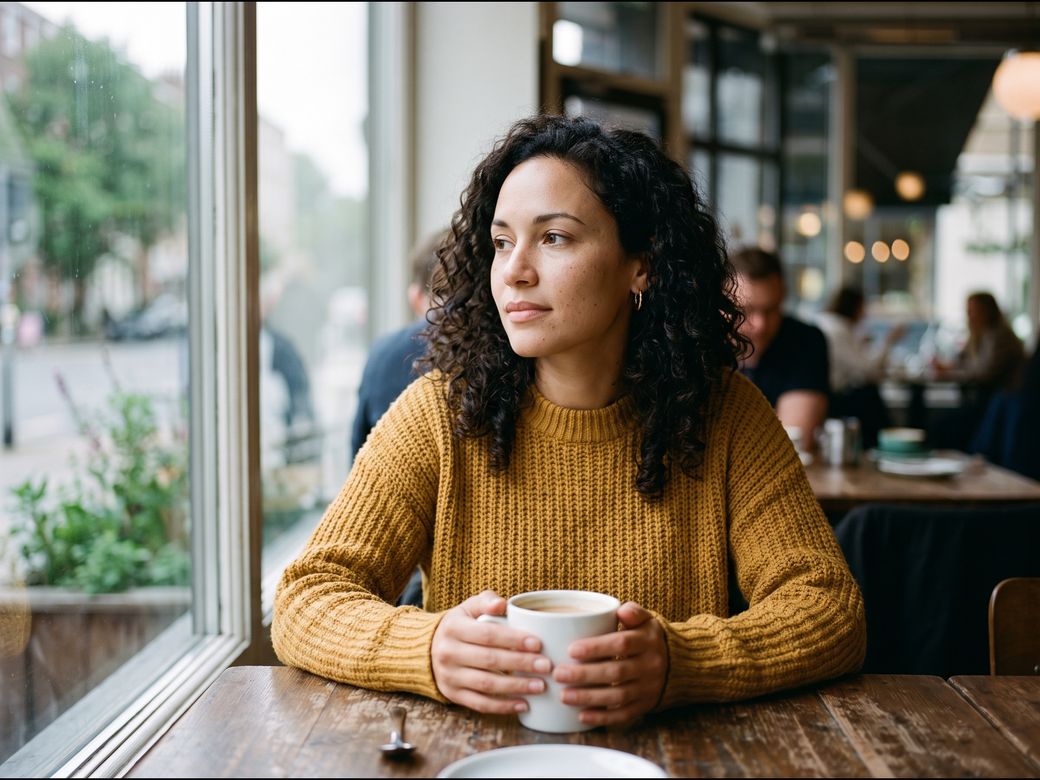
A woman in a mustard sweater sitting at a cafe window, holding a white cup

YOUR IMAGE

01 / LOOK

Your image sets the look

The person, colours and setting all come from the one image that you upload.

A woman in a mustard sweater sitting at a cafe window, holding a white cup

YOUR DESCRIPTION

02 / MOTION

Your words set the motion

Describe the motion in a sentence or two, such as “She looks up and smiles.”

YOUR VIDEO

03 / RESULT

Your video brings it to life

Protoface turns your image into a video that follows your words, ready to post.

How to make one

How to turn a photo into a video with Protoface

Go from one still image to a finished video in six short steps, with no editing software and no subscription to manage.

01 / IMAGE

Upload a clear image

Use a sharp photo, illustration or AI image with one clear subject in the frame.

02 / MOTION

Describe the motion you want

Say what moves and what the camera does, such as a slow push in on a smile.

03 / MODEL

Pick a model for the job

Wan 3.0 runs longest, Seedance 2.0 reaches 4K, and Veo 3.1 adds matching sound.

04 / SETTINGS

Set length, shape and sound

Choose how many seconds, a wide or vertical shape, and whether you want sound.

05 / GENERATE

Check the estimate, then generate

See the credit cost for your settings before you commit, then generate your video.

06 / REVIEW

Review faces, hands and text

Watch for details that drift. If something looks off, change one thing and retry.

Upload one image, describe the motion, and Protoface turns your image into a video. Your first 50 credits are free.

Upload one image, describe the motion, and Protoface turns your image into a video. Your first 50 credits are free.

Better images, cleaner motion

Which images work best for photo to video AI?

A clear image gives you steadier motion and fewer retries. Check yours before you spend credits.

✓

One clear subject, in focus and well lit

✓

Space around the subject, so the motion has room

✓

The same shape as your video, wide for 16:9 or vertical for 9:16

✓

An image you made or have the right to use

An amber glass bottle with a wooden cap on a stone plinth beside a sprig of eucalyptus

Ideas

What can you make from one image with Protoface?

One photo can become a dance, a hug, a TikTok post, a music video, a film scene or a longer clip. Pick the idea that fits your image.

01 / DANCE

A dance from one photo

Add a dance clip and the AI dance video generator makes your photo perform it.

02 / HUG

A hug between two people

Bring the people in your photo together with the AI hug video generator.

03 / TIKTOK

A vertical post for TikTok

Turn a product shot or a selfie into a vertical 9:16 post, ready to share on TikTok.

04 / MUSIC

A video for your song

Set your cover art or band photo in motion with the AI music video generator.

05 / FILM

A scene for your short film

Open your story on an image you love, then build scenes in the AI movie generator.

06 / LONGER

A longer cut of your video

Keep the action going past the final second of your video with the AI video extender.

Turn one image into your next post. Start free, no credit card needed.

Turn one image into your next post. Start free, no credit card needed.

Choose your model

Which Protoface models turn an image into a video?

Choose from one of our 44 models, and switch whenever you like, on the same credits. To turn an image into a video, start with models such as Kling 3.0 Pro, Seedance 2.0 or Veo 3.1.
Pricing

How much does an AI image to video generator cost?

You pay only for the videos you make. There is no subscription to sign up for, and your first 50 credits are free.

01 / START FREE

Start with 50 free credits

New accounts get 50 free credits, and you need no credit card to sign up.

02 / PAY AS YOU GO

Pay only for what you make

Buy credits when you need them. There is no subscription, and a monthly plan is optional.

03 / NO SURPRISES

See the cost before you generate

Protoface shows what a video will cost before you make it, so you decide before you spend.
Media

Realtime

Media

Get low pricing on video, image, audio, and 3D models. Tap a model for more detailed info.

Media

Realtime

Media

Get low pricing on video, image, audio, and 3D models. Tap a model for more detailed info.

Media

Realtime

Media

Get low pricing on video, image, audio, and 3D models. Tap a model for more detailed info.

Is there a free AI image to video generator on Protoface?

Yes. New accounts start with 50 free credits and need no credit card. That is enough to turn your first image into a short video and see how it looks. Before your first payment, free-credit videos are watermarked and for evaluation only.

Try your own image on 50 free credits, then pay only for the videos you make.

Try your own image on 50 free credits, then pay only for the videos you make.

For developers

Add an AI video generator from images to your app

Offer image to video inside your own product with the Protoface API. Your app sends the image and a description, and gets the finished video back.

01 / SEND

Send the image and description

Your app uploads the image your user picked, with a line describing the motion.

02 / GENERATE

Start the video

One request to the model you choose creates the video. You pay as you go, with no subscription.

03 / DELIVER

Show the finished video

When the video is ready, your app collects it and shows it to your user.

Add image to video to your app. Create an account to get your API key.

Add image to video to your app. Create an account to get your API key.

Need help?

Frequently
asked questions

Operating at enterprise scale?

What is image to video AI?

Image to video AI turns one still image into a short video. You upload the image and describe the motion, and a video model creates the movement while keeping the look of your image.

How do I animate a photo with AI?

Upload your photo, describe what should move, pick Kling 3.0 Pro, Seedance 2.0, Wan 3.0 or Veo 3.1, and generate. Check the estimate for your settings first, so you know the cost before you commit.

Is Protoface’s image to video AI generator free?

New accounts start with 50 free credits, with no credit card needed. Before your first payment, free-credit videos are watermarked and for evaluation only. You see the cost of a video before you generate it.

How long can a video made from one image be?

It depends on the model: 3 to 15 seconds on Kling 3.0 Pro, 4 to 15 seconds on Seedance 2.0, 2 to 30 seconds on Wan 3.0, and 4, 6 or 8 seconds on Veo 3.1. To go further, continue your video with the AI video extender.

Will my video have sound?

Seedance 2.0 and Veo 3.1 create sound together with the picture, and sound is optional on Kling 3.0 Pro and Wan 3.0. Switch it off if you plan to add your own music.

What resolution can I get?

Seedance 2.0 runs from 480p up to 4K, Veo 3.1 offers 720p, 1080p or 4K, and Wan 3.0 offers 480p, 720p or 1080p. Try an idea at a lower resolution first, then move up for your final video.

Can I choose how my video ends?

Kling 3.0 Pro and Veo 3.1 let you add a second image for your video to end on, so the motion travels from your first image to your second.

Can I make a vertical video for social media?

Yes. The models shown here all make vertical 9:16 videos, the shape for hooks, product posts and creator clips.

Do I need a subscription?

No. You pay as you go for the credits you use. A monthly plan is optional.

Can I animate someone else’s photo?

Only with their consent, and only with a photo you have the right to use. Never create a video that depicts a real person without their consent.

Need help?

Frequently
asked questions

Operating at enterprise scale?

What is image to video AI?

Image to video AI turns one still image into a short video. You upload the image and describe the motion, and a video model creates the movement while keeping the look of your image.

How do I animate a photo with AI?

Upload your photo, describe what should move, pick Kling 3.0 Pro, Seedance 2.0, Wan 3.0 or Veo 3.1, and generate. Check the estimate for your settings first, so you know the cost before you commit.

Is Protoface’s image to video AI generator free?

New accounts start with 50 free credits, with no credit card needed. Before your first payment, free-credit videos are watermarked and for evaluation only. You see the cost of a video before you generate it.

How long can a video made from one image be?

It depends on the model: 3 to 15 seconds on Kling 3.0 Pro, 4 to 15 seconds on Seedance 2.0, 2 to 30 seconds on Wan 3.0, and 4, 6 or 8 seconds on Veo 3.1. To go further, continue your video with the AI video extender.

Will my video have sound?

Seedance 2.0 and Veo 3.1 create sound together with the picture, and sound is optional on Kling 3.0 Pro and Wan 3.0. Switch it off if you plan to add your own music.

What resolution can I get?

Seedance 2.0 runs from 480p up to 4K, Veo 3.1 offers 720p, 1080p or 4K, and Wan 3.0 offers 480p, 720p or 1080p. Try an idea at a lower resolution first, then move up for your final video.

Can I choose how my video ends?

Kling 3.0 Pro and Veo 3.1 let you add a second image for your video to end on, so the motion travels from your first image to your second.

Can I make a vertical video for social media?

Yes. The models shown here all make vertical 9:16 videos, the shape for hooks, product posts and creator clips.

Do I need a subscription?

No. You pay as you go for the credits you use. A monthly plan is optional.

Can I animate someone else’s photo?

Only with their consent, and only with a photo you have the right to use. Never create a video that depicts a real person without their consent.

Need help?

Frequently
asked questions

Operating at enterprise scale?

What is image to video AI?

Image to video AI turns one still image into a short video. You upload the image and describe the motion, and a video model creates the movement while keeping the look of your image.

How do I animate a photo with AI?

Upload your photo, describe what should move, pick Kling 3.0 Pro, Seedance 2.0, Wan 3.0 or Veo 3.1, and generate. Check the estimate for your settings first, so you know the cost before you commit.

Is Protoface’s image to video AI generator free?

New accounts start with 50 free credits, with no credit card needed. Before your first payment, free-credit videos are watermarked and for evaluation only. You see the cost of a video before you generate it.

How long can a video made from one image be?

It depends on the model: 3 to 15 seconds on Kling 3.0 Pro, 4 to 15 seconds on Seedance 2.0, 2 to 30 seconds on Wan 3.0, and 4, 6 or 8 seconds on Veo 3.1. To go further, continue your video with the AI video extender.

Will my video have sound?

Seedance 2.0 and Veo 3.1 create sound together with the picture, and sound is optional on Kling 3.0 Pro and Wan 3.0. Switch it off if you plan to add your own music.

What resolution can I get?

Seedance 2.0 runs from 480p up to 4K, Veo 3.1 offers 720p, 1080p or 4K, and Wan 3.0 offers 480p, 720p or 1080p. Try an idea at a lower resolution first, then move up for your final video.

Can I choose how my video ends?

Kling 3.0 Pro and Veo 3.1 let you add a second image for your video to end on, so the motion travels from your first image to your second.

Can I make a vertical video for social media?

Yes. The models shown here all make vertical 9:16 videos, the shape for hooks, product posts and creator clips.

Do I need a subscription?

No. You pay as you go for the credits you use. A monthly plan is optional.

Can I animate someone else’s photo?

Only with their consent, and only with a photo you have the right to use. Never create a video that depicts a real person without their consent.